SmartSDR v4.2.20 | SmartSDR v4.2.20 Release Notes
SmartSDR v3.10.15 | SmartSDR v3.10.15 Release Notes
The latest 4O3A Genius Product Software:
The latest 4O3A Genius Product Software and Firmware
If you are needing assistance with FlexRadio products, please refer to the product documentation or check the Help Center for known solutions. Need technical support from FlexRadio? It's as simple as creating a HelpDesk ticket.
6700 updated to SmartSDR v4.2.20 results in GPS no longer functional

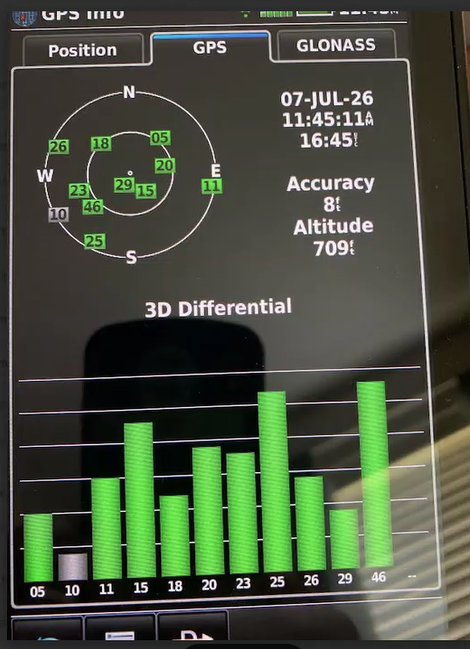
2026-07-18 Updated 6700 to v4.2.20. Started with a factory reset following the latest recommended FLEX radio procedure. After install the FLEX GPS is not functional. "GPS is active" (see screen shot) but no longer populates with data. GPS antenna tests fine with professional GARMIN unit,10 satellites and 3D mode received. Any ideas of why moving to V4.2.20 cause the issue?

Comments
-
Screen shot of working antenna test (from the same radio location) using GARMIN (Internal GPS board was factory installed).
 0
0 -
Have you tried rolling back to the previous version of SmartSDR to see if that corrects the problem?
James
WD5GWY
0 -
Caution when rolling back!
0 -
 Mike-VA3MW Administrator, FlexRadio Employee, Community Manager, Super Elmer, Moderator adminOptions
Mr Radio, comments such as that require more details if you want to say something please.
If the GPS is not working on a 6700, then open a support ticket for the problem.
You can roll back safely, you just need to do a reset of the radio when you roll back.
1


Leave a Comment
Categories
- All Categories
- 401 Community Topics
- 2.2K New Ideas
- 688 The Flea Market
- 8.6K Software
- 196 SmartSDR+
- 6.6K SmartSDR for Windows
- 200 SmartSDR for Maestro and M models
- 457 SmartSDR for Mac
- 278 SmartSDR for iOS
- 268 SmartSDR CAT
- 220 DAX
- 395 SmartSDR API
- 9.6K Radios and Accessories
- 105 Aurora
- 348 FLEX-8000 Signature Series
- 7.2K FLEX-6000 Signature Series
- 998 Maestro
- 58 FlexControl
- 872 FLEX Series (Legacy) Radios
- 972 Genius Products
- 481 Power Genius XL Amplifier
- 358 Tuner Genius XL
- 133 Antenna Genius
- 321 Shack Infrastructure
- 226 Networking
- 483 Remote Operation (SmartLink)
- 145 Contesting
- 846 Peripherals & Station Integration
- 147 Amateur Radio Interests
- 1.1K Third-Party Software