Welcome to the FlexRadio Community! Please review the new Community Rules and other important updates on the Message Board.
The latest SmartSDR Software:
SmartSDR v4.3.16 | SmartSDR v4.3.16 Release Notes
SmartSDR v3.10.15 | SmartSDR v3.10.15 Release Notes
The latest 4O3A Genius Product Software: The latest 4O3A Genius Product Software and Firmware
How to Receive Technical Support: If you are needing assistance with FlexRadio products, please refer to the product documentation or check the Help Center for known solutions.
Need technical support from FlexRadio? It's as simple as creating a HelpDesk ticket.
APD stays in Calib mode SmartSDR V 4.2.18

Answers
-
 Mike-VA3MW Administrator, FlexRadio Employee, Community Manager, Super Elmer, Moderator adminOptions
Describe your microphone, TX bandwidth, band, RF power output, tx band width settings, and what you are doing with the Mic Level.
As a quick test, will it work with the hand mic that came with the radio.
0 -
Mike…how long does one have to transmit before the APD is Active?
0 -
My 8600 and AU510 both go active within about 5 seconds of talking. I have mic gain peak at -5 and processor on and in normal position. I do run 100 - 3000 TX BW normally on 40 meters.
If you are not running an external coupler, make sure in Settings/Radio Setup/APD that you have Ant1 and Ant2 set to internal.
73 Dave wo2x
0 -
Dave…That's about what I see.
If transmitting for a shorter period the APD will never show active. So, for example, if you are calling a DX station and just sending your callsign APD will not activate.
0 -
Hello, I'm using a Shure pd58 dynamic microphone. Rf power set to 80 watts. Preset Default HDST Dynamic , cursor at 80. Tried with and without processor (in DX position). While speaking level goes to -20 and compression ( whenprocessor activated) indicate -15db. Tried on a dummy load and also on yagi antenna (20m band). Tx bandwidth 2.9 khz. Tried to speak three times during abt 1 minute. Radio setup apd all settings on INTERNAL. Radio setup Phone/CW +20db activated (blue). What else should I look at?
Jean-Paul, ON6AO0 -
Worked perfectly on same config with previous software version (4.1.13)0
-
I've read all I could about this upgrade but still no solution found…
0 -
-20 and -15 peak may be too low. You would benefit from a small preamp between mix and radio then turn off 20 dB boost. Adjust preamp so mic level around 40 shows peaks about -5.
The external preamp will give been dynamic range.Dave wo2x
0 -
It seems that APD is working but displays shows always "Calib". Toughts?
-1 -
It seems to be a bug. Hope it will be corrected in the next release.
SMART-12819
0 -
Mike-VA3MW Administrator, FlexRadio Employee, Community Manager, Super Elmer, Moderator adminOptions
Usually, if APD can't calculate an solution, it can be related to the Microphone shaping. In the early days, this was pretty common, but since running 4.2.18 (for me), it locks immediately and I pretty just set it and forget it.
Make sure your audio driving the radio is peaking about -5dB 100% of the time. If it is routinely less than that, then there is not enough audio for the equalizer to work out a good solution.
0 -
I have downloaded and installed the latest version of the software, V4.3.16, yet the problem persists. Despite the fix "SMART-12819 APD: Indicator now reflects actual status consistently," the issue remains unresolved: the APD stays in "Calib" mode. What should I do now?
0 -
I would submit a help desk ticket.
0 -
Mike-VA3MW Administrator, FlexRadio Employee, Community Manager, Super Elmer, Moderator adminOptions
Can we see a screen shot of your Mic Level and Transmitted signal?
0 -
-
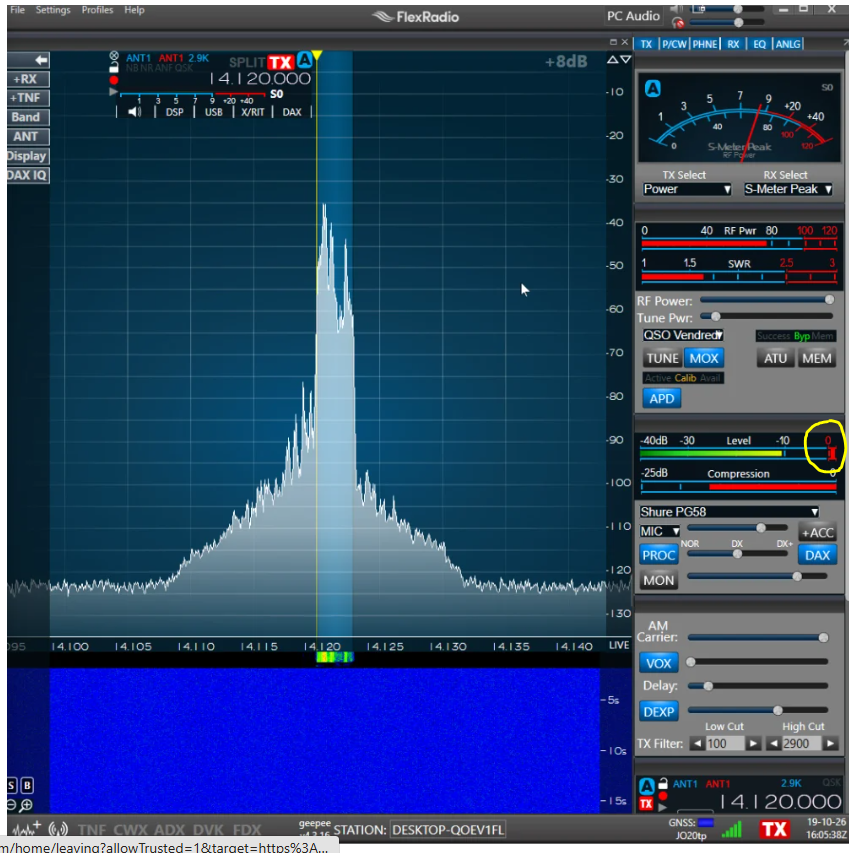
You are overdriving your audio. There are two components to the audio level meter - the long bar is the average and the little rectangle (circled below) is the peak indicator. You need to adjust your audio level so that the peak indicator is below 0 dB.
 1
-
Mike-VA3MW Administrator, FlexRadio Employee, Community Manager, Super Elmer, Moderator adminOptions
What Len said and you can see your RF is way into Compression. Also, try it with PROC in NOR as well.
Thanks for the screen shot. It really helps to give you some ideas.
0 -
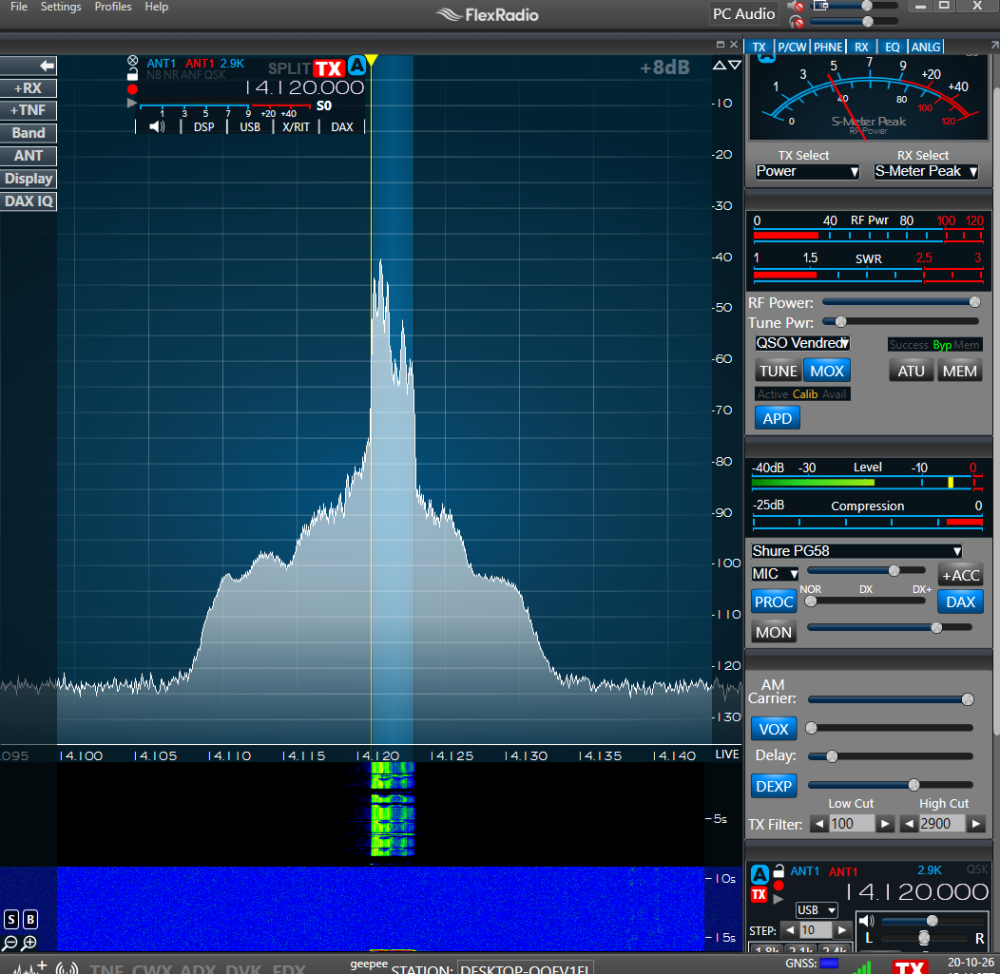
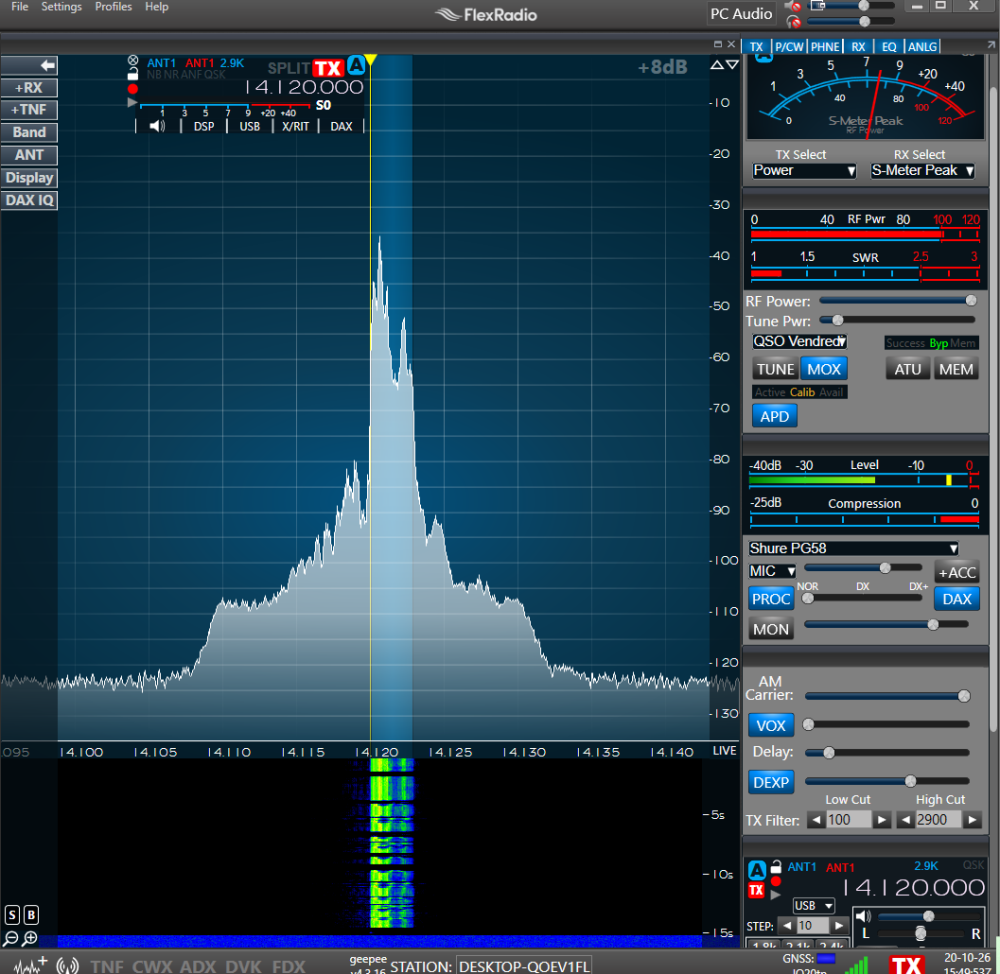
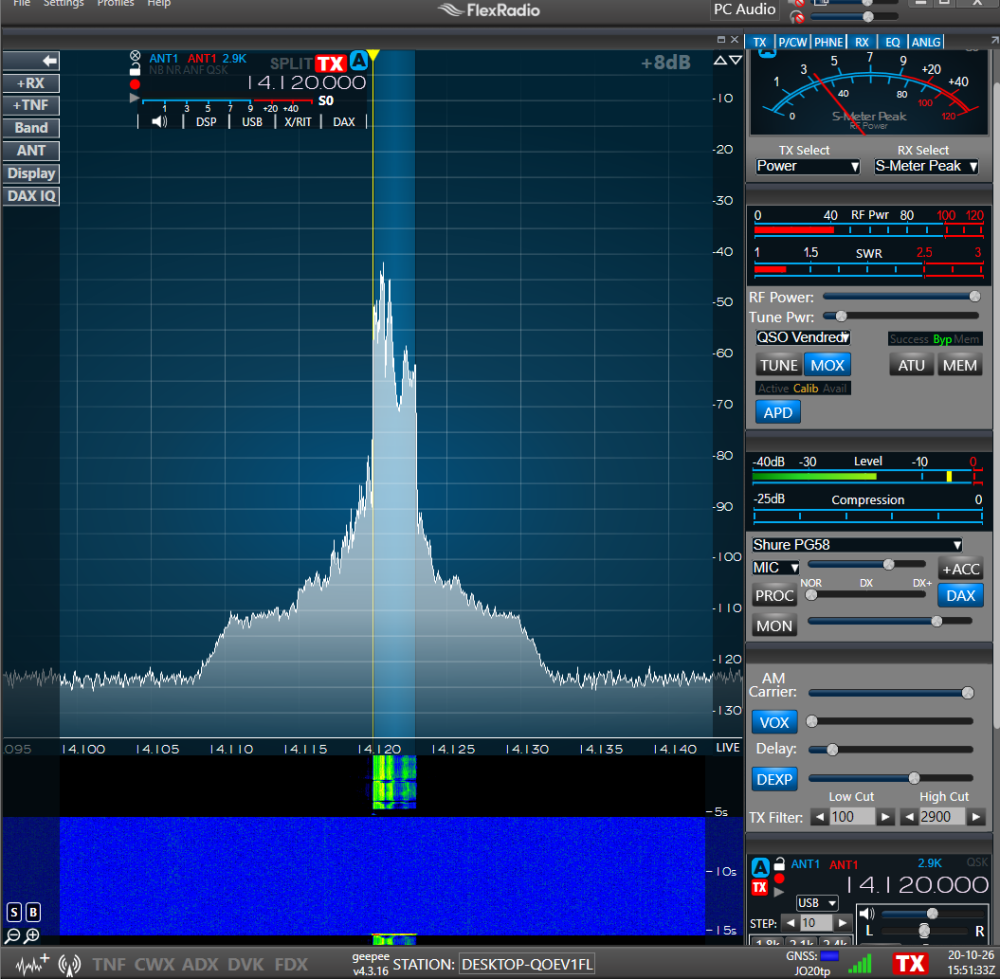
Here is another screenshot in normal mode, the last one without processor . Dummy load. APD stays always in calib mode.
 0
-
I see that you have DAX on. Are you taking audio from your MIC socket on the back of the radio or from a source in the computer?
0 -
I'm talking from the back of the rig with a dynamic mike Shure PG58. The dax is used when I'm working in FT8 mode ( HRD 6.8.0372 + JTDX + JTAlert)
0 -
I wonder if the problem is having DAX on. Try turning off DAX to see if that has any effect.
0 -
Hello. Tried with DAX off. Once with processor on, second try without processor. Still no calibration successfull…
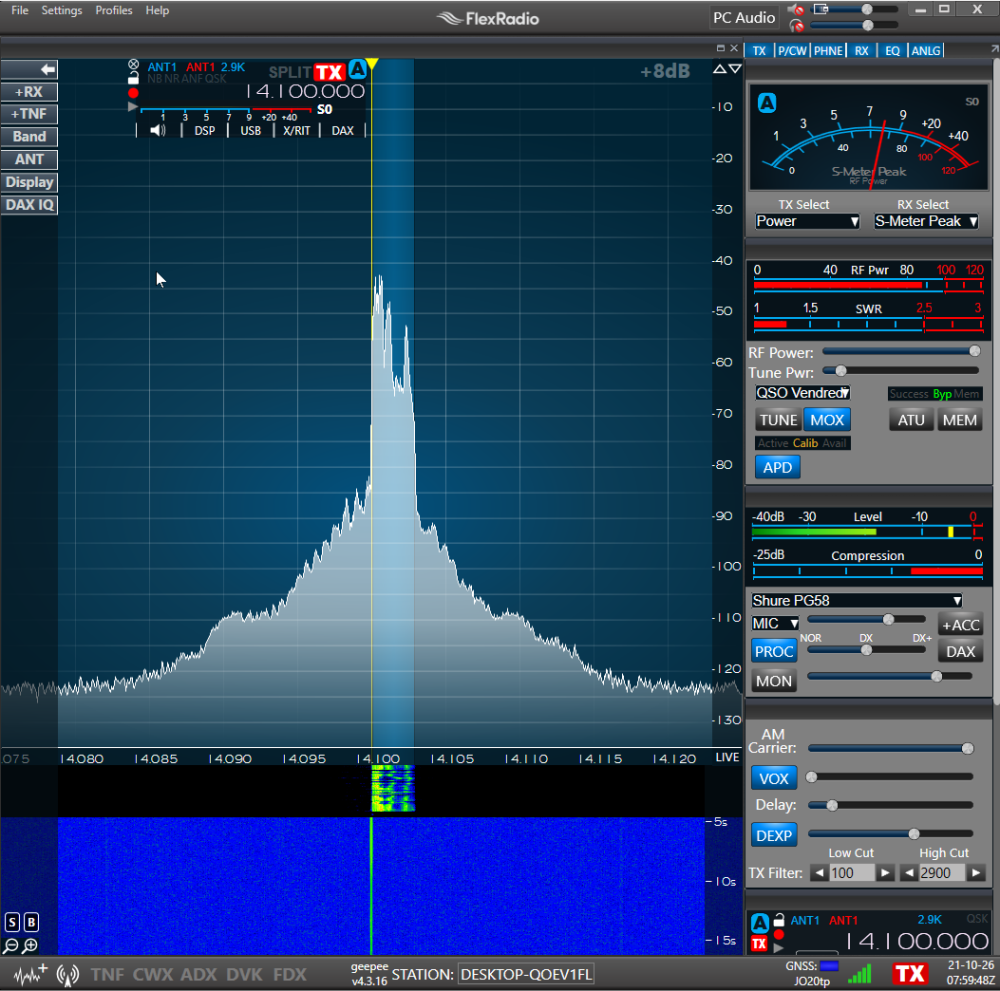
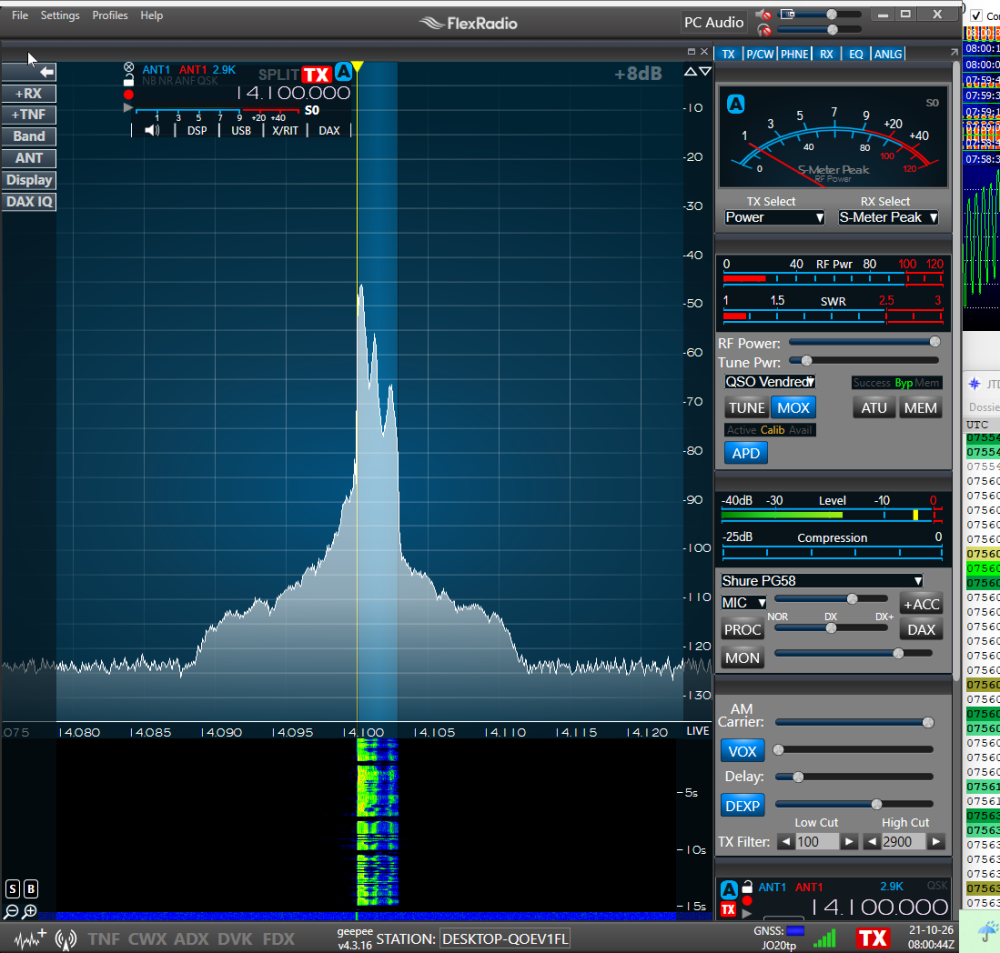 0
-
Hello geepee,
Did you find a solution for APD problem?
I have the same problem ( 8600 SmartSDR 4.3.16), APD will never activate.
I have tested all possible "tricks" but nothing seems to help.
- balanced mic input, mic input, PC mic input, adjusting ANT gain, mic input level -5 db, different output power (10 to 100W), Factory reset serveral times...
73 OH5BE
Mikko0



Leave a Comment
Categories
- All Categories
- 417 Community Topics
- 2.2K New Ideas
- 716 The Flea Market
- 8.7K Software
- 224 SmartSDR+
- 6.6K SmartSDR for Windows
- 212 SmartSDR for Maestro and M models
- 471 SmartSDR for Mac
- 281 SmartSDR for iOS
- 270 SmartSDR CAT
- 225 DAX
- 397 SmartSDR API
- 9.7K Radios and Accessories
- 140 Aurora
- 385 FLEX-8000 Signature Series
- 7.3K FLEX-6000 Signature Series
- 1K Maestro
- 58 FlexControl
- 876 FLEX Series (Legacy) Radios
- 1K Genius Products
- 495 Power Genius XL Amplifier
- 366 Tuner Genius XL
- 139 Antenna Genius
- 333 Shack Infrastructure
- 237 Networking
- 500 Remote Operation (SmartLink)
- 149 Contesting
- 867 Peripherals & Station Integration
- 148 Amateur Radio Interests
- 1.2K Third-Party Software