SmartSDR v4.2.20 | SmartSDR v4.2.20 Release Notes
SmartSDR v3.10.15 | SmartSDR v3.10.15 Release Notes
The latest 4O3A Genius Product Software:
The latest 4O3A Genius Product Software and Firmware
If you are needing assistance with FlexRadio products, please refer to the product documentation or check the Help Center for known solutions. Need technical support from FlexRadio? It's as simple as creating a HelpDesk ticket.
8600 Band changes now killing JTDX waterfall

Did something change in 4.2.18 and DAX2 that kills the JTDX or WSJT-X waterfalls every time there is a Band Change? Band changes over all previous SSDR and DAX always auto updated JTDX or WSJT-X to the new Band and waterfall.
I find if I restart WSJT or JTDX everything restarts fine OR another way is to go into the JTDX/WSJT settings for audio and just refresh the OK button and the programs waterfall restarts ok.
Is there a way to keep DAX from dropping out during Band Changes? Not sure where to look now. I am interfacing the Radio to the JT programs via DX Labs Commander as always, no changes there.
I find changing Bands via JTDX/WSJY willchange the Radio freq via DX Labs Commander without losing the DAX controlled waterfall but going the other way by using the Radio profiles thru DX Lab Commander drops the DAX channel and causes me to manually restart JTDX or WSJT to get the FT8 waterfall back.
Regards Lar K1UO
Comments
-
 Mike-VA3MW Administrator, FlexRadio Employee, Community Manager, Super Elmer, Moderator adminOptions
Hi Larry
This sounds unusual. I am running WSJT v3.0.0 and did a bunch of band changes and I could not recreate this.
- WSJT Band Changes or SmartSDR Band changes - there is a big difference as one is a band change and the other is frequency change. When you do it via WSJT it is a frequency change (not a band change) from the radio perspective.
- How are you doing CAT control win WSJT as there are 3 or 4 ways to configure this. Is it RS232, Hamlib or TCP/IP?
Mike
 0
0 -
Im using DX Lab Suite Commander. when going from JTDX thru Commander to the radio its a frequency (and Band) change via DX Labs Commander to the 8600 and seems to work fine (just tested 6M freq to 10M freq)
However, when using the Radio profile to change Bands.Modes and saved FT8 freq the DAX audio connection for the JTDX or WSJT waterfall is lost but the JTDX or WSJT program does actually change to the new frequency/Band for FT8
0 -
Mike-VA3MW Administrator, FlexRadio Employee, Community Manager, Super Elmer, Moderator adminOptions
I find changing Bands via JTDX/WSJY willchange the Radio freq via DX Labs Commander without losing the DAX controlled waterfall but going the other way by using the Radio profiles thru DX Lab Commander drops the DAX channel and causes me to manually restart JTDX or WSJT to get the FT8 waterfall back.
Just to confirm, this is the WSJT Waterfall? (sorry, not enough caffeine this morning)
It would be good if someone else could test/confirm this.
0 -
Yes BOTH JTDX and WSJT DAX2 audio stream are being dropped when using the 8600 to change FTt8 Bands.
i.e 6M FT8 freq to 10M FT8 freq etc. that is using DX LAB SUITE COMMANDER as the Rig name which always worked in all previous SSDR versions and the previous DAX.
I checked the programs and the DAX audio stream names remain correct, the DAX2 stream is just interrupted and drops the decoding waterfall. The FrequencyBand indicators does, however, change correctly in each FT8 program.
I have done multiple factory resets of both the 8600 and the radio PC but no change. I have not tried a reload of SSDR V4.2.18 though.
NOTE: Changing the radio Band mode "FROM" JTDX/WSJT through DX LAB SUITE COMMANDER connection works fine by selecting the FT8 frequency from the FT8 program band/freq windows but not the other way around from the radio "TO" JTDX/WSJT through the DXL SUITE COMMANDER.
0 -
@va3mw
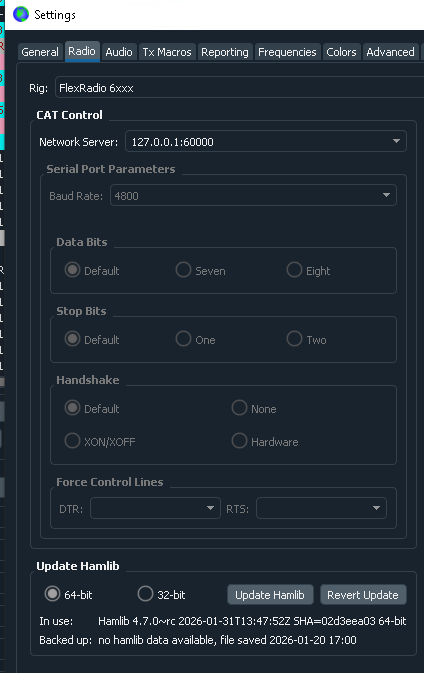
Mike, I tried setting up WSJT/JTDX using the Flex6XXX for the RIG and localhost:60000 for the CAT TCP port and the failure is exactly the same as described above.
0 -
Mike-VA3MW Administrator, FlexRadio Employee, Community Manager, Super Elmer, Moderator adminOptions
If you don't use the DX Commander part and use a direction connection to CAT does the problem go away?
0 -
It does not matter which RIG connection method I use, results are the same .
I asked Dave at DX Labs about this and he says he has a similar report from Europe.
He also states "There is no supported interoperation between DXLab and JTDX." and, of course, WSJT also.
He did also mention he had received another such report from a EU station and has forwarded these reports to Eric there at Flex.
Meanwhile I am working with a local friend with the exact same setup who has NO problem with the same DX Commander settings etc. At least I have a work around using the JTDX or WSJT programs to change FT8 Bands with no problem. OR just restarting JTDX/WSJT if I make a mistake and use the SSDR profiles to change FT8 Bands.
0 -
Mike-VA3MW Administrator, FlexRadio Employee, Community Manager, Super Elmer, Moderator adminOptions
Hi Larry
Thanks for the update. I am not sure what else to suggest at this point other than maybe it is something unique with Windows.
I'm fighting something similar using WinTrak for some EME stuff. It just doesn't run on my Win 11 Pro laptop but works find on the desktop.
Hopefully Eric will find something.
73
0 -
Same problem with FT8 on my 6600M running Windows 11. I am running WSJT-X x3.1.0 Build 260522 Improved Plus and Stack4 to change profiles / bands. This version of WSJT-X has FT2 in addition to FT4. Changing bands with the profile is always causing a problem: however, I notice that selecting FT2 and then back to FT8 after the band change seems to resolve the issue for me. Selecting FT4 does not work but FT2 does. Hope helps identifying the problem.
Randy
0 -
To add one more observation, by going into WSJT-X Setting > General > Addition Features after completing a band change using the radio and simply pressing the OK button the decoding resumes correctly.
0 -
Also, simply putting WSJT-X into transmit mode resets the software and decoding again resumes properly.
0 -
@KH6XX
Yes, I sent that observation to Eric at Flex also. Putting JTDX into a quick TUNE will cause the DAX RX channel to start decoding again but trying the same with the 8600 TUNE button does not.
BTW. tracking for this problem is designated as SMART-12788
0 -
Even toggling from Monitor to Stop and back to Monitor resets it on my 6600M after doing a band change. Thanks for the tracking number.
0 -
Re " He also states "There is no supported interoperation between DXLab and JTDX." and, of course, WSJT also."
That's not correct. There is well-supported interoperation between DXLab and WSJT-X - both directly, and via JTAlert. See
https://www.dxlabsuite.com/dxlabwiki/GettingStartedwithK1JTModesThere is no supported inteoperation between JTXDX and DXLab because JTDX is a hostile fork of WSJT-X that has significantly reduced WSJT-X development team's velocity.
de AA6YQ0


Leave a Comment
Categories
- All Categories
- 401 Community Topics
- 2.2K New Ideas
- 691 The Flea Market
- 8.6K Software
- 197 SmartSDR+
- 6.6K SmartSDR for Windows
- 200 SmartSDR for Maestro and M models
- 462 SmartSDR for Mac
- 280 SmartSDR for iOS
- 268 SmartSDR CAT
- 220 DAX
- 395 SmartSDR API
- 9.6K Radios and Accessories
- 113 Aurora
- 352 FLEX-8000 Signature Series
- 7.2K FLEX-6000 Signature Series
- 999 Maestro
- 58 FlexControl
- 872 FLEX Series (Legacy) Radios
- 978 Genius Products
- 484 Power Genius XL Amplifier
- 358 Tuner Genius XL
- 136 Antenna Genius
- 323 Shack Infrastructure
- 228 Networking
- 485 Remote Operation (SmartLink)
- 147 Contesting
- 847 Peripherals & Station Integration
- 148 Amateur Radio Interests
- 1.1K Third-Party Software