SmartSDR v4.2.20 | SmartSDR v4.2.20 Release Notes
SmartSDR v3.10.15 | SmartSDR v3.10.15 Release Notes
The latest 4O3A Genius Product Software:
The latest 4O3A Genius Product Software and Firmware
If you are needing assistance with FlexRadio products, please refer to the product documentation or check the Help Center for known solutions. Need technical support from FlexRadio? It's as simple as creating a HelpDesk ticket.
6000 Series radios and SmartSDR v 4

I have a 6300 that is now 10 years old in service now getting new chip coolers, finals, and a calibration. It is headed to a hill top contest station to be a remotely operated transceiver for the rest of it's life.
I also have a 6700 that I inherited.
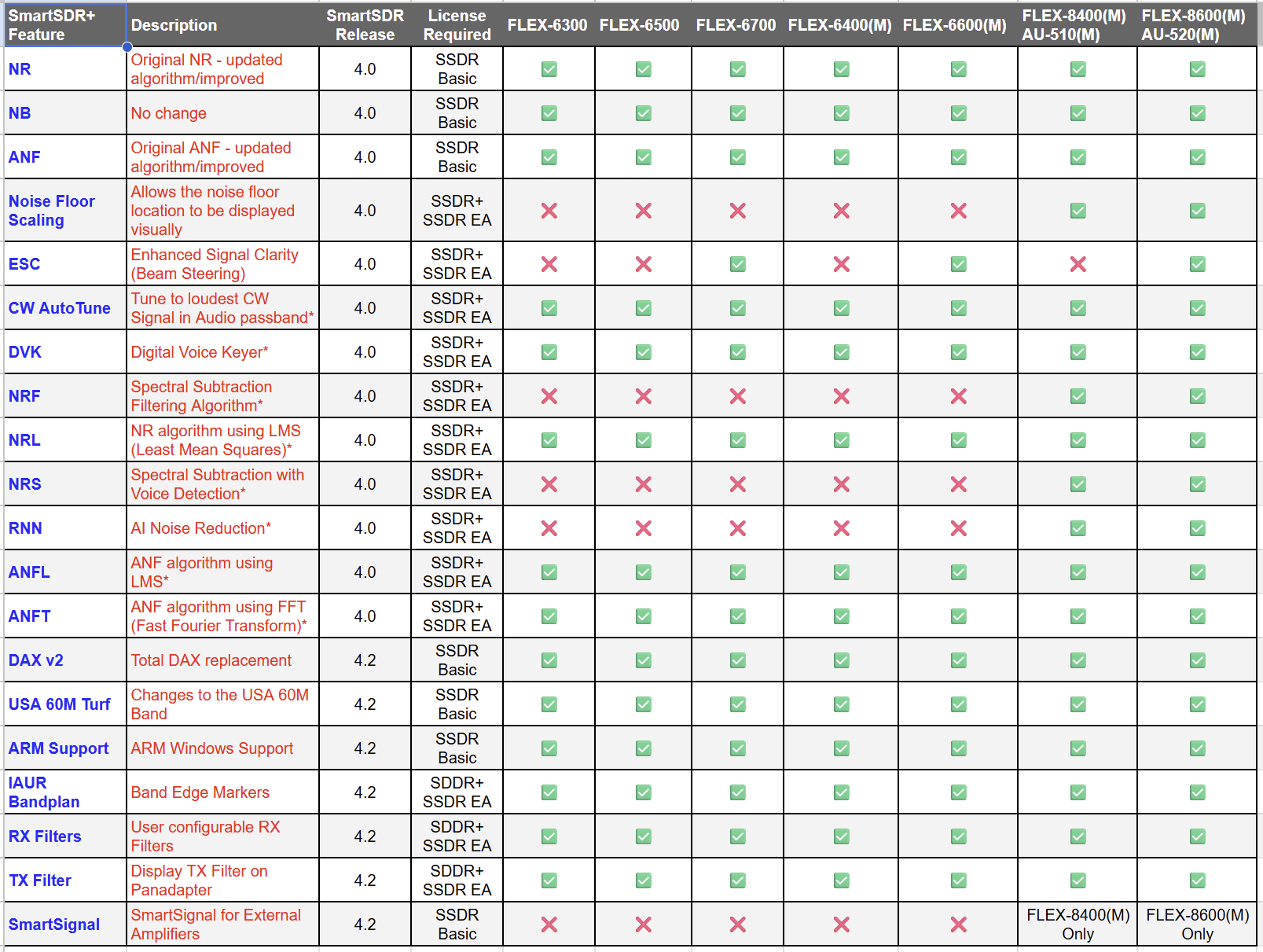
So, what new features in the version 4 will actually be available on these 6000 series radios that would make it worth upgrading to v 4 at $200 a pop?
I also have a shiny new 8400, so I can see the value in running the latest version on it. It is running v 4 and I enjoy the additional DSP funcitions.
So, for the 6000 series, what is the ROI on SmartSDR V 4 ?
Bob N4RFC
Comments
-
Hi Bob, you can upgrade to 4.2.18 basic for no cost. I would do that first. The value you would get from SmartSDR+ probably depends more on how much you use the older rigs compared to the 8400.
I upgraded my 6400 to SmartSDR+ and found the new NRL noise filter to be excellent. Not as good as NRS on my 8600, but still quite good. If the DVK feature is important to you, that might be a factor to consider as well.
0 -
0
-
 Mike-VA3MW Administrator, FlexRadio Employee, Community Manager, Super Elmer, Moderator adminOptions
 0
0



Leave a Comment
Categories
- All Categories
- 401 Community Topics
- 2.2K New Ideas
- 685 The Flea Market
- 8.6K Software
- 194 SmartSDR+
- 6.6K SmartSDR for Windows
- 200 SmartSDR for Maestro and M models
- 456 SmartSDR for Mac
- 278 SmartSDR for iOS
- 268 SmartSDR CAT
- 220 DAX
- 395 SmartSDR API
- 9.6K Radios and Accessories
- 102 Aurora
- 347 FLEX-8000 Signature Series
- 7.2K FLEX-6000 Signature Series
- 994 Maestro
- 58 FlexControl
- 872 FLEX Series (Legacy) Radios
- 970 Genius Products
- 481 Power Genius XL Amplifier
- 357 Tuner Genius XL
- 132 Antenna Genius
- 321 Shack Infrastructure
- 226 Networking
- 482 Remote Operation (SmartLink)
- 144 Contesting
- 845 Peripherals & Station Integration
- 147 Amateur Radio Interests
- 1.1K Third-Party Software