SmartSDR v4.2.20 | SmartSDR v4.2.20 Release Notes
SmartSDR v3.10.15 | SmartSDR v3.10.15 Release Notes
The latest 4O3A Genius Product Software:
The latest 4O3A Genius Product Software and Firmware
If you are needing assistance with FlexRadio products, please refer to the product documentation or check the Help Center for known solutions. Need technical support from FlexRadio? It's as simple as creating a HelpDesk ticket.
VOX comes on by default at every disconnect on ipad 2024 17. anyone else?

Hi,
I cant seem to find a way to make smartsdr for ios leave the VOX off? I don't have any headset connected, and every time the connection drops, or I log in a new session, vox is active. I dont like that because I will be tx all sorts of garbage if I dont pull up the vox menu and turn it off each time it connect, or change profile.
I tried saving mic profile for the ipad, it works, but the vox setting is not apparently included.
I tried saving the tx profile and the global as well, while vox is off, and no help there either. each time I click use that profile, vox is back on again.
if I use a profile created by a windows laptop, ironically, that vox setting will be "off"
anyone else have this issue? latest version of ios and smart sdr best I know, it is all a new install today. thanks,
radio is flex 8400 version 4.1.5
MN
Answers
-
 Mike-VA3MW Administrator, FlexRadio Employee, Community Manager, Super Elmer, Moderator adminOptions
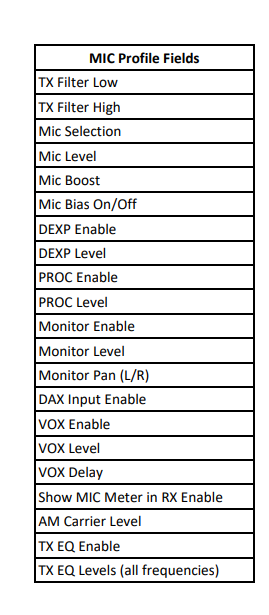
The VOX setting is stored in a the MIC Profile you are using and you see how they work in Section 18 of the SmartSDR manual.
Next time it happens, make sure you new MIC profile is loaded with VOX off. These settings are stored in the actual radio and then read by SmartSDR for iOS when it connects to the radio.
 0
0

Leave a Comment
Categories
- All Categories
- 401 Community Topics
- 2.2K New Ideas
- 689 The Flea Market
- 8.6K Software
- 196 SmartSDR+
- 6.6K SmartSDR for Windows
- 200 SmartSDR for Maestro and M models
- 460 SmartSDR for Mac
- 279 SmartSDR for iOS
- 268 SmartSDR CAT
- 220 DAX
- 395 SmartSDR API
- 9.6K Radios and Accessories
- 109 Aurora
- 348 FLEX-8000 Signature Series
- 7.2K FLEX-6000 Signature Series
- 999 Maestro
- 58 FlexControl
- 872 FLEX Series (Legacy) Radios
- 975 Genius Products
- 482 Power Genius XL Amplifier
- 358 Tuner Genius XL
- 135 Antenna Genius
- 322 Shack Infrastructure
- 227 Networking
- 483 Remote Operation (SmartLink)
- 145 Contesting
- 847 Peripherals & Station Integration
- 147 Amateur Radio Interests
- 1.1K Third-Party Software