SmartSDR v4.2.20 | SmartSDR v4.2.20 Release Notes
SmartSDR v3.10.15 | SmartSDR v3.10.15 Release Notes
The latest 4O3A Genius Product Software:
The latest 4O3A Genius Product Software and Firmware
If you are needing assistance with FlexRadio products, please refer to the product documentation or check the Help Center for known solutions. Need technical support from FlexRadio? It's as simple as creating a HelpDesk ticket.
Pictures Needed - Your Remote Setup

All,
I’m always on the lookout for great stock photos to use in presentations, and right now I’d love to showcase your remote station—especially the radio side of things.
If you’re willing to share a photo, take a moment to really frame it. Good lighting goes a long way, and try to capture the story of your remote setup so others can look at it and walk away inspired with ideas of their own.
Please use the highest resolution possible (for example, on an iPhone, be sure Live Mode is turned off). Crisp photos make a big difference.
If uploading here is tricky—either as an attachment or pasted into the text box—you can always email it directly to me at va3mw@flex .radio.
If your photo ends up being used, I’ll make sure your callsign is visible, so your friends can be appropriately envious 😉
I’m interested in everything from simple and clean setups to the big, bold SO2R QRO dream stations—bring it on!
Thanks in advance, and I can’t wait to see what you’ve built.
Mike va3mw
Comments
-
Hi Mike, not a photo, but you are welcome to use my ultra-simple diagram if it helps:
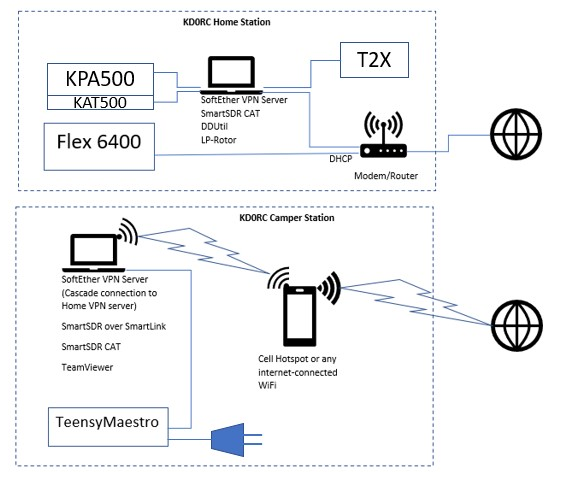
Note that those are keyer paddles, not a giant line plug…
0


Leave a Comment
Categories
- All Categories
- 401 Community Topics
- 2.2K New Ideas
- 685 The Flea Market
- 8.6K Software
- 195 SmartSDR+
- 6.6K SmartSDR for Windows
- 200 SmartSDR for Maestro and M models
- 456 SmartSDR for Mac
- 278 SmartSDR for iOS
- 268 SmartSDR CAT
- 220 DAX
- 395 SmartSDR API
- 9.6K Radios and Accessories
- 102 Aurora
- 348 FLEX-8000 Signature Series
- 7.2K FLEX-6000 Signature Series
- 994 Maestro
- 58 FlexControl
- 872 FLEX Series (Legacy) Radios
- 971 Genius Products
- 481 Power Genius XL Amplifier
- 357 Tuner Genius XL
- 133 Antenna Genius
- 321 Shack Infrastructure
- 226 Networking
- 482 Remote Operation (SmartLink)
- 144 Contesting
- 845 Peripherals & Station Integration
- 147 Amateur Radio Interests
- 1.1K Third-Party Software