SmartSDR v4.2.20 | SmartSDR v4.2.20 Release Notes
SmartSDR v3.10.15 | SmartSDR v3.10.15 Release Notes
The latest 4O3A Genius Product Software:
The latest 4O3A Genius Product Software and Firmware
If you are needing assistance with FlexRadio products, please refer to the product documentation or check the Help Center for known solutions. Need technical support from FlexRadio? It's as simple as creating a HelpDesk ticket.
Setting up UDP with SDC

I'm running SmartSDR 4.1.3. I ran into the "Slicemaster no longer works" problem, so I downloaded SDC.
I am not using SmartLink, I don't operate remotely.
In SDC's SmartSDR API tab, I am able to connect the TCP port, but the UDP port shows the two link halves as green but they are not connected.
How do I set up a UDP port on SmartSDR so that the UDP connection succeeds? I did set up the TCP and UDP ports in my Windows Firewall, but I may not have done it all correctly.
Thanks for your help!
Claudia de W7OMM
Comments
-
Before you worry too much about the UDP port, ensure that you have actually defined a Skimmer first.
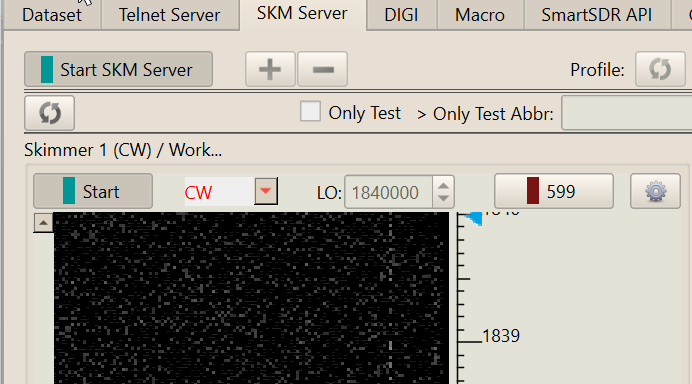
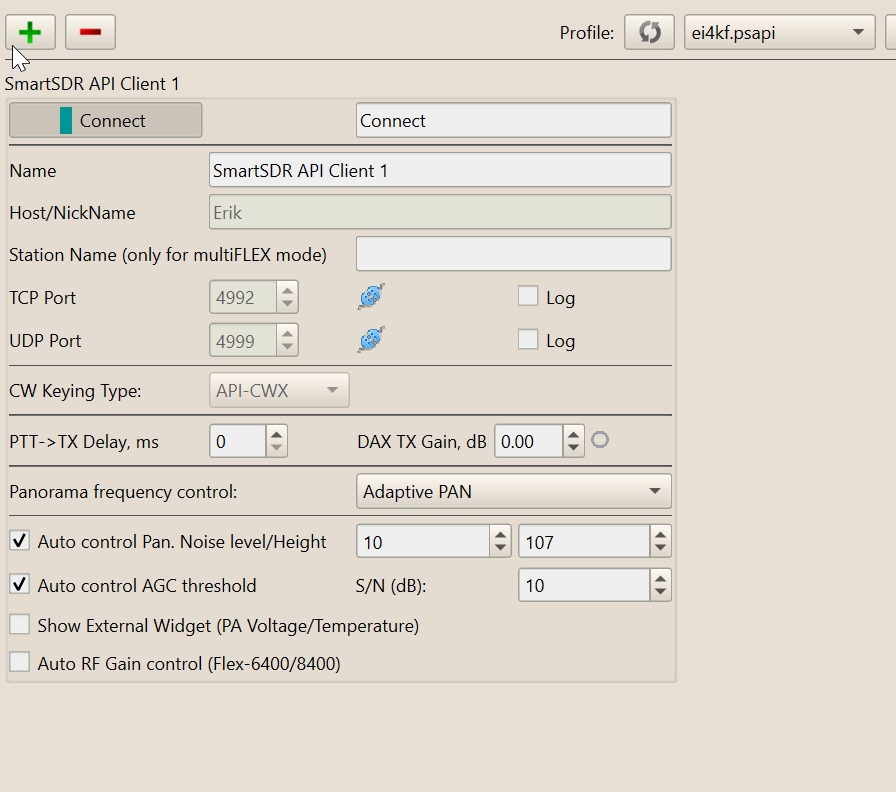
Without this, there is nothing to use the UDP link. If you do already have a Skimmer set (and it is not working because of UDP failure), try different UDP port numbers. Some are in use and hence cannot be used.
Here, I use 4999 because other ports are not available to me
 0
0 -
Got it, that could be the whole problem, since I haven't defined a skimmer. I'll set that up tomorrow - thanks much!
0



Leave a Comment
Categories
- All Categories
- 401 Community Topics
- 2.2K New Ideas
- 691 The Flea Market
- 8.6K Software
- 197 SmartSDR+
- 6.6K SmartSDR for Windows
- 200 SmartSDR for Maestro and M models
- 462 SmartSDR for Mac
- 280 SmartSDR for iOS
- 268 SmartSDR CAT
- 220 DAX
- 395 SmartSDR API
- 9.6K Radios and Accessories
- 114 Aurora
- 352 FLEX-8000 Signature Series
- 7.2K FLEX-6000 Signature Series
- 999 Maestro
- 58 FlexControl
- 872 FLEX Series (Legacy) Radios
- 979 Genius Products
- 485 Power Genius XL Amplifier
- 358 Tuner Genius XL
- 136 Antenna Genius
- 323 Shack Infrastructure
- 228 Networking
- 485 Remote Operation (SmartLink)
- 147 Contesting
- 847 Peripherals & Station Integration
- 148 Amateur Radio Interests
- 1.1K Third-Party Software