SmartSDR v4.2.20 | SmartSDR v4.2.20 Release Notes
SmartSDR v3.10.15 | SmartSDR v3.10.15 Release Notes
The latest 4O3A Genius Product Software:
The latest 4O3A Genius Product Software and Firmware
If you are needing assistance with FlexRadio products, please refer to the product documentation or check the Help Center for known solutions. Need technical support from FlexRadio? It's as simple as creating a HelpDesk ticket.
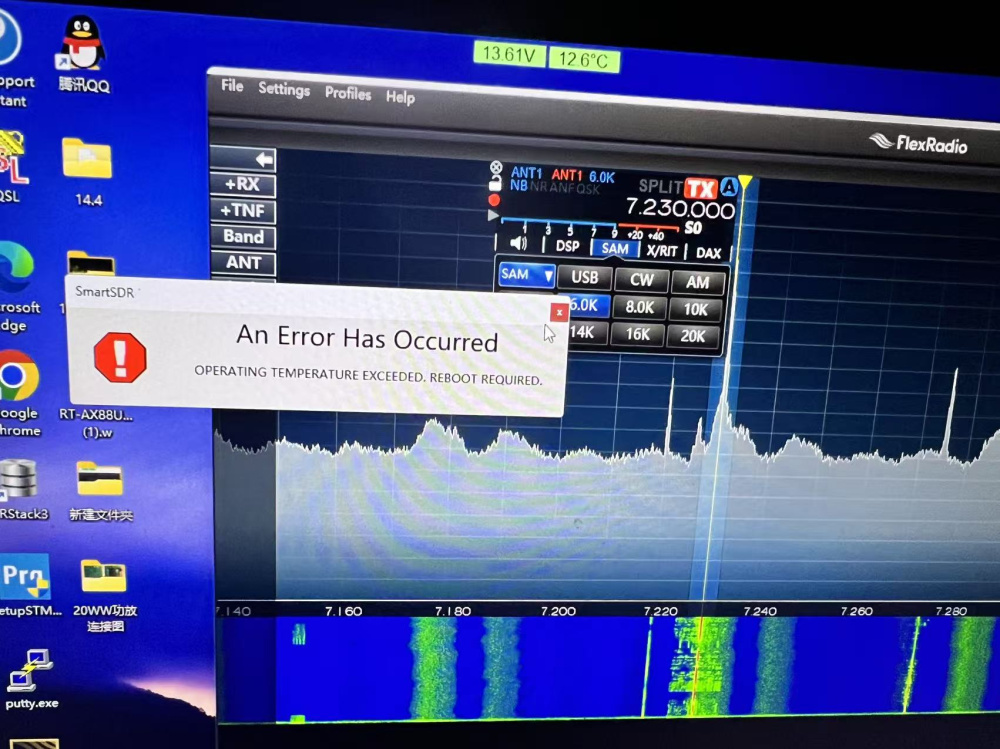
6600M fault display: An error has occurred, Additional details

My Flex 6600M isn't used very often. Recently, it frequently displays "An Eo Has occurred" on the screen after about 10 minutes of use, the power indicator light starts flashing red, and it automatically restarts. This happens frequently. After about 60 minutes, everything is normal. I don't know what's causing this.

Comments
-
Additional information: The first sign of the malfunction is the disappearance of sound, followed by an error message 1-2 minutes later, as shown in the image.
 0
0 -
The internal fan is failing. The radio will keep doing this to protect itself until you replace the fan with the correct replacement. I suggest you open a Help Desk ticket and let them help you get a replacement fan.
James
WD5GWY
0 -
The tests have been normal for the past few days, but it seems the stability is poor.
0 -
 Mike-VA3MW Administrator, FlexRadio Employee, Community Manager, Super Elmer, Moderator adminOptions
You radio is having an issue cooling correctly and/or the fan is not running at full speed.
If the fan fails or runs at the wrong RPM, the power controller will shut down the radio. That is what we are seeing here.
0


Leave a Comment
Categories
- All Categories
- 401 Community Topics
- 2.2K New Ideas
- 689 The Flea Market
- 8.6K Software
- 196 SmartSDR+
- 6.6K SmartSDR for Windows
- 200 SmartSDR for Maestro and M models
- 460 SmartSDR for Mac
- 279 SmartSDR for iOS
- 268 SmartSDR CAT
- 220 DAX
- 395 SmartSDR API
- 9.6K Radios and Accessories
- 109 Aurora
- 348 FLEX-8000 Signature Series
- 7.2K FLEX-6000 Signature Series
- 999 Maestro
- 58 FlexControl
- 872 FLEX Series (Legacy) Radios
- 975 Genius Products
- 482 Power Genius XL Amplifier
- 358 Tuner Genius XL
- 135 Antenna Genius
- 322 Shack Infrastructure
- 227 Networking
- 483 Remote Operation (SmartLink)
- 145 Contesting
- 847 Peripherals & Station Integration
- 147 Amateur Radio Interests
- 1.1K Third-Party Software