SmartSDR v4.2.20 | SmartSDR v4.2.20 Release Notes
SmartSDR v3.10.15 | SmartSDR v3.10.15 Release Notes
The latest 4O3A Genius Product Software:
The latest 4O3A Genius Product Software and Firmware
If you are needing assistance with FlexRadio products, please refer to the product documentation or check the Help Center for known solutions. Need technical support from FlexRadio? It's as simple as creating a HelpDesk ticket.
FRStack V4.0.0.1 Released

Version 4.0.0.1 of FRStack for Windows and FRStack Web APIs for Windows, RPi, Linux and OSX has been released.
Updates and Changes
Update to FlexAPI 4.1.5
Add Slice DSP: NRL, NRS, RNN, NRF ANFL, ANFT
Add Slice ESC, ESCGAIN, ESCPHASESHIFT
Add Slice FMTX1750 for EU
Download link: http://www.MKCMSoftware.com/download/FRStack4Setup.exe
This release replaces FRStack3, it supports version 3 and 4 radios.
If you upgrade FRStack3 the install folder will remain FRStack3 else it will be named FRStack4.
Expose FRStack REST APIs to your network
- Edit FRStack.exe.config file in the "C:\Program Files (x86)\FRStack4" folder then change the following to expose REST to the network.
Change
to
Now when FRStack executes it will be available to your network. You now must run FRStack as Administrator OR register the REST port with Windows.
I recommend that you add a URLACL for the PORT for any Windows User that runs FRStack.
You register the port with NETSH by running the following command in a CMD window launched as Administrator. Note the default port for FRStack is 13522.
netsh http add urlacl url=http://+:13522/ user=everyone delegate=yes
FYI:
You can list registration via: netsh http show urlacl
You can delete this registration via: netsh http delete urlacl url=http://+:13522/
What is "FRStack Web APIs"?
This version of FRStack provides REST APIs for RADIO, SLICE, UDP, PGXL AMP, SPE AMP, SteppIR Control for the Raspberry PI (ARM32) , Linux (x64), Windows and OSX (x64) platforms.
73, Mark W3II
Comments
-
 Mike-VA3MW Administrator, FlexRadio Employee, Community Manager, Super Elmer, Moderator adminOptions
Thanks Mark! It is great to have you as part of the group.
Merry Christmas!
0 -
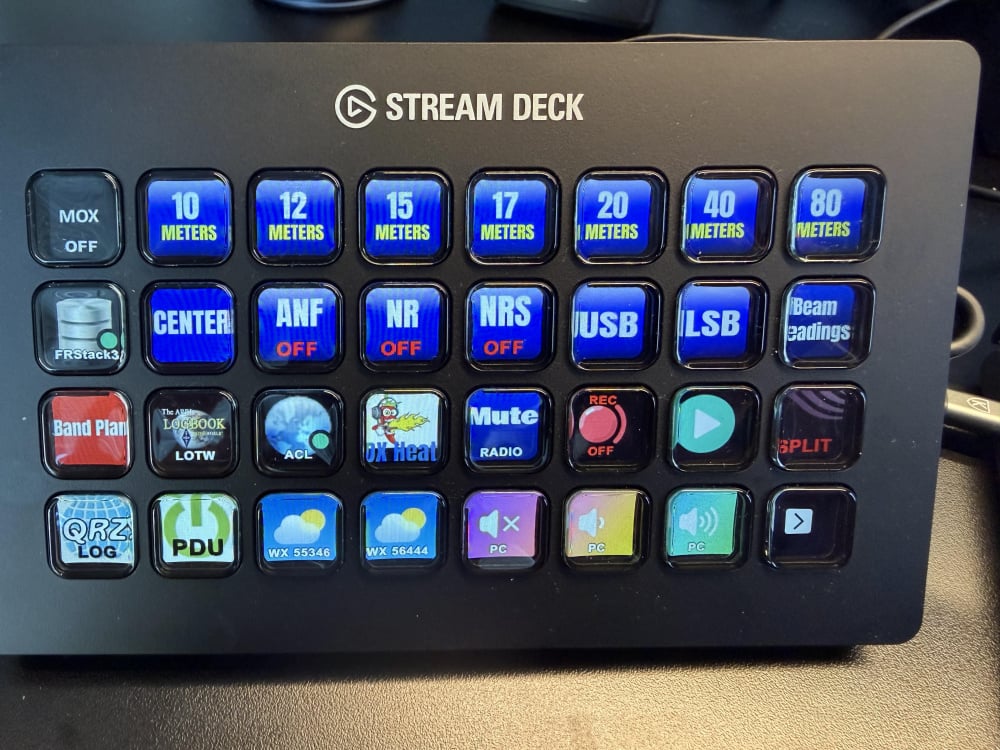
How do you get the new commands, i.e. to turn on NRS, to show up in Stream Deck?
0 -
I am assuming you have the proper licensing on your Radio that enables new DSP features.
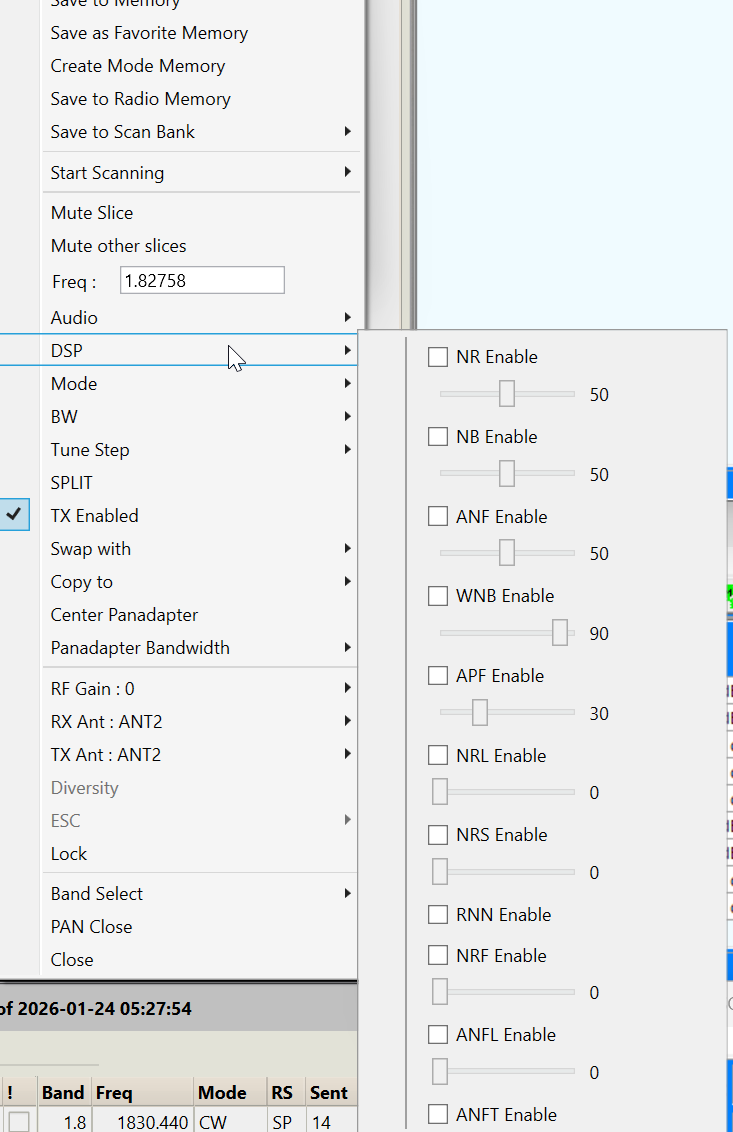
For FRStack UI, Right click on slice display then select DSP menu item.
You could also add global hotkey in FRStack that toggles the DSP features on and off. Find this under View Hotkey Editor. once you add your hotkeys remember to select the View Hotkeys to enable them.
For STREAMDECK
In the FRStack installation directory there is a new
com.mkcmsoftware.restcall.streamDeckPlugin. Install folder may be FRStack3 or FRStack4.
Open the Streamdeck editor then right click on a FRStack item then select uninstall.
Next step is to load the new plugin by double click on the new plugin you found in the installation directory. You should see a message box confirmation in the Streamdeck editor.The installation folder also holds stream deck profiles to which I have added the new features.
"C:\Program Files\FRStack3\FRStack SD+.streamDeckProfile" has a new page with DSP additions.
"C:\Program Files\FRStack3\FRStack4 Rest.streamDeckProfile" has a new DSP+ under DSP folder.73, Mark W3II
0 -
Yes, I am a SmartSDR+ Early Access Subscriber.
…and thank you for the quick reply, that worked! I added NRS to my Stream Deck.
 1
1 -
FRStack V4.0.0.5 released, adds new DSP NRF, NRL, NRS and ANFL Level settings.
3 -
Mark, thank you. Our prayers answered.
 1
1 -
So you can adjust the level of these (awesome) DSP filters in FRStack but not yet in SmartSDR?
0 -
I think it was mentioned in another thread that the sliders will be available in version 4.2.x. when it is released. The Flex API has the necessary parts available to allow 3rd party applications to connect to the various parts of the different functions that has been using sliders for adjustment all along. Fortunately Stack and the upcoming DSP Sliders programs are now taking advantage of the API and making the sliders available now.
James
WD5GWY
1 -
Question; The API and now third party apps now adjust the NR parameters…..does anyone know what changing each of the parameters for each NR function actually does? I too, have manipulated the values per the API, but cannot discern what the end result is. Documention?
Alan. WA9WUD
1 -
There's some documentation about the new noise reduction features on Flex Radio's website. Several of the methods and algorithms and their descriptions are available online. It will take some sleuthing with Wireshark and looking at the api calls itself to determine what settings effect each function and in what way. The last time I looked, the API documentation hadn't quite caught up with the latest version being used. So,it will take some trial and error to add more adjustments than just the sliders themselves. It really depends on how Flex Radio developers coded the new algorithms. If they are hard coded in such a way that none of the parameters can be altered, then, most likely all that can be changed is how aggressive the different functions are applied to a signal.
James
WD5GWY
0 -
OK, where are the DSP sliders located? I can't seem to find the menu selection.
0 -
Assuming you’ve upgraded to the newest version of FRStack, to access the sliders in FRStack, right click on the “slice” in FRStack, then click DSP.
0 -
Got it! Thanks!!!
0 -
I have installed FRStack, unfortunately it does not see my 8600.
Is there a way to resolve this problem?
Tom
0 -
This is usually the firewall settings. Uninstall FRStack then re-install in Administrator mode.
0 -
Hello Mark I had frstack3 on my computer then downloaded frstack4 I do not see anything for the plus features and yes I do have the plus bought nothing for diversity or NRL. I have a stream deck plus I did get the turn knobs going but as for the buttons not so much I don't see and band buttons any help would be great. thanks Ed W9US0
-
Right click on the active VFO display in FRStack and highlight DSP. Another menu will open up and you should see all of the DSP functions listed. Tick the checkbox of the filter you want to use and it there's a slider adjustment associated with it, you can adjust the level of the filter.
James
WD5GWY
1 -
How do I get the band buttons on the stream deck?0







Leave a Comment
Categories
- All Categories
- 401 Community Topics
- 2.2K New Ideas
- 689 The Flea Market
- 8.6K Software
- 196 SmartSDR+
- 6.6K SmartSDR for Windows
- 200 SmartSDR for Maestro and M models
- 460 SmartSDR for Mac
- 279 SmartSDR for iOS
- 268 SmartSDR CAT
- 220 DAX
- 395 SmartSDR API
- 9.6K Radios and Accessories
- 109 Aurora
- 348 FLEX-8000 Signature Series
- 7.2K FLEX-6000 Signature Series
- 999 Maestro
- 58 FlexControl
- 872 FLEX Series (Legacy) Radios
- 975 Genius Products
- 482 Power Genius XL Amplifier
- 358 Tuner Genius XL
- 135 Antenna Genius
- 321 Shack Infrastructure
- 226 Networking
- 483 Remote Operation (SmartLink)
- 145 Contesting
- 847 Peripherals & Station Integration
- 147 Amateur Radio Interests
- 1.1K Third-Party Software