SmartSDR v4.2.20 | SmartSDR v4.2.20 Release Notes
SmartSDR v3.10.15 | SmartSDR v3.10.15 Release Notes
The latest 4O3A Genius Product Software:
The latest 4O3A Genius Product Software and Firmware
If you are needing assistance with FlexRadio products, please refer to the product documentation or check the Help Center for known solutions. Need technical support from FlexRadio? It's as simple as creating a HelpDesk ticket.
SmartUnlink for VPN connections

Make your FlexRadio visible over VPN connections
The Problem
If you've ever tried to use your FlexRadio remotely over a VPN, you've probably run into a frustrating issue: SmartSDR can't find your radio.
This happens because FlexRadio uses a discovery system that broadcasts special packets on your local network to announce "Hey, I'm here!". These broadcast packets work great on your home network, but VPNs typically don't forward them. So when you're connected via VPN from a remote location, SmartSDR sits there searching... and searching... and never finds your radio.
The Solution
SmartUnlink solves this problem by running on a computer at your remote location (where SmartSDR is running) and broadcasting those discovery packets on your behalf. It tells SmartSDR "there's a FlexRadio at this IP address" - and suddenly your radio appears!
Comments
-
That is a nice solution. A friend of mine will be happy to hear about this.
Thanks for posting.
James
WD5GWY
0 -
Mike-VA3MW Administrator, FlexRadio Employee, Community Manager, Super Elmer, Moderator adminOptions
Make sure you thank Brian! (I couldn't find his callsign)
0 -
Seems like a lot of work. Why not just allow the user to manually declare an IP address in the radio discovery pane?
0 -
Mike-VA3MW Administrator, FlexRadio Employee, Community Manager, Super Elmer, Moderator adminOptions
FlexRadio's canned answer:
At this time, we do not have plans to allow SmartSDR to support direct IP addressing.
The primary reason is security. Enabling direct IP access would require users to open non-secure ports on their firewalls, which creates a significant risk of exposing the radio’s control port to the public internet. That scenario makes radios an attractive target for bad actors and is not something we are comfortable encouraging or supporting.
For users who require direct access, there are well-established VPN solutions that solve this problem correctly and securely. Options such as SoftEther and similar VPN technologies allow full, direct network access to the radio while maintaining proper encryption, authentication, and firewall protection.
We understand the desire for flexibility, but protecting customers and their stations from unintended exposure has to remain a priority.
0 -
Is downloading and running third party code, which is outside of FlexRadio's control, not a potential vector for "unintended exposure" on the customer's station? The network configuration is identical in both scenarios (3rd party IP spoofing vs native support). FlexRadio is endorsing this solution, so the network setup aspect isn't be the objectionable part. I don't see why native support is a hard "no", despite it solving the exact same problem using the exact same method: a user-supplied IP.
0 -
Mike-VA3MW Administrator, FlexRadio Employee, Community Manager, Super Elmer, Moderator adminOptions
That is a fair question, and you are correct that security always involves an element of trust somewhere in the chain.
The key difference is where that trust is placed and how broadly the exposure is created. With a VPN, the user is explicitly choosing to trust a specific piece of software whose sole purpose is to create an encrypted tunnel with authentication and access controls. The radio is never exposed directly to the public internet, and no FlexRadio service ports are opened to unsolicited traffic. From the radio’s perspective, the connection behaves as if it were on a private LAN.
Native direct IP addressing would require users to open and forward control ports on their firewall. In practice, many users would do this incorrectly or incompletely secure it, even with warnings and documentation. Once those ports are open, the radio becomes directly reachable by anyone who can find it. That is a fundamentally different risk profile than a VPN, even if the end goal of connectivity looks similar on the surface.
You are absolutely right that running third party software requires trust. The distinction is that this trust is intentional, limited in scope, and well understood, whereas exposing a device control port to the internet creates ongoing unintended exposure that cannot be meaningfully mitigated by the application alone.
We are not saying VPNs are perfect or that trust is eliminated. We are saying that placing trust in a mature VPN solution is a far safer and more controllable approach than encouraging users to expose radio control services directly to the internet. That balance is why native direct IP support remains a no at this time.
0 -
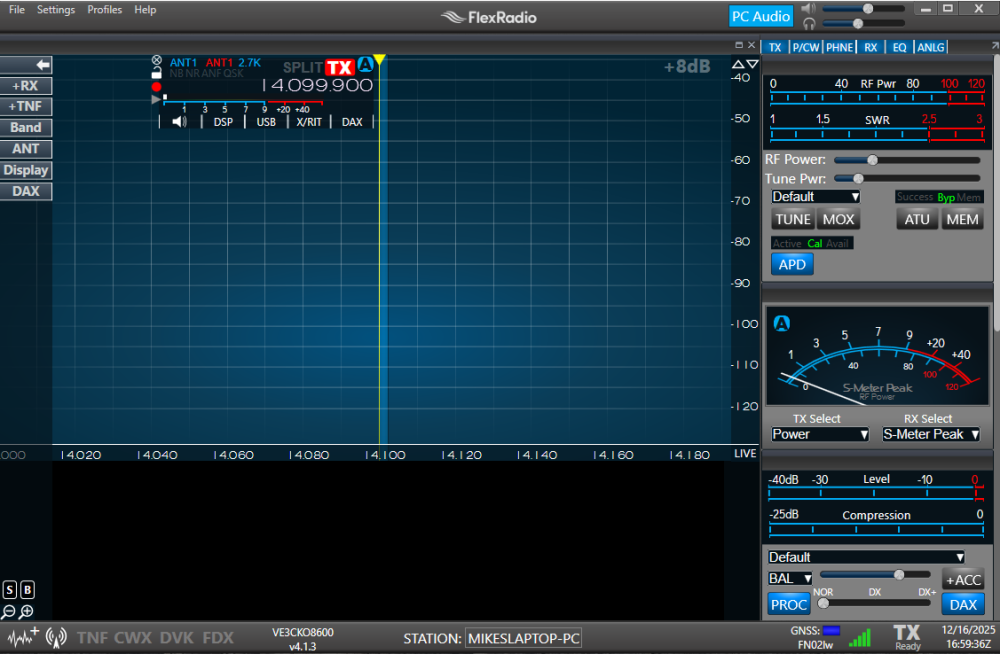
I had used SoftEther in the past that had seen the radio on the network and opened up SmartSDR no problem, used it remotely without issue. I have not tried it for a few years and it does not work now. Using SmartUnlink does broadcast and I can see the radio on the remote laptop and it does connect to the radio, however there is no stream passing see below, what am I missing ?
 0
0 -
Big Thank You to EI6LF Brian! It works great, even with my ancient 6500 :)
Have to admit no tunneling yet, but the discovery packets do work!0 -
Mike, would FlexRadio consider manual IP address support for the intranet IPv4 blocks? 192.168.0.0/16, 172.16.0.0/12, and 10.0.0 0/8 aren't publicly routable, so there is no added exposure risk for manual entry, but it would be very handy for solving this sort of problem.
0 -
@Mike VE3CKO my bet is the UDP-stream is not working due to closed ports! Not sure if you can open those, all depends on your provider, or could be in your router.
But having the Smartunlik s/w allows the use of all sorts of simple tunnels not having to find one that supports layer2 i.e. discovery packets.
0 -
Mike-VA3MW Administrator, FlexRadio Employee, Community Manager, Super Elmer, Moderator adminOptions
@reed Not likely, but I will pass on your request. Part of this answer is related to higher priority items being worked on. AKA, just not enough time and given that there valid solutions with VPNs, etc. it won't be a priority (just telling it like it is).
1 -
Running SmartUnlink on a PC at your remote LAN will broadcast the discovery packets all over that local LAN.. i.e. my Maestro did pick up the packets :) This makes remote operation a lot simpler for sure.
0 -
I have identified the problem why my SoftEther no longer could connect remotely. I confirmed I am behind both CG-NAT and double NAT.
After some research I found that it was suggested to use VPN Azure.
- If the firewall is more restricted and the NAT Traversal of SoftEther VPN doesn't work correctly, instead use VPN Azure to **** such a firewall.
- a works around strick firewalls
- gets through double NAT etc.
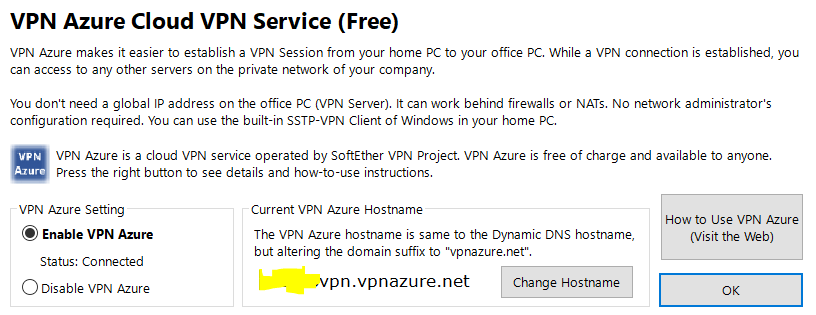
To fix this you have to enable VPN Azure in the SoftEther VPN Server Manager, this will take your Dynamic DNS hostname such as mystationvpn.softether.net and make a new one mystationvpn.vpnazure.net you then would need to copy the new Host Name and replace it in your SoftEther Client Manager.
To do this, open up SoftEther VPN Server Manager and then Manage VPN Server by clicking CONNECT. You should already have a Dynamic DNS Setting from the original server setup. You can enable VPN Azure by going to VPN Azure Setting button, and selecting Enable VPN Azure radio-button it will take a short bit for the status to say: Status: Connected
Then copy the new hostname and edit your VPN Client Manager user on the computer you use to remotely login. Open up the VPN Client Manager and right click on the user, select Properties. You will see xxxxx.softether.net in the Host Name field. Replace this with the hostname you copied (xxxxx.vpnazure.net), click OK.
That's it !
0 -
Will any of this work using TailScale VPN (which I already have installed and connected on my various computers)
I'm not a network guru - so I don't know what fundamentally is going on with Azure)
0 -
I have to say its ridiculous we have to use a third party solution in order to connect to a flex radio over a vpn connection.
I run site-to-site vpns (home to business). My rigs are located at my businesses since I can't install antennas at my home and my routers (peplink) handles the site-to-site vpn so I can access everything from the home to business and vice versa. . Yet, I can't directly address my flex radio at my business LAN from my home LAN because I don't have the option to type in the network address of the flex unit to connect directly to it?? Wut?!?
This is crazy.0 -
One word … AetherSDR …
The Flex remote approach might have been nice 10 years ago. Today, it is a joke. Many of us are under CGNAT. No choice in the matter depending on where we live. Some are only able to use IPV6, which Flex does not support. Hey, it's 2026 … not 1995 …
There are much more customer friendly approaches than simply saying open up ports, which is not good security practice. Reverse proxy, STUN, … there are other solutions which other amateur radio companies are using.
VPN can be used, but if you want to use SmartSDR then you have to route the UDP packets, which is problematic. To add insult to injury, Flex compresses the stream, but only if you use their remote option …
0 -
I guess I'm going to have to check out AetherSDR. Smartunlink doesn't work (it isn't forwarding correctly and it aways shows "update" for the radio on the other end of the vpn.0





Leave a Comment
Categories
- All Categories
- 401 Community Topics
- 2.2K New Ideas
- 691 The Flea Market
- 8.6K Software
- 197 SmartSDR+
- 6.6K SmartSDR for Windows
- 200 SmartSDR for Maestro and M models
- 462 SmartSDR for Mac
- 280 SmartSDR for iOS
- 268 SmartSDR CAT
- 220 DAX
- 395 SmartSDR API
- 9.6K Radios and Accessories
- 114 Aurora
- 352 FLEX-8000 Signature Series
- 7.2K FLEX-6000 Signature Series
- 999 Maestro
- 58 FlexControl
- 872 FLEX Series (Legacy) Radios
- 979 Genius Products
- 485 Power Genius XL Amplifier
- 358 Tuner Genius XL
- 136 Antenna Genius
- 323 Shack Infrastructure
- 228 Networking
- 485 Remote Operation (SmartLink)
- 147 Contesting
- 847 Peripherals & Station Integration
- 148 Amateur Radio Interests
- 1.1K Third-Party Software