SmartSDR v4.2.20 | SmartSDR v4.2.20 Release Notes
SmartSDR v3.10.15 | SmartSDR v3.10.15 Release Notes
The latest 4O3A Genius Product Software:
The latest 4O3A Genius Product Software and Firmware
If you are needing assistance with FlexRadio products, please refer to the product documentation or check the Help Center for known solutions. Need technical support from FlexRadio? It's as simple as creating a HelpDesk ticket.
Updated to v 4.1.3, now WSJT-X crashes SSDR when changing bands

Hi all,I had no problems with v 2.12.1 and WSJT-X (exept the occasional BSOD with DAX),but now I find that changing bands from WSJT-X crashes SSDR and the Flex.They come back with time, but the Flex starts clicking and changing frequency.I have to reset to factory settings, reload profiles and then the Flex works again. My way around this is to use profiles for every band and switch that way.
Has anyone experienced this? Is it a hamlib error with v 4.1.3?
Vy 73 and merry x-mas,Alex - DH2ID
Answers
-
Similar effect here :
UCXLOG from remote crashes smatsdr, giving reboots.. strangely not when used from a pc on same network switch . Now i know…i am not alone…
Harald
DL9NDW
1 -
Hello Harald,
thank you for your message. The same crashes occurr with SSDR for iOS and iPadOS!
I have opened a ticket with Flex, athough WSJT-X is not mantained by Flex. Vy 73 and merry XMAS, Alex - DH2ID
0 -
Having the same issue here Alex. Flex 8600, SSDR 4.1.3 on Windows 11 Pro 25H2, WSJT-x 3.0.0-rc1. Changing bands with WSJT-x triggers some sort of CAT storm with frequency rapidly changing between the old band and new band very rapidly. TGXL is trying to keep up with the rapid changes as well….lots of relays chunking very fast. Have to reboot the 8600 and PC to recover. I'm going to do a clean install of everything and see if that heals it.
73,
Pat, W5VY
1 -
Thanks a lot, Pat! You made my day, as I thought I was the only one with these problems. I'm interested how you can solve the CAT storm! My way around this is the use of profiles for all digimodes and bands and switching this way using FRstack. Switching bands from SSDR for iOS and for iPadOS results also with crashes, which is a pity, as I like to work from my tablet…
Thank you again, and merry Christmas, Alex - DH2ID
0 -
 Mike-VA3MW Administrator, FlexRadio Employee, Community Manager, Super Elmer, Moderator adminOptions
Before you open a support ticket, please do a reset on the radio. The directions are in the release notes.
If that does not resolve the issue, then open a support ticket.
1 -
Thank you, Mike. I aways do a reset as I follow the instructions to the dot, which did not help. My ticket is open, but WSJT-X being a third-party software I'm not really hopeful. I wish I could go back to V 2.12.1 which worked just fine.
Pat W5VY wrote that band changes trigger some sort of a CAT storm, which coincides with my thoughts about a hamlib problem.
Thanks for your help, vy 73, Alex - DH2ID
0 -
Mike-VA3MW Administrator, FlexRadio Employee, Community Manager, Super Elmer, Moderator adminOptions
Hi Alex
I wonder if there are some settings that are unique to your setup. I do not see the same issue and I am active on the AU-520 (same as an 8000) and my 6600M none stop. And, I am running on 4.1.3.
I would recommend you spend some time and compare you setup with others and see if there is something unique. I mention this as not everyone is experiencing the same issue.
BTW, I have seen issue where using SliceMaster can slow down the network commands. I wonder if this related.
Mike
1 -
Hi Mike, I've just updated to 4.1.5 and it works (fingers crossed).
73s, Alex
1 -
The solution of my problem seems to be to recall hamlib 64bit4.6.2 from 2025-02-09. No crashes since, cross fingers!I also updated to SSDR 4.1.5Merry Christmas, Alex - DH2ID
Flex-6500
Flex-15000 -
Resolved Issue: FlexRadio 8600 Rebooting and SmartSDR Blank Panadapter
After carefully monitoring when the radio rebooted and completing the full factory‑reset process typically recommended to resolve this behavior, I identified that the root cause was related to a small number of corrupted profiles. I wanted to avoid rebuilding all of my Mic, TX, and Global profiles from scratch, so I continued troubleshooting until I discovered a consistent pattern.
Ultimately, I found that two Global Profiles were repeatedly triggering either:
- A full reboot of the FlexRadio 8600, or
- A blank panadapter (PAN) display within SmartSDR.
Deleting only those two problematic profiles and recreating them resolved the issue completely.
Detailed Procedure
- Exported all radio settings before making changes.
- Performed a full factory reset, following the steps documented by Tim Ellison in the “How to completely reset an Aurora/Flex‑8000/6000” guide.
- Imported only “Custom” profiles, specifically: "Make sure to uncheck any built-in Radio Profiles that show in the import list."
- Global Profiles
- TX Profiles
- Mic ProfilesI did not import any built‑in/default profiles.
- Did not import Memories, since those can be reviewed easily via the Excel‑format export.
- Did not import:
- Preferences
- TNFs
- XVTR settings
- USB Cable configurations
- Identified two Global Profiles that consistently caused either radio reboots or SmartSDR display issues.
- Deleted those two profiles, then recreated them manually based on working profile copies.
- After these steps, the radio has been stable with no further issues.
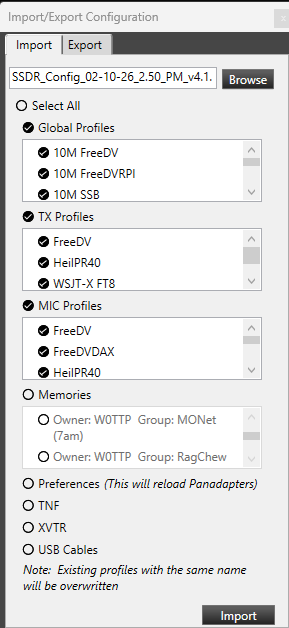 0
0 -
Update: After doing a factory reset of my Radio, I then imported, deleted, and recreated the profiles that were causing the Radio to reboot. This process worked for a while, but then I started seeing profiles cause reboots again, and the radio would just randomly reboot. I performed a factory reset and spent half a day rebuilding all my mix, TX, and global profiles from scratch. ** (That was not good) from scratch.) ** Flex, you are going to have to get this fixed. Just doing version upgrades that require you to rebuild your Radio from scratch is NOT a good thing.
0




Leave a Comment
Categories
- All Categories
- 401 Community Topics
- 2.2K New Ideas
- 689 The Flea Market
- 8.6K Software
- 196 SmartSDR+
- 6.6K SmartSDR for Windows
- 200 SmartSDR for Maestro and M models
- 460 SmartSDR for Mac
- 279 SmartSDR for iOS
- 268 SmartSDR CAT
- 220 DAX
- 395 SmartSDR API
- 9.6K Radios and Accessories
- 109 Aurora
- 348 FLEX-8000 Signature Series
- 7.2K FLEX-6000 Signature Series
- 999 Maestro
- 58 FlexControl
- 872 FLEX Series (Legacy) Radios
- 975 Genius Products
- 482 Power Genius XL Amplifier
- 358 Tuner Genius XL
- 135 Antenna Genius
- 322 Shack Infrastructure
- 227 Networking
- 483 Remote Operation (SmartLink)
- 145 Contesting
- 847 Peripherals & Station Integration
- 147 Amateur Radio Interests
- 1.1K Third-Party Software