SmartSDR v4.2.20 | SmartSDR v4.2.20 Release Notes
SmartSDR v3.10.15 | SmartSDR v3.10.15 Release Notes
The latest 4O3A Genius Product Software:
The latest 4O3A Genius Product Software and Firmware
If you are needing assistance with FlexRadio products, please refer to the product documentation or check the Help Center for known solutions. Need technical support from FlexRadio? It's as simple as creating a HelpDesk ticket.
Where are the new DSP features in SmartSDR+ 4.1.3

Answers
-
First thing to check is whether your radio has your SmartSDR+ license loaded. You can verify this in SmartSDR for Windows by checking the License Info section in Radio Settings > Radio Tab. If you don't see SmartSDR+ there in the Subscription entry, then you may want to ensure that your radio has internet access so that it can pull the license.
Beyond that, if you want to tell us what features you're looking at in particular, that might help. Here's a table that shows the features and which hardware platforms support them:
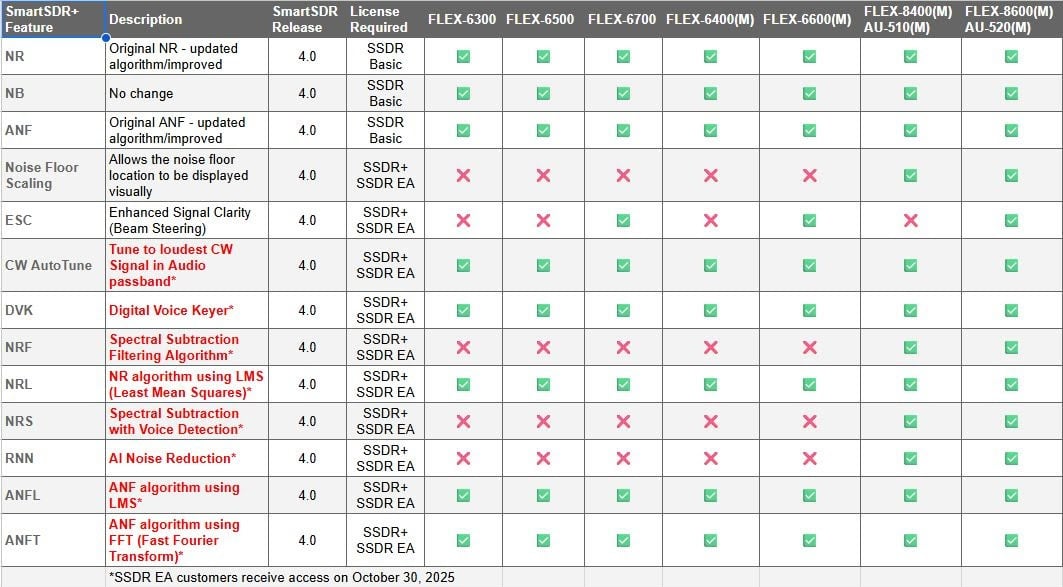
Note that this table is dated and the ones that say EA are now all available for SmartSDR+.
0 -
Hello, I have the same problem. I have purchased the SmartSDR+ package for FlexRadio 8400. The license is displayed until January 6, 2026. It is December 7, 2025 and none of the new features are active. What should I do to make the new features appear?0
-
Rick & Andy, after you upgraded to v4 did you a proper Factor Reset - Cold Boot ? If you have not done so, go to the link and follow the instructions.
Rick: On a 6700 the DSP features NRS, RNN and NRF are not available, the DSP should look like this below, if not I would open up a ticket.
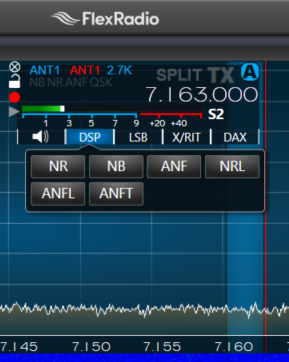
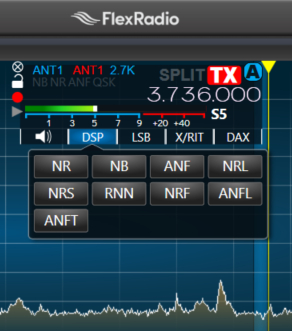
Andy: The SmartSDR+ one year license is just that, for one year. Your expiration date is incorrect so I would open a ticket for that. Maybe once that is corrected you should see your 8400 DSP showing all the available features:
 0
0





Leave a Comment
Categories
- All Categories
- 401 Community Topics
- 2.2K New Ideas
- 689 The Flea Market
- 8.6K Software
- 197 SmartSDR+
- 6.6K SmartSDR for Windows
- 200 SmartSDR for Maestro and M models
- 460 SmartSDR for Mac
- 279 SmartSDR for iOS
- 268 SmartSDR CAT
- 220 DAX
- 395 SmartSDR API
- 9.6K Radios and Accessories
- 109 Aurora
- 348 FLEX-8000 Signature Series
- 7.2K FLEX-6000 Signature Series
- 999 Maestro
- 58 FlexControl
- 872 FLEX Series (Legacy) Radios
- 975 Genius Products
- 482 Power Genius XL Amplifier
- 358 Tuner Genius XL
- 135 Antenna Genius
- 322 Shack Infrastructure
- 227 Networking
- 483 Remote Operation (SmartLink)
- 145 Contesting
- 847 Peripherals & Station Integration
- 147 Amateur Radio Interests
- 1.1K Third-Party Software