Welcome to the FlexRadio Community! Please review the new Community Rules and other important new Community information on the Message Board.
The latest SmartSDR Software:
SmartSDR v4.2.20 | SmartSDR v4.2.20 Release Notes
SmartSDR v3.10.15 | SmartSDR v3.10.15 Release Notes
The latest 4O3A Genius Product Software:
The latest 4O3A Genius Product Software and Firmware
SmartSDR v4.2.20 | SmartSDR v4.2.20 Release Notes
SmartSDR v3.10.15 | SmartSDR v3.10.15 Release Notes
The latest 4O3A Genius Product Software:
The latest 4O3A Genius Product Software and Firmware
How to Receive Technical Support::
If you are needing assistance with FlexRadio products, please refer to the product documentation or check the Help Center for known solutions. Need technical support from FlexRadio? It's as simple as creating a HelpDesk ticket.
If you are needing assistance with FlexRadio products, please refer to the product documentation or check the Help Center for known solutions. Need technical support from FlexRadio? It's as simple as creating a HelpDesk ticket.
How to display spots on Maestro using SmartLink?
Options

Fritz
Member, Unconfirmed ✭
How can i send spots from N1MM (or any other spot source) on my local Windows PC to Maestro?
0
Answers
-
 Mike-VA3MW Administrator, FlexRadio Employee, Community Manager, Super Elmer, Moderator adminOptions
Here’s how to set it up:
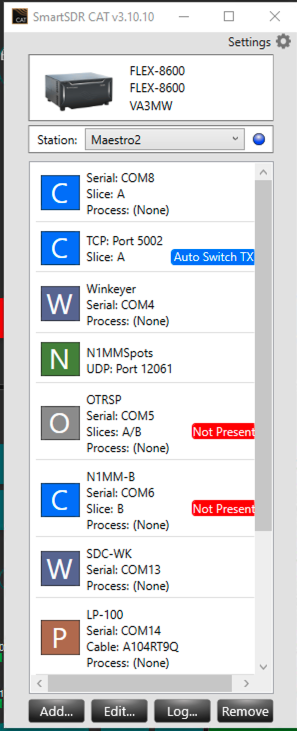
- In SmartSDR CAT, make sure you have an entry called N1MMSpots. SmartSDR CAT must be running on the same computer.
- In your case, it is already set up to listen on UDP Port 12061.
- In N1MM+, go to Config → Broadcast Data.
- Enable Spot Information (UDP Broadcast).
- Set the IP Address to 127.0.0.1.
- Set the Port to 12061 (to match the port shown in SmartSDR CAT).
- Once configured, cluster spots in N1MM+ will be sent to SmartSDR CAT, which will inject them into your radio.
- On your Maestro, go to Menu/Spots and make sure Spots are enabled.
- Tune around on your Maestro’s panadapter and you should see spots appear if they are on or near any frequency in the panadapter.
 1
1 -
Many thanks Mike.0

Leave a Comment
Categories
- All Categories
- 401 Community Topics
- 2.2K New Ideas
- 689 The Flea Market
- 8.6K Software
- 196 SmartSDR+
- 6.6K SmartSDR for Windows
- 200 SmartSDR for Maestro and M models
- 460 SmartSDR for Mac
- 279 SmartSDR for iOS
- 268 SmartSDR CAT
- 220 DAX
- 395 SmartSDR API
- 9.6K Radios and Accessories
- 109 Aurora
- 348 FLEX-8000 Signature Series
- 7.2K FLEX-6000 Signature Series
- 999 Maestro
- 58 FlexControl
- 872 FLEX Series (Legacy) Radios
- 975 Genius Products
- 482 Power Genius XL Amplifier
- 358 Tuner Genius XL
- 135 Antenna Genius
- 322 Shack Infrastructure
- 227 Networking
- 483 Remote Operation (SmartLink)
- 145 Contesting
- 847 Peripherals & Station Integration
- 147 Amateur Radio Interests
- 1.1K Third-Party Software