SmartSDR v4.2.20 | SmartSDR v4.2.20 Release Notes
SmartSDR v3.10.15 | SmartSDR v3.10.15 Release Notes
The latest 4O3A Genius Product Software:
The latest 4O3A Genius Product Software and Firmware
If you are needing assistance with FlexRadio products, please refer to the product documentation or check the Help Center for known solutions. Need technical support from FlexRadio? It's as simple as creating a HelpDesk ticket.
I have been receiving reports of nothing but static when I key the mic.

Any ideas? Thanks in advance,
Espo53
Best Answer
-
 Mike-VA3MW Administrator, FlexRadio Employee, Community Manager, Super Elmer, Moderator adminOptions
Hi
Since you are getting started, you'll find this video very helpful.
0
Answers
-
HI… can you give us a bit more info on your setup? What mic are you using? Where is it plugged in? What input have you selected? Have you set up a Mic Profile? When you key up and speak into the mic are you seeing any movement on the RF power meter? Any movement on the Level or Compression meters?
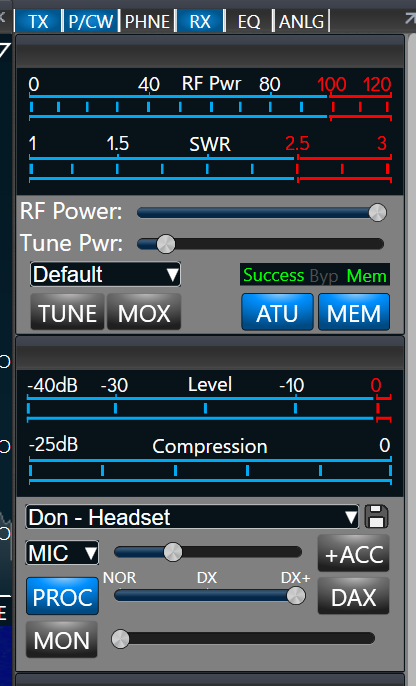
Here is a shot of my panel (at the side of the panadapter). When you speak, you should see deflection in the RF Pwr meter at the top. You should also see deflection i the Level and Compression meters underneath that. Check your setting for RF Power — the slider underneath. It should be set all the way to the right. Below the Compression meter, check the drop down to see what mic profile you are using. Then ensure that you've selected the right input (the MIC drop-down) just below that. And look at the mic level beside that.
You can also listen to what you sound like by turning on the MON button below the PROC slider.
0 -
Hi Espo, if you are using the FHM3 hand mic that came with the rig, you will need to turn on BIAS. Also make sure that DAX is off, like Don's screen shot shows.
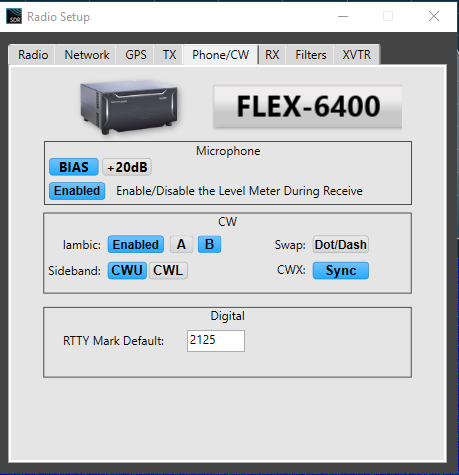
I also recommend enabling the Level Meter During Receive. This will allow you to look at the level meter and adjust your mic level without transmitting. When you set the level, adjust the slider so that the little peak indicator does not go past 0 and turn red. Do not look at the bar part of the graph, just look at the little yellow square.
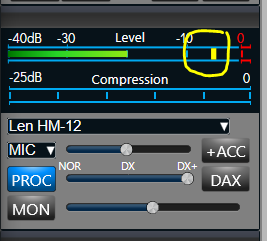
I keep mine adjusted somewhere between -5 dB and 0 dB so that louder voice peaks don't go into the red.
0





Leave a Comment
Categories
- All Categories
- 401 Community Topics
- 2.2K New Ideas
- 689 The Flea Market
- 8.6K Software
- 196 SmartSDR+
- 6.6K SmartSDR for Windows
- 200 SmartSDR for Maestro and M models
- 460 SmartSDR for Mac
- 279 SmartSDR for iOS
- 268 SmartSDR CAT
- 220 DAX
- 395 SmartSDR API
- 9.6K Radios and Accessories
- 109 Aurora
- 348 FLEX-8000 Signature Series
- 7.2K FLEX-6000 Signature Series
- 999 Maestro
- 58 FlexControl
- 872 FLEX Series (Legacy) Radios
- 975 Genius Products
- 482 Power Genius XL Amplifier
- 358 Tuner Genius XL
- 135 Antenna Genius
- 322 Shack Infrastructure
- 227 Networking
- 483 Remote Operation (SmartLink)
- 145 Contesting
- 847 Peripherals & Station Integration
- 147 Amateur Radio Interests
- 1.1K Third-Party Software