SmartSDR v4.2.20 | SmartSDR v4.2.20 Release Notes
SmartSDR v3.10.15 | SmartSDR v3.10.15 Release Notes
The latest 4O3A Genius Product Software:
The latest 4O3A Genius Product Software and Firmware
If you are needing assistance with FlexRadio products, please refer to the product documentation or check the Help Center for known solutions. Need technical support from FlexRadio? It's as simple as creating a HelpDesk ticket.
SmartSDR issues or Radio issues (FLEX 8600)

it could be SmartSDR or the GPSDO that was installed during the build. My Radio is going down and back up by its self. It will be triggered by most the time when I select different band I will get alert that SmartSDR has lost connection to the radio. I'm running 3.9.18. the Radio will reboot and it could happen again right after the reboot. This is odd for sure. I can't find the correct thing I'm doing but always changing bands.
Jim
WU5E
Comments
-
Hi Jim, I would do a profile export, then do a factory reset. If that doesn't solve it issue, submit a help desk ticket.
0 -
I just turned the smart link off on my 8400m. Didn't need it on,and the disconnect issue went away of course.
0 -
Network Diagnostics
Network status: Excellent
Latency: <1ms
Max Latency: 111ms
Remote TX 0
Remote RX 0
Dropped 6 out of 2330300 packets 0.0%
Network is good network is Starlink Home
The Radio acts like a pageant woman the first time I turn it on at 0530 it blues up with the GPSDO in it I start SmartSDR 3.9.18 and I select 6m this morning good CW contact and the Radio reboots I get up and walk into the kitchen for coffee. 3 minutes later I walk about the Radio room and sit down with my coffee. It stays up the rest of the day
Jim
WU5E
0 -
I did do a factory Reset
0 -
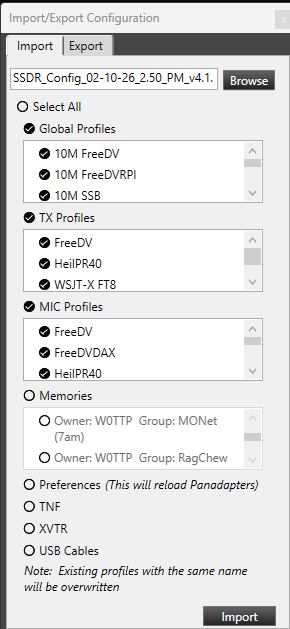
Be sure that when doing a Factory Reset, that you leave the "Preferences" box UN-CHECKED when you export or import your profiles. This resets the Radio Persistence Database, which is often where the issues "hide."
0 -
a { text-decoration: none; color: #464feb;}tr th, tr td { border: 1px solid #e6e6e6;}tr th { background-color: #f5f5f5;}
Resolved Issue: FlexRadio 8600 Rebooting and SmartSDR Blank Panadapter
After carefully monitoring when the radio rebooted and completing the full factory‑reset process typically recommended to resolve this behavior, I identified that the root cause was related to a small number of corrupted profiles. I wanted to avoid rebuilding all of my Mic, TX, and Global profiles from scratch, so I continued troubleshooting until I discovered a consistent pattern.
Ultimately, I found that two Global Profiles were repeatedly triggering either:
- A full reboot of the FlexRadio 8600, or
- A blank panadapter (PAN) display within SmartSDR.
Deleting only those two problematic profiles and recreating them resolved the issue completely.
Detailed Procedure
- Exported all radio settings before making changes.
- Performed a full factory reset, following the steps documented by Tim Ellison in the “How to completely reset an Aurora/Flex‑8000/6000” guide.
- Imported only “Custom” profiles, specifically:
- Global Profiles
- TX Profiles
- Mic Profiles
I did not import any built‑in/default profiles.
- Did not import Memories, since those can be reviewed easily via the Excel‑format export.
- Did not import:
- Preferences
- TNFs
- XVTR settings
- USB Cable configurations
- Identified two Global Profiles that consistently caused either radio reboots or SmartSDR display issues.
- Deleted those two profiles, then recreated them manually based on working profile copies.
- After these steps, the radio has been stable with no further issues.
 0
0





Leave a Comment
Categories
- All Categories
- 401 Community Topics
- 2.2K New Ideas
- 691 The Flea Market
- 8.6K Software
- 197 SmartSDR+
- 6.6K SmartSDR for Windows
- 200 SmartSDR for Maestro and M models
- 462 SmartSDR for Mac
- 280 SmartSDR for iOS
- 268 SmartSDR CAT
- 220 DAX
- 395 SmartSDR API
- 9.6K Radios and Accessories
- 113 Aurora
- 352 FLEX-8000 Signature Series
- 7.2K FLEX-6000 Signature Series
- 999 Maestro
- 58 FlexControl
- 872 FLEX Series (Legacy) Radios
- 978 Genius Products
- 484 Power Genius XL Amplifier
- 358 Tuner Genius XL
- 136 Antenna Genius
- 323 Shack Infrastructure
- 228 Networking
- 485 Remote Operation (SmartLink)
- 147 Contesting
- 847 Peripherals & Station Integration
- 148 Amateur Radio Interests
- 1.1K Third-Party Software