SmartSDR v4.2.20 | SmartSDR v4.2.20 Release Notes
SmartSDR v3.10.15 | SmartSDR v3.10.15 Release Notes
The latest 4O3A Genius Product Software:
The latest 4O3A Genius Product Software and Firmware
If you are needing assistance with FlexRadio products, please refer to the product documentation or check the Help Center for known solutions. Need technical support from FlexRadio? It's as simple as creating a HelpDesk ticket.
Cat not working in WXJT-X

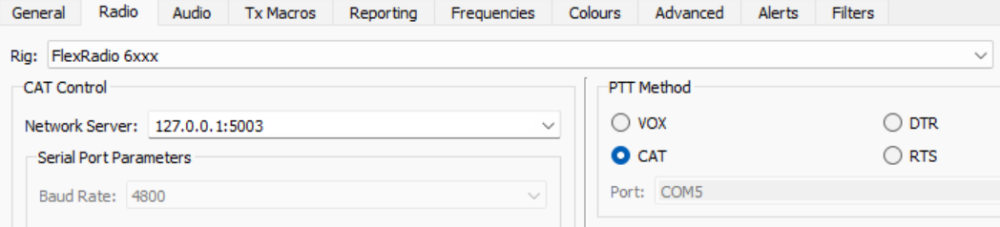
Trying to configure wsjt-x on my 8400M. W9NWR and I worked on it for 2 hrs this morning and it keeps saying rig control error. we followed the guide that Ken Wells put out to the letter but still does not work. When I try to test it with the test button, it says rig control error. Any suggestions.
Answers
-
SmartSDR CAT + WSJTx configured on same port (yours will say Slice A). The port parameters are Protocol = CAT, Type = TCP.

 0
0 -
Mine says 9600 baud rate. CAT is checked under PTT method. We went by Ken Wells guide when we set it up.
0 -
Baud rate is irrelevant for a TCP connection.
0 -
Baud rate is irrelevant, only applies to serial ports and not TCP ports.
0 -
Forgot to mention that when we were testing, the was 2 A slices on the display. don't know if that would help.
0




Leave a Comment
Categories
- All Categories
- 401 Community Topics
- 2.2K New Ideas
- 691 The Flea Market
- 8.6K Software
- 197 SmartSDR+
- 6.6K SmartSDR for Windows
- 200 SmartSDR for Maestro and M models
- 461 SmartSDR for Mac
- 280 SmartSDR for iOS
- 268 SmartSDR CAT
- 220 DAX
- 395 SmartSDR API
- 9.6K Radios and Accessories
- 113 Aurora
- 349 FLEX-8000 Signature Series
- 7.2K FLEX-6000 Signature Series
- 999 Maestro
- 58 FlexControl
- 872 FLEX Series (Legacy) Radios
- 976 Genius Products
- 483 Power Genius XL Amplifier
- 358 Tuner Genius XL
- 135 Antenna Genius
- 323 Shack Infrastructure
- 228 Networking
- 484 Remote Operation (SmartLink)
- 146 Contesting
- 847 Peripherals & Station Integration
- 147 Amateur Radio Interests
- 1.1K Third-Party Software