SmartSDR v4.2.20 | SmartSDR v4.2.20 Release Notes
SmartSDR v3.10.15 | SmartSDR v3.10.15 Release Notes
The latest 4O3A Genius Product Software:
The latest 4O3A Genius Product Software and Firmware
If you are needing assistance with FlexRadio products, please refer to the product documentation or check the Help Center for known solutions. Need technical support from FlexRadio? It's as simple as creating a HelpDesk ticket.
AURORA AU-520

My set-up : FHM3 mic connected to rig and Laptop Dell PC running SmartSDR + Portable Antenna (ATAS 25 from Yeasu / 100W) (the so called Picnic tabble set up) : It does not work, the audio is so weak it can only brings 3 to 4 WATTS output with Mic gain UP and PROC...with proper MIC set up and input.
It tried wih the PC mic, same thing...
When I hit the TUNE button, I get 100 W (at 20%), and 1.15 SWR, but when I hit the MOX, I get 2 to 3 Watts of ooutput, with power slider set at 20% (100 W)
Flex support responded by a bunch of links…
Any idea? Defective Unit ?
Steel NOT TRANSMITTING... (A shame for a 10,000 dollar radio...)
Comments
-
Have you checked that DAX is off? Button to right of PROC in P/CW panel.
Is the MIC selection drop down set to MIC? (in same panel as above).
The FlexRadio FHM-3 is an electret condenser microphone and requires voltage from the radio to function.
- Go to Settings > Radio Setup > Phone/CW tab.
- Ensure that BIAS is turned ON.
- Note: If you need more drive, you can also toggle the +20 dB Mic Boost to ON in this menu.
Is your Level meter moving at all when you speak into the microphone?
1 -
Hi Erik,
DAX is off, BIAS is ON, and +20dB not recommended
FHM-3 is connected to the back panel of the AURORA (MIC and PTT), which makes NO sense to me, since I operate the radio with a PC, away from the Aurora 🙄
MIC input / FHM-3 profile
Audio level on meter is VERY LOW...
Not talking about the ATU that takes forever to tune the antenna, (such a noise!!!!) and most of the time not able to fine tune.
I have so many problems with this RIG, it's been over a month, and not being able to transmit at all !
It looked so easy watching Mike (VA3MW) from flexradio on YouTube videos, but the reality I'm facing is totally different. I'm not a computer type of guy, and AURORA requires computer knowledge.
I might send it back and get a normal HF Transceiver that works as soon as I turn it on.0 -
How are you operating the Aurora away from your radio on your pc and using the microphone connected to the back of the radio at the same time? If you are not getting enough output, you should try as Erik suggested and turn on the +20db of boost to see if it makes a difference.
James
WD5GWY
1 -
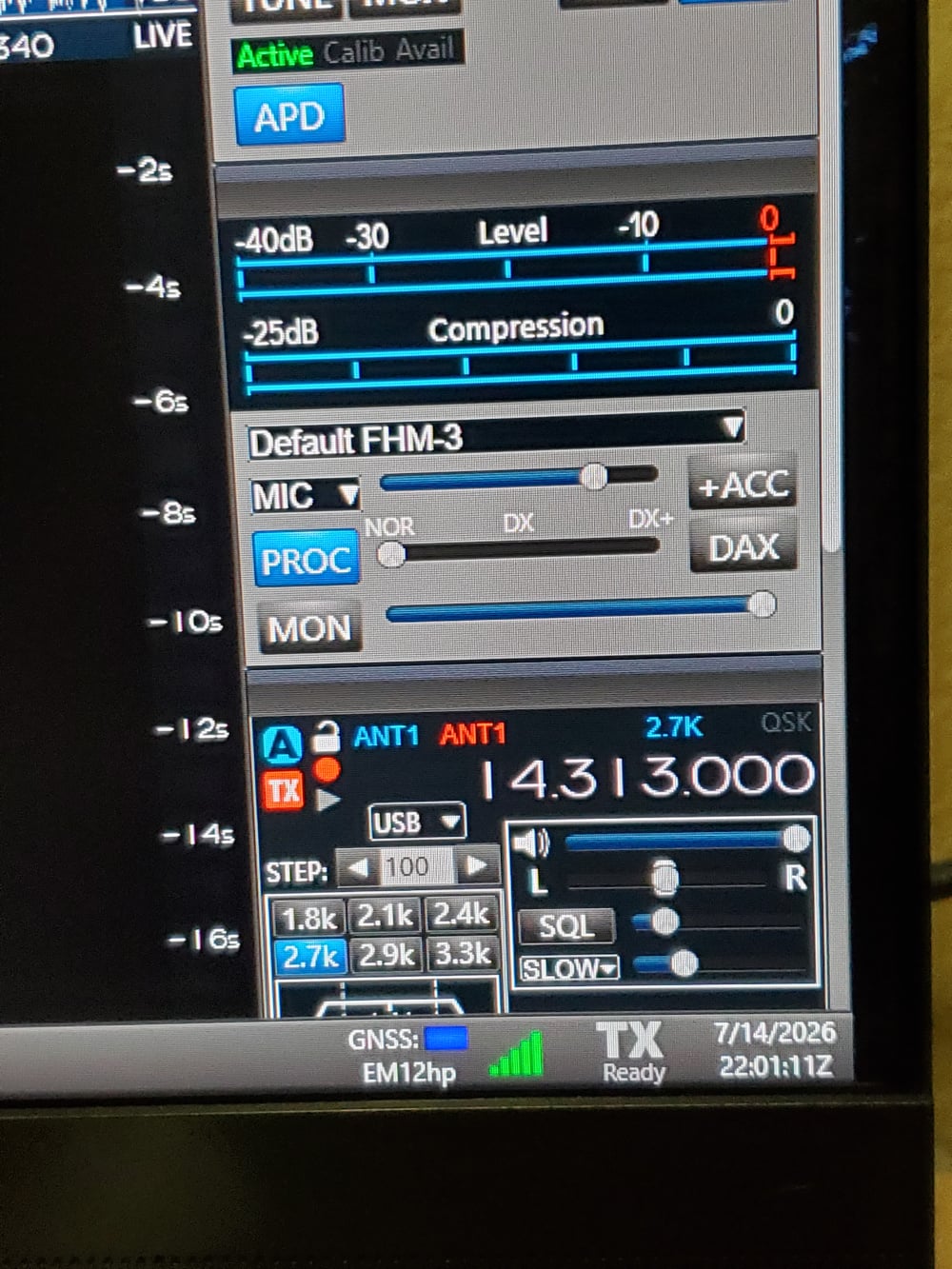
Using the FMH-3 hand microphone connected to the back of my AU-520M ( front panel disabled) I get full power output using the hand microphone. The radio is sitting on my desk just below my computer monitor. I do have Bias turned on. But, not the +20db boost.
James
WD5GWY
1 -
-
I also have a microphone connected to my computer through a external USB audio interface. When I use it, I select PC as the input source and the appropriate microphone profile from the drop down menu for my microphone.
James
WD5GWY
1 -
well, if it shows power with the Tune button, the transmitter is producing power. Its best to get the radio working with the mic connected to the radio is a first test, then set up the PC mic. When testing the FHM power out, are you using the PTT button and speaking at the same time. Just a starting point for refining the problem.
1 -
Thanks for all your help. But it looks like this kind of radio is not for me. First of, NO manual in the box...Like, it took me a week to figure how to turn the radio ON!! Why two switches, why is it blinking and so on....what is the procedure to turn it OFF, I mean, no manual at all. Flex Fex and more Flex. I spent more time searching infos on the internet than trying to make the **** thing work... Tickets and more tickets.
Why can't they make a step 1, step 2, step 3, etc...procedure???? It's a 10.000 dollar radio!!!!!!!!!!!
Are you guys happy with that? I'm very disappointed.0 -
There are links posted here in the Community to videos explaining everything you need to get going. In the case of the Aurora, the two switches are because the radio has an internal power supply ( switch on the rear of the radio) and a switch that wakes up the radio and front panel display and controls. There should have been a quick start pamphlet to help you get started in the box with the radio. Asking questions here can also help you get going. At the worst you can contact the Help Desk and get even better help if you don't find the answers you need here.
James
WD5GWY
0 -
Complete manuals for your radio are available from Flex Radio's website in PDF format and are easy to download to your computer.
James
WD5GWY
0 -
Are you ever told when you buy one off the Flex website that you need to download a manual?
0 -
It's in the Quick Start guide in the box with the radio. Plus, it's all over this Community and other forums and even on a Facebook group. There is a lot of resources available to get started with a Flex radio.
James
WD5GWY
0 -
Hi Doc… yes, I get it can be quite frustrating getting 'used' to the Flex, since it is a very different type of radio. Especially for those of us who grew up on 'knobs', 'tubes', and discrete components. :-)
The biggest difference I find a lot of new users have with the flex environment is that the radio is not actually a 'radio' in the commonly-held sense. It is a Radio Signal Server, operating on your home network. It sits on the network, connected to your antenna happily listening and digitizing what it hears. For us to 'hear it', we connect to it with a PC or Maestro or similar device on the same network and the software on the PC interprets the output from the server into a visual and audio presentation.
Via the software, we can tailor that visual and audio presentation pretty much any way we want.
The Flex world is much more like working with computers on a network, rather than the radios we were used to, and it does take a bit of reading and practice/experience getting used to. It's definitely not 'Plug and Play'
As I say, I do understand the frustration. Most of us have gone through it as we first started up our Flex's as well.
We (and the Flex Help Desk) are here to help as much as we can.
0



Leave a Comment
Categories
- All Categories
- 401 Community Topics
- 2.2K New Ideas
- 688 The Flea Market
- 8.6K Software
- 196 SmartSDR+
- 6.6K SmartSDR for Windows
- 200 SmartSDR for Maestro and M models
- 457 SmartSDR for Mac
- 278 SmartSDR for iOS
- 268 SmartSDR CAT
- 220 DAX
- 395 SmartSDR API
- 9.6K Radios and Accessories
- 105 Aurora
- 348 FLEX-8000 Signature Series
- 7.2K FLEX-6000 Signature Series
- 998 Maestro
- 58 FlexControl
- 872 FLEX Series (Legacy) Radios
- 972 Genius Products
- 481 Power Genius XL Amplifier
- 358 Tuner Genius XL
- 133 Antenna Genius
- 321 Shack Infrastructure
- 226 Networking
- 483 Remote Operation (SmartLink)
- 145 Contesting
- 846 Peripherals & Station Integration
- 147 Amateur Radio Interests
- 1.1K Third-Party Software