SmartSDR v4.2.20 | SmartSDR v4.2.20 Release Notes
SmartSDR v3.10.15 | SmartSDR v3.10.15 Release Notes
The latest 4O3A Genius Product Software:
The latest 4O3A Genius Product Software and Firmware
If you are needing assistance with FlexRadio products, please refer to the product documentation or check the Help Center for known solutions. Need technical support from FlexRadio? It's as simple as creating a HelpDesk ticket.
AURORA AU-520

My set-up : FHM3 mic connected to rig and Laptop Dell PC running SmartSDR + Portable Antenna (ATAS 25 from Yeasu / 100W) (the so called Picnic tabble set up) : It does not work, the audio is so weak it can only brings 3 to 4 WATTS output with Mic gain UP and PROC...with proper MIC set up and input.
It tried wih the PC mic, same thing...
When I hit the TUNE button, I get 100 W (at 20%), and 1.15 SWR, but when I hit the MOX, I get 2 to 3 Watts of ooutput, with power slider set at 20% (100 W)
Flex support responded by a bunch of links…
Any idea? Defective Unit ?
Steel NOT TRANSMITTING... (A shame for a 10,000 dollar radio...)
Comments
-
Have you checked that DAX is off? Button to right of PROC in P/CW panel.
Is the MIC selection drop down set to MIC? (in same panel as above).
The FlexRadio FHM-3 is an electret condenser microphone and requires voltage from the radio to function.
- Go to Settings > Radio Setup > Phone/CW tab.
- Ensure that BIAS is turned ON.
- Note: If you need more drive, you can also toggle the +20 dB Mic Boost to ON in this menu.
Is your Level meter moving at all when you speak into the microphone?
1 -
Hi Erik,
DAX is off, BIAS is ON, and +20dB not recommended
FHM-3 is connected to the back panel of the AURORA (MIC and PTT), which makes NO sense to me, since I operate the radio with a PC, away from the Aurora 🙄
MIC input / FHM-3 profile
Audio level on meter is VERY LOW...
Not talking about the ATU that takes forever to tune the antenna, (such a noise!!!!) and most of the time not able to fine tune.
I have so many problems with this RIG, it's been over a month, and not being able to transmit at all !
It looked so easy watching Mike (VA3MW) from flexradio on YouTube videos, but the reality I'm facing is totally different. I'm not a computer type of guy, and AURORA requires computer knowledge.
I might send it back and get a normal HF Transceiver that works as soon as I turn it on.0 -
How are you operating the Aurora away from your radio on your pc and using the microphone connected to the back of the radio at the same time? If you are not getting enough output, you should try as Erik suggested and turn on the +20db of boost to see if it makes a difference.
James
WD5GWY
0 -
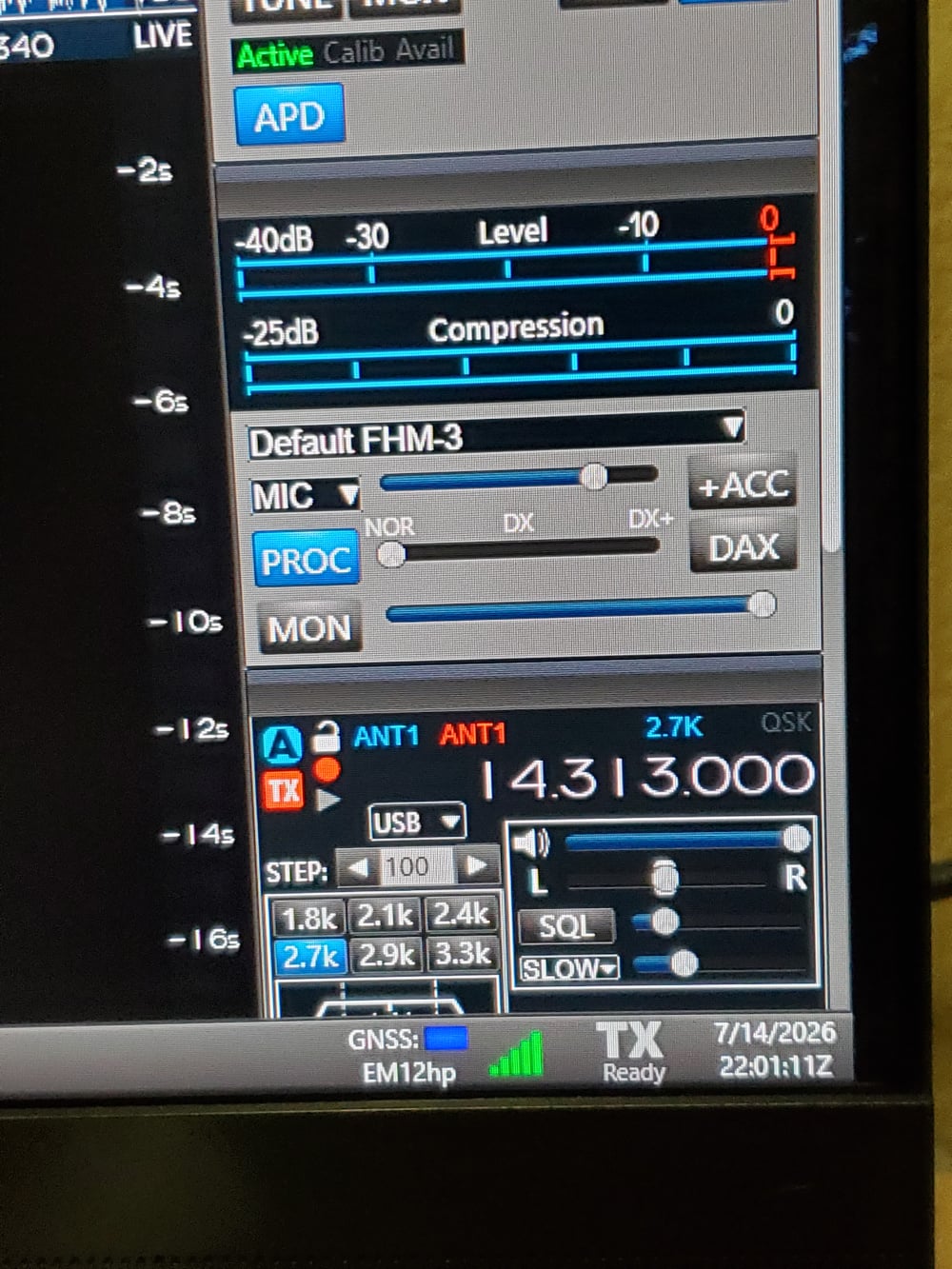
Using the FMH-3 hand microphone connected to the back of my AU-520M ( front panel disabled) I get full power output using the hand microphone. The radio is sitting on my desk just below my computer monitor. I do have Bias turned on. But, not the +20db boost.
James
WD5GWY
0 -
-
I also have a microphone connected to my computer through a external USB audio interface. When I use it, I select PC as the input source and the appropriate microphone profile from the drop down menu for my microphone.
James
WD5GWY
0 -
well, if it shows power with the Tune button, the transmitter is producing power. Its best to get the radio working with the mic connected to the radio is a first test, then set up the PC mic. When testing the FHM power out, are you using the PTT button and speaking at the same time. Just a starting point for refining the problem.
0


Leave a Comment
Categories
- All Categories
- 401 Community Topics
- 2.2K New Ideas
- 686 The Flea Market
- 8.6K Software
- 195 SmartSDR+
- 6.6K SmartSDR for Windows
- 200 SmartSDR for Maestro and M models
- 456 SmartSDR for Mac
- 278 SmartSDR for iOS
- 268 SmartSDR CAT
- 220 DAX
- 395 SmartSDR API
- 9.6K Radios and Accessories
- 102 Aurora
- 348 FLEX-8000 Signature Series
- 7.2K FLEX-6000 Signature Series
- 994 Maestro
- 58 FlexControl
- 872 FLEX Series (Legacy) Radios
- 971 Genius Products
- 481 Power Genius XL Amplifier
- 357 Tuner Genius XL
- 133 Antenna Genius
- 321 Shack Infrastructure
- 226 Networking
- 483 Remote Operation (SmartLink)
- 145 Contesting
- 845 Peripherals & Station Integration
- 147 Amateur Radio Interests
- 1.1K Third-Party Software