SmartSDR v4.2.20 | SmartSDR v4.2.20 Release Notes
SmartSDR v3.10.15 | SmartSDR v3.10.15 Release Notes
The latest 4O3A Genius Product Software:
The latest 4O3A Genius Product Software and Firmware
If you are needing assistance with FlexRadio products, please refer to the product documentation or check the Help Center for known solutions. Need technical support from FlexRadio? It's as simple as creating a HelpDesk ticket.
Control of the Ext Powered Speaker Jack

One unexpected advantage of the Flex Radio System and SmartSDR is the ability to play the audio over the External Powered speaker at the same time as I I am using the headset. Some may think this is silly but let me elaborate. My Wife has her Technicians license and loves to listen to me on the various nets I am on and even when I am just rag chewing. I on the other hand have lost a good portion of my hearing and really depend on the use of a headset to help me understand what I am hearing.
On my old FT-710 and many radios, plugging the headset into the radio jack disconnects the external speakers but on the Flex I can run both audio devices. At least until I start running my Rx through the Computer connection. When I select the PC Audio button the external speaker jack is disconnected, meaning I can only hear the audio through the computer, which works for my wired or BT headphone but means she cannot hear the audio.
Is there a way to control the signal to the Ext Powered Speaker jack so it can remain live?
Answers
-
No, you would need a splitter at the PC to have two outputs if PC Audio is selected.
I much prefer the audio directly from the radio. Is there a reason that you want audio from the PC?
0 -
What does this option do Len? It would have appeared to do what the op wanted but indeed it doesn't.
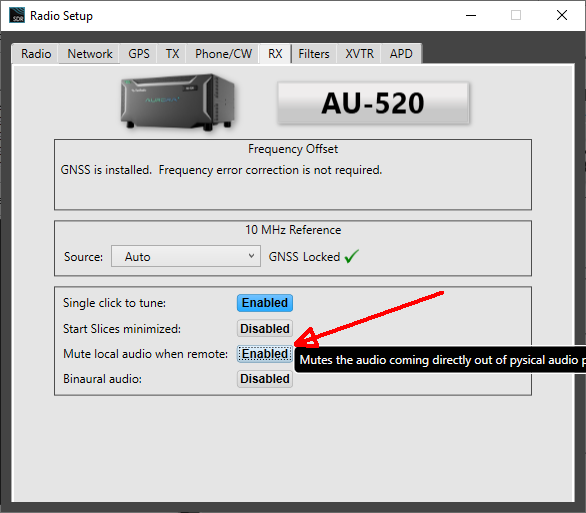
73 Martin
0 -
I tried that Martin, it had no affect on the External Power Speaker.
Len, this would allow me to use a headset connected to my computer which gives me access to the RX of the radio and allows me to output it through the speaker so my wife can listen in. Using a headset connected to my Computer allows me to also listen in to any SDR receivers I might need to use on those horrible prop nights.
0



Leave a Comment
Categories
- All Categories
- 401 Community Topics
- 2.2K New Ideas
- 685 The Flea Market
- 8.6K Software
- 194 SmartSDR+
- 6.6K SmartSDR for Windows
- 200 SmartSDR for Maestro and M models
- 456 SmartSDR for Mac
- 278 SmartSDR for iOS
- 268 SmartSDR CAT
- 220 DAX
- 395 SmartSDR API
- 9.6K Radios and Accessories
- 102 Aurora
- 347 FLEX-8000 Signature Series
- 7.2K FLEX-6000 Signature Series
- 994 Maestro
- 58 FlexControl
- 872 FLEX Series (Legacy) Radios
- 970 Genius Products
- 481 Power Genius XL Amplifier
- 357 Tuner Genius XL
- 132 Antenna Genius
- 321 Shack Infrastructure
- 226 Networking
- 482 Remote Operation (SmartLink)
- 144 Contesting
- 845 Peripherals & Station Integration
- 147 Amateur Radio Interests
- 1.1K Third-Party Software