SmartSDR v4.2.20 | SmartSDR v4.2.20 Release Notes
SmartSDR v3.10.15 | SmartSDR v3.10.15 Release Notes
The latest 4O3A Genius Product Software:
The latest 4O3A Genius Product Software and Firmware
If you are needing assistance with FlexRadio products, please refer to the product documentation or check the Help Center for known solutions. Need technical support from FlexRadio? It's as simple as creating a HelpDesk ticket.
Monitor problem

Hi,
I solved the problem of controlling the mic from the PC by using an Apollo Universal Audio SPDIF connection. The signal from the Flex is clear with very low latency, and I can use Aether Voice and plugins. The only problem is that the headphones connected to the Flex 8600M don't monitor the signal. Is there a solution to this problem? I can hear the signal with MON enabled when I connect the headphones to the PC and enable the Realtek card in playback.
Answers
-
Yes, a complete pain. Flex use two different audio paths and there is no native option to play audio to both radio headphone jack and PC at the same time.
There are solutions, but you have to be careful about latency. Some Flex users on here might have alternative answers, however what I do is this:
- Turn OFF PC Audio in SmartSDR so the radio jack stays active.
- Connect a cable from the 8600M headphone jack to Channel 1 of a small desktop audio mixer (such as a cheap Maker Hart which is about $60 and available on Amazon) .
- Connect a second cable from your PC's headphone/line-out jack to Channel 2 of the mixer.
- Plug your headphones into the mixer's output jack. You can now manually adjust the volume of both sources independently using physical knobs.
- If I choose not to use PC audio, it is ok because the headphones work. They stay working if I turn PC audio on. There is no latency that I can detect.
Before I did this I had to physically unplug the headphones from the radio and plug them into the computer.
There is also VB-Audio Voicemeeter, a free software solution. It should work, but I had problems probably of my own making. You could try it though.
0 -
Hi Eric,
Thank you very much for the advice. I hadn't considered that solution. I'll try to find a small mixer. Listening to the latency on a computer is a bit of a pain. I'm using a Uaudio X4 Thunderbolt interface. It's an advanced design, but it didn't allow the signal from the audio interface to be sent to the PC. I had to route the signal through fiber optic and use a USB/SPDIF adapter on the computer. Now the signal is clear and I can finally use AetherVoice. I don't like VoiceMeter Potato. I uninstalled it and everything works fine.Best regards,
Slawomir0 -
I will enthusiastically endorse the "Mixer" approach!
In my shack, I wall-mounted a couple of "nice" full-range JBL studio monitors (speakers). In the interest of keeping clutter to a minimum, I wished to use these speakers for everything, and not add more.
So, I got an audio mixer, and I mix two PCs, three/four radios, occasionally more stuff. I happen to choose a somewhat larger MX822, by ART (Applied Research and Technology). Each device has it's own volume control, and they can be tailored to levels I like.
https://www.sweetwater.com/store/detail/MX822--art-mx822-stereo-rackmount-mixer
This did result in quite a bit of cabling, but it's all "out the back" and out of sight 😂 I also happen to use large ferrite toroids on each, which adds to the bulk …
0 -
Hi Eric,
Thank you very much for the advice. I hadn't considered that solution. I'll try to find a small mixer. Listening to the latency on a computer is a bit of a pain. I'm using a Uaudio X4 Thunderbolt interface. It's an advanced design, but it didn't allow the signal from the audio interface to be sent to the PC. I had to route the signal through fiber optic and use a USB/SPDIF adapter on the computer. Now the signal is clear and I can finally use AetherVoice. I don't like VoiceMeter Potato. I uninstalled it and everything works fine.Best regards,
Slawomir0 -
Hi Eric,
Today, I received my new Behringer Flow 8 digital mixer. I connected the cables to the Flex 8600's headphone output, connected speakers to the mixer's input, and headphones to the mixer's output. The input and output levels are adjustable. I can hear the radio's frequency response. But I can't hear my own signal when I turn on the monitor. When I connect headphones to the Flex's output, I can hear the monitor's signal. Any ideas what might be wrong?
0 -
Good question. I do not know. Does your computer have a dedicated headphone output jack as well as speakers out jack? If so, change to the headphone jack. I am guessing so don't blame me if nothing changes. I am wondering if there is an impedance mis-match. My headphones do work if I use a cable from speaker out to the mixer (instead of headphone out to mixer) but the level is very low.
Also check your PC audio settings / levels.
But if this is not the reason, say so and hopefully someone will provide the answer.
0 -
Eric, I'm currently trying to get a signal from the 8600 output, not the computer. This is a simple connection: Flex8600 output - Input mixer, with headphones or speakers connected to the mixer. Once I get a monitor signal through the headphones, I'll proceed with the PC connection.
0 -
Oh I see, I understand now. So there is a signal out from the radio but not the monitor signal. In the CW sub panel, do you have Sidetone enabled?
0 -
If I have headphones plugged into the radio, I have a monitor. I connect a cable from the same jack to the mixer and hear the band signals through the headphones. But when I turn on the PTT and speak into the microphone, I can't hear my modulation. Everything else works fine.
0 -
If I have headphones plugged into the radio, I have a monitor. I connect a cable from the same jack to the mixer and hear the band signals through the headphones. But when I turn on the PTT and speak into the microphone, I can't hear my modulation. Everything else works fine.
0 -
The side tone in CW is on. I can't hear it either.
-1 -
If your cabling is correct I would suspect a AetherSDR problem. I would submit an issue with a settings bundle, description of hardware and cable layout. The developers are really helpful.
0 -
But I'm trying it in SmartSDR first. I don't know why headphones connected to the Flex8600's headphone jack receive my signal from the monitor, but after passing through the monitor, it disappears, although I can hear the band through the same jack.
0 -
Volume level? Mixer problem? What else can there be?
0 -
I have no idea. The Miher is transmitting the signal correctly because I can hear the receiver's frequency response. I noticed that in the new SSDR 4.2.20 version, the monitor doesn't work on the Flex-8600's speaker output. That's good because there's no feedback if the speakers are driven at high levels. Now I've connected the headphones directly to the Flex-8600M and the monitor works. Maybe I can solve this mystery?
0 -
Just for you, I changed to SmartSDR with my Maker Hart mixer. All works well.
I am really lost now but have you downloaded the FLOW app? Turn on the mixer's bluetooth and pair the app. Activate the EZ-GAIN function. If there is any detected monitor/sidetone signal, it should add gain so you can hear it. I do not have this mixer so I cannot be sure this is valid. Worth a try?
0 -
I have no idea. The Miher is transmitting the signal correctly because I can hear the receiver's frequency response. I noticed that in the new SSDR 4.2.20 version, the monitor doesn't work on the Flex-8600's speaker output. That's good because there's no feedback if the speakers are driven at high levels. Now I've connected the headphones directly to the Flex-8600M and the monitor works. Maybe I can solve this mystery?
0 -
There's no FLOW app for Windows. I have Bluetooth on my PC, but it's under my desk, and I can't pair it with the mixer. The problem is probably solvable. I posted about this on the FLEX 8600 and SDR group. Maybe someone will have an idea. I see the analog mixer works fine. Could you tell me what inputs and outputs you have on your mixer? Maybe I need to configure something in the audio properties in Win10? I configured WSJTX yesterday and want to work on it a bit. Thanks, Eric, for your support. We'll be in touch.
0 -
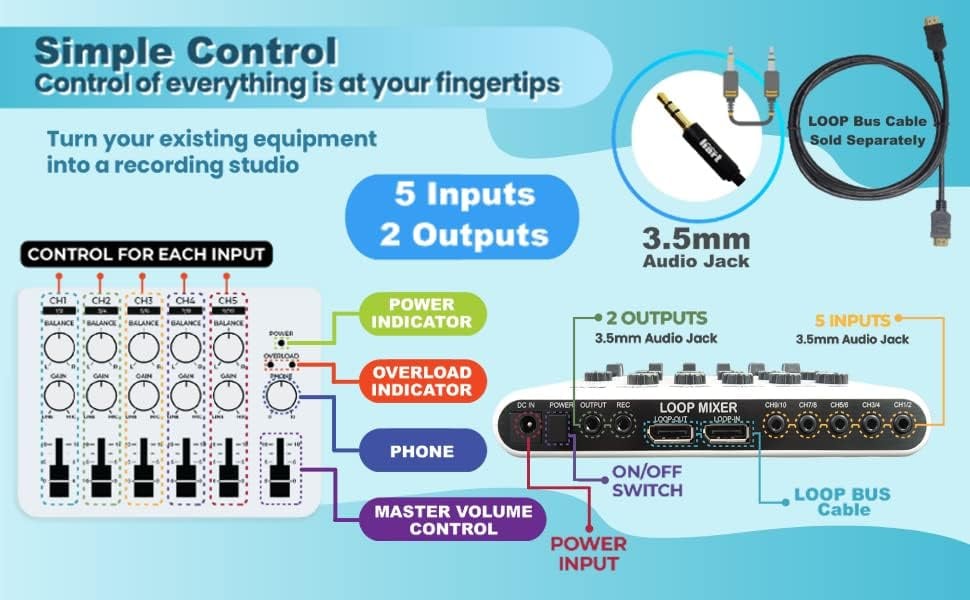
The Maker Hart is probably very much like yours, though it is only a cheap mixer.
I did advise to check PC audio settings / levels. But I do not know if that will solve it.
I know nothing about the FLOW app but a friend told me it works in Windows. https://github.com/abelroes/flow-8-midi/releases/download/v1.1.0/flow-8-midi-windows-x86_64.zip
I don't know if what he says is true or not. Sorry if I misled you.
0 -
There's no FLOW app for Windows. I have Bluetooth on my PC, but it's under my desk, and I can't pair it with the mixer. The problem is probably solvable. I posted about this on the FLEX 8600 and SDR group. Maybe someone will have an idea. I see the analog mixer works fine. Could you tell me what inputs and outputs you have on your mixer? Maybe I need to configure something in the audio properties in Win10? I configured WSJTX yesterday and want to work on it a bit. Thanks, Eric, for your support. We'll be in touch.
0 -
Eric,
I found this app, but it doesn't work for me and there was no connection to Flow 8. The mixer works without the app. It has a VU meter, and I can hear the station's performance on the band through headphones or an external speaker. Both the input and output levels are adjustable. I connected the input signal to mono jack sockets and the same to stereo. Output S is two XLR sockets in the main path and two jack sockets for monitors. All the changes haven't resolved the issue.
I'll keep working on it. It has to work.
Regards,
Slawomir0 -
Eric, One more important thing: The Flex has two audio outputs: one for headphones and one for speakers. Do you connect two cables from these outputs to the mixer, or just the headphone output?
0 -
I only connected the headphone output. See my answer of 11 June. I do not know enough to say that is the correct way, only that for me this is what works.
0 -
I need to replace this mixer with a simple analog one. What input and output jacks are you using on your mixer?
0 -
As per my previous answer: input on channels 1 and 2 and output on the mixer's output jack.
0 -
As I run a phone patch my audio path is a little more complicated than most. When I got my mixer, I put all my parameters (flex 6600, mixer name, phone patch connection details) and a description of what I wanted to accomplish into claude.ai (any AI engine will work) and asked it to figure it out. I got a complete wiring diagram and instructions on how to best use it. When something doesn't work the way I expected it's quick and easy to ask for an explanation or revision. Remember to question anything that doesn't sound right because AI isn't foolproof. It's common to get a reply of "you're right. sorry, i should have remembered that", etc.
0




Leave a Comment
Categories
- All Categories
- 401 Community Topics
- 2.2K New Ideas
- 685 The Flea Market
- 8.6K Software
- 194 SmartSDR+
- 6.6K SmartSDR for Windows
- 200 SmartSDR for Maestro and M models
- 456 SmartSDR for Mac
- 278 SmartSDR for iOS
- 268 SmartSDR CAT
- 220 DAX
- 395 SmartSDR API
- 9.6K Radios and Accessories
- 102 Aurora
- 347 FLEX-8000 Signature Series
- 7.2K FLEX-6000 Signature Series
- 994 Maestro
- 58 FlexControl
- 872 FLEX Series (Legacy) Radios
- 970 Genius Products
- 481 Power Genius XL Amplifier
- 357 Tuner Genius XL
- 132 Antenna Genius
- 321 Shack Infrastructure
- 226 Networking
- 482 Remote Operation (SmartLink)
- 144 Contesting
- 845 Peripherals & Station Integration
- 147 Amateur Radio Interests
- 1.1K Third-Party Software