SmartSDR v4.2.20 | SmartSDR v4.2.20 Release Notes
SmartSDR v3.10.15 | SmartSDR v3.10.15 Release Notes
The latest 4O3A Genius Product Software:
The latest 4O3A Genius Product Software and Firmware
If you are needing assistance with FlexRadio products, please refer to the product documentation or check the Help Center for known solutions. Need technical support from FlexRadio? It's as simple as creating a HelpDesk ticket.
Computer sound cards and RAM

I have two Laptop Computers Laptop 1 was a Windows 7 machine that I upgraded to Windows 10, it cannot be upgraded to Windows 11. Laptop 2 was a Windows 10 machine that has been updated to Windows 11.
Laptop 1 has been my go to computer with my new Flex 8400, I like using the laptop headphone jack for connecting my headset and also the BT dongle for freedom from wires. While that started out working great I have noticed that after only a few minute of use my TX as heard on a local Kiwi SDR is garbled and not readable. I have had this same issue with two Gaming type headsets. My first thoughts were the weak sound card built into my laptop. This laptop is about 8 years old.
I decided to try an experiment and loaded SSDR onto laptop 2, which is a newer laptop with Windows 11 and possible a better built in sound card. I did so using the BT headset and was able to work a full net with reports from others that they noticed no difference from me using the hand mic that came with my Flex. I did notice that when laptop 2 was accessing other files or something in the browser that the RX on the Flex was choppy with hesitation, almost like a choppy lag.
I do know that while Laptop 1 has 16 GB of Ram, Laptop 2 only has 8 GB of Ram. Neither are big power houses but I expect more Ram would help Laptop 2 with the rough audio.
My plan is to upgrade laptop 2 with a 1TB SSD, and 32GB of Ram, and turn it into my primary computer.
Does this sound like a good path moving forward and do my conclusions make sense?
Comments
-
That may or may not be a good conclusion. Often, performance is more impacted by network robustness than by compute power. Try plugging your laptop directly into the radio using an Ethernet cable. Both the radio and computer will need to be restarted.
If that solves the issue, then you know that you have network issues to deal with. If it does not help, then there is a good chance that more memory will make it better.
Also try without BlueTooth to see if that smooths things out. I have not had great luck with BT devices, so I tend to just use wired audio equipment.
How many cores and processors do your laptops have? Go to Windows Task Manager and select the performance tab. The lower right-hand section should have this info:
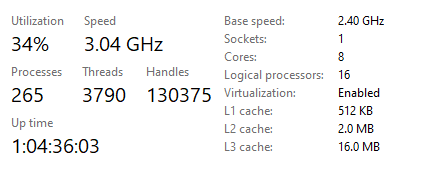
Mine is a core i9 with 32 GB of RAM. The 16 logical processors ensure that I don't run out of compute power for everything that I like to run. Note that SmartSDR itself does not take a lot of power, it is all the other things like Skimmers, digital programs, etc. that require the computing oomph.
0 -
I did look for a comparison and found this, the i7 is the older and the i5 is the newer, but I will try plugging into the headphone port to see if the lag is still there, good idea
See Below


The Intel Core i5-8265U significantly outperforms the older Core i7-5600U.
Released three years later, the i5 features 4 cores and 8 threads
compared to the i7's 2 cores and 4 threads. This gives the i5 roughly
double the multi-core processing power, making it noticeably faster and
more capable for modern multitasking. Key ComparisonsFeature
Intel Core i7-5600U
Intel Core i5-8265U
Release Year
2015
2018
Cores / Threads
2 Cores / 4 Threads
4 Cores / 8 Threads
Base Clock
2.60 GHz
1.60 GHz
Boost Clock
Up to 3.20 GHz
Up to 3.90 GHz
0 -
Do you have any other software running? I didn't use your particular mike setup but with an equivalent W7 laptop, all was OK. as I added other software, I moved to a small NUC (mini) just for the flex and other pc for the additional software. With all on the same network, interconnect was pretty easy.
0



Leave a Comment
Categories
- All Categories
- 401 Community Topics
- 2.2K New Ideas
- 691 The Flea Market
- 8.6K Software
- 197 SmartSDR+
- 6.6K SmartSDR for Windows
- 200 SmartSDR for Maestro and M models
- 462 SmartSDR for Mac
- 280 SmartSDR for iOS
- 268 SmartSDR CAT
- 220 DAX
- 395 SmartSDR API
- 9.6K Radios and Accessories
- 114 Aurora
- 352 FLEX-8000 Signature Series
- 7.2K FLEX-6000 Signature Series
- 999 Maestro
- 58 FlexControl
- 872 FLEX Series (Legacy) Radios
- 980 Genius Products
- 485 Power Genius XL Amplifier
- 359 Tuner Genius XL
- 136 Antenna Genius
- 323 Shack Infrastructure
- 228 Networking
- 485 Remote Operation (SmartLink)
- 147 Contesting
- 847 Peripherals & Station Integration
- 148 Amateur Radio Interests
- 1.1K Third-Party Software