SmartSDR v4.2.20 | SmartSDR v4.2.20 Release Notes
SmartSDR v3.10.15 | SmartSDR v3.10.15 Release Notes
The latest 4O3A Genius Product Software:
The latest 4O3A Genius Product Software and Firmware
If you are needing assistance with FlexRadio products, please refer to the product documentation or check the Help Center for known solutions. Need technical support from FlexRadio? It's as simple as creating a HelpDesk ticket.
Dual Mechanical Lightning Disconnect

I was recently at a Hamfest and saw a new product that physically separates the coax cables going into and out of a Flex transceiver. I have seen other "protector" products that use relays with minimal separation between contacts. They don't offer the isolation that this one does. The alignment of the mechanical movement was very precise.
Here is the weblink and video:
73,
Bill, NE1B
Comments
-
 Mike-VA3MW Administrator, FlexRadio Employee, Community Manager, Super Elmer, Moderator adminOptions
This is the one I use.
You will notice that the case is plastic. Also when the cables pull apart, the grounds are seperated. For proper installation, you need 2 different ground straps connected to the same grounding point.
When I talked to the author of this device last summer in Huntsville, he had had built over 300 of them and had first hand knowledge of several direct strike saves.
This is very inexpensive insurance.
Mike va3mw
0 -
I built this. Disconnect with 8 N connectors and one rotator connector. Provides 7" air gap. Designed and built the controller, wrote the firmware, and a server app running on a RPi that provides a web page for remote operation and real time streaming switch position updates.
1 -
What protection does a gap of a few inches afford if lightning has taversed thousands of feet already?
I must be missing something.
Thanks…
-1 -
Geoff wrote:
“What protection does a gap of a few inches afford if lightning has taversed thousands of feet already? “
I saw a design idea that included a metal plate that moved into the space between the connectors automatically as they separated. The plate was grounded. The plate is intended to intercept any arcs and ground them to prevent any surges from getting to the coax going into the station.Seems like this would potentially address the concern……thoughts?
Al / NN4ZZ0 -
I suppose some actual testing would be in order. Pretty dificult to simulate…
But, perhaps someone has done that previously.
0 -
Mike-VA3MW Administrator, FlexRadio Employee, Community Manager, Super Elmer, Moderator adminOptions
I think there are many ways to build a better mouse trap. However, this is available today which is better than not having it at all. :)
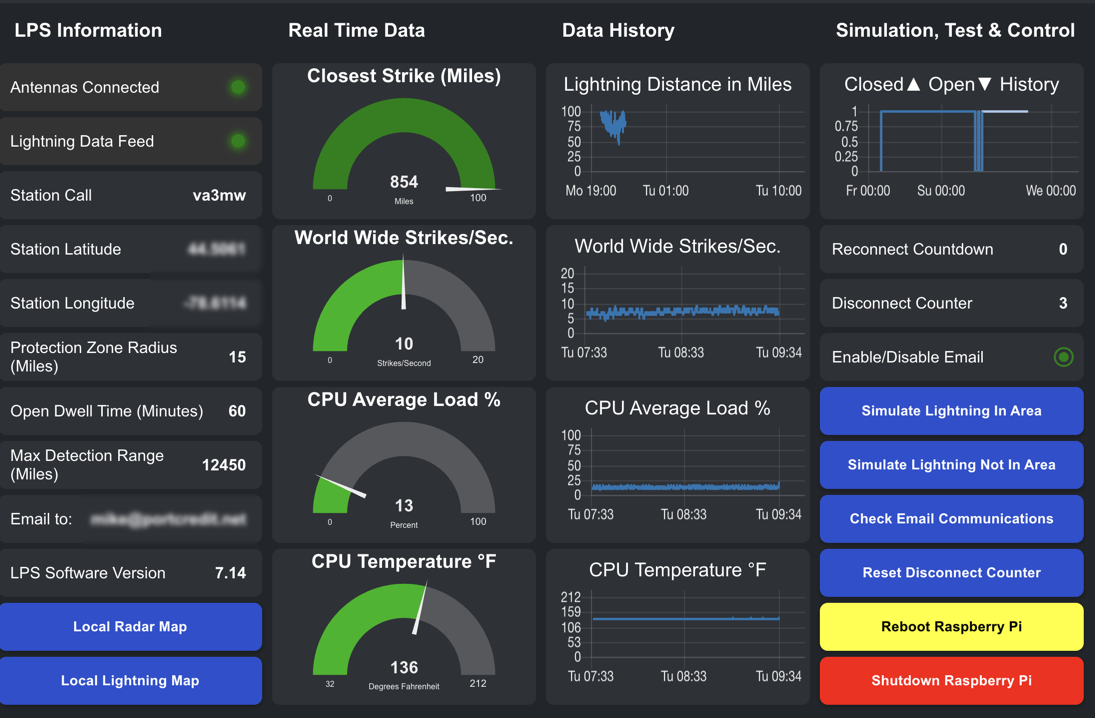
It was cool to see that while I was away for a week at Dayton, that the automation kicked in 3 times. Since we needed all the radios for remote Hamvention demonstrations, I had to leave them connected.
 0
0 -
Barring spending thousands upon thousands of dollars on lightning protection, there is probably nothing available that is going to protect our Radio equipment from a direct strike. The Lightning protection employed for most amateur radio stations is there to protect you from a near strike.
I also have an antenna disconnect and its purpose is to take care of those near strikes sending the excess current straight to ground, and the lighting is going to want to go to ground as that should be the path of least resistance.
The purpose of grounding everything in your shack and bonding your grounds together is so that the current/voltages rises and falls together within your equipment during a near strike. It is the wild variances in voltage and current that do the most damage. Read "Grounding and Bonding for the Radio Amateur" Wade Silver, ARRL.
0 -
Mike-VA3MW Administrator, FlexRadio Employee, Community Manager, Super Elmer, Moderator adminOptions
Yes, true, and that's exactly why a layered approach matters so much. Doing nothing is absolutely the worst thing you can do. This solution does help, and the builder of the devices knows personally of 5 stations that were saved by it where the energy/damage did NOT enter the radio via the feedline.
The reality is that lightning protection isn't a single product or a single decision. You have many tools in your quiver: a proper single-point ground entry panel, gas discharge tubes and MOV-based surge arrestors on every feedline, an antenna disconnect (shorting stub or knife switch) that diverts excess current directly to ground, bonding all your equipment grounds together so voltages rise and fall together rather than creating destructive differentials across your gear, whole-house surge suppression at the panel, and individual point-of-use protection on AC lines, ethernet, and rotor cables. Each layer handles something the others can't.
Yes, there was still damage to items connected via LAN cables (like switches) and things tied to AC power in the affected stations, which is exactly the point. The feedline protection did its job. The energy found other paths. That's why you protect ALL the entry points, not just the antenna.
No single solution stops everything short of a direct strike, but the more layers you add, the less catastrophic the outcome.
0





Leave a Comment
Categories
- All Categories
- 401 Community Topics
- 2.2K New Ideas
- 691 The Flea Market
- 8.6K Software
- 197 SmartSDR+
- 6.6K SmartSDR for Windows
- 200 SmartSDR for Maestro and M models
- 462 SmartSDR for Mac
- 280 SmartSDR for iOS
- 268 SmartSDR CAT
- 220 DAX
- 395 SmartSDR API
- 9.6K Radios and Accessories
- 114 Aurora
- 352 FLEX-8000 Signature Series
- 7.2K FLEX-6000 Signature Series
- 999 Maestro
- 58 FlexControl
- 872 FLEX Series (Legacy) Radios
- 979 Genius Products
- 485 Power Genius XL Amplifier
- 358 Tuner Genius XL
- 136 Antenna Genius
- 323 Shack Infrastructure
- 228 Networking
- 485 Remote Operation (SmartLink)
- 147 Contesting
- 847 Peripherals & Station Integration
- 148 Amateur Radio Interests
- 1.1K Third-Party Software