SmartSDR v4.2.18 | SmartSDR v4.2.18 Release Notes
SmartSDR v3.10.15 | SmartSDR v3.10.15 Release Notes
The latest 4O3A Genius Product Software:
The latest 4O3A Genius Product Software and Firmware
If you are needing assistance with FlexRadio products, please refer to the product documentation or check the Help Center for known solutions. Need technical support from FlexRadio? It's as simple as creating a HelpDesk ticket.
SmartSDR v4.2 - New features
Comments
-
As long as people actually read the release notes, etc. It shouldn't be. :)
A HUGE amount of our support cases are for items that were previously published but the person never took a moment to review the notes. It is very typical of the way the world is today and why so many things are kept at the KISS level.
1 -
I got my -60 dB RF sampler from CleanRF.com today.
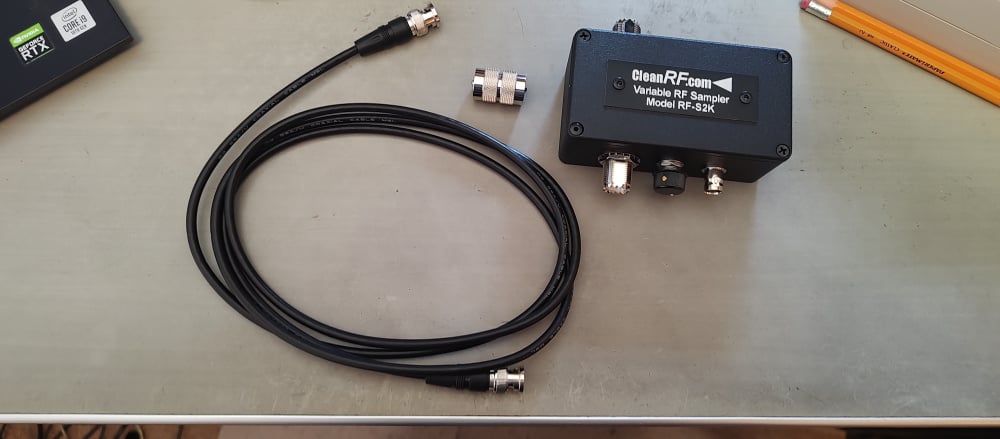
I ordered it on Thursday afternoon and it got here today (Monday).
I have it all hooked up to my KPA 500 amp and the tap to RXA. I put the rig in FDX and looked at my sig on RXA in a separate panadapter. It all looks great, so now I am ready for 4.2.18 to try the new APD (external) version.
1 -
Mike, how often does that happen? Let us know how your day goes tomorrow.
James
WD5GWY
0 -
From Tim's comment on removing old versions on the Maestro, I have this question. This weekend I want to operate the New England QSO party contest. I will use a remote 8600 running 4.1.5.
If I update my home 8600 to 4.2.18 and use the Maestro with the home Flex, will that cause the old versions on the Maestro to be deleted so that I can't use the Maestro with the remote 8600 on 4.1.5?
73 de K1ESE
John
0 -
So I'm a little unclear. how do we uninstall things on the 8400M? Or do we have too? Will it be as usual where it shows up in the startup, and select the update and the update will remove and install the 4.2??
Jeff
0 -
Only uninstall SmartSDR in Windows. The radio and M panel updates are as usual. This document covers everything.
https://helpdesk.flexradio.com/hc/en-us/articles/49065021252635-How-to-Install-SmartSDR-v4-2-18
Specific M version information is at the bottom.
0 -
OK, so I'm reading that the windows software for 4.2 must be installed first, then it lets me know to update the radio. seems backwards then before. When I started the 8400M this morning it didn't show me the update available like it did before. That's what made things unclear. I did read the instructions at the very bottom. Yup clear as mud.. Ok more coffee!!
0 -
"Great news! There is actually no required order when it comes to updating your FLEX-8400M, so if updating from the front panel first feels more natural to you, that is absolutely the way to go. You are not doing anything wrong by starting there!
If you are not seeing the update appear, don't worry. It simply means it has not been published to the Maestro Servers just yet, so it should show up for you soon once it has been pushed out.
That is exactly why we have the FlexRadio Community! Whenever things are not as clear as we would like, this is the perfect place to come and get your questions answered. Our Elmers are here and always happy to help clarify any concerns and point you in the right direction."
0 -
Your 8400M will show the update in the version chooser once 4.2 is released. That is today, presumably soon after the Flex offices open.
Once there is a new release, follow the document explicitly from start to finish. The mud will clear away, allowing comprehension to shine through.
0 -
So far no notice that 4.2 is even available. Ive already removed Smartsdr 4.15. When i clicked on the Smartsdr 4.2 site link for download that was on the instruction page, it said Oops page not found..
0 -
As advertised … not until 9am CT.
0 -
Not sure where that happened, But thank you!! 👍️
0 -
I don't see any comments about the CW, all comments seem to be about DAX or APD or remote.
I just hope the slurred dots and the TX delay problems have been mitigated. If there are any CW ops among us, please support the request for user adjustable CW parameters too. We could definitely use some input there!
Hope you are with us CW guys Hayley!"!!!!!!!
73 de Roger, G3LDI
1 -
Available now
Installation was straightforward.
0 -
Just finished the update to my Flex 6600 and was a seamless process.0
-
All seems well. Just need to see what activated with SSDR + 60m seems to be acting as I thought it should. I'm a 60m DXer W/ Dedicated 60m antenna. Looking forward to checking out everything on all the channels. DD
1 -
Many thanks to the people at Flex Radio. I have the new version, 4.2.18 installed and up and running on my now 12/3 y/o Flex 6300. So far all is looking well.0
-
Mike— I assume full multi operator contest capability is now available since this SmartSDR release now includes ARM support. I log in remotely from my MAC M2 or M4 using Parallels with Windows 11. Is my assumption correct?
Thanks Ed
N4OC
0 -
If you are talking about MultiFlex, there is no change at all. You can use any 2 clients you wish from multiple different platforms. If you need SmartSDR to run on an ARM device, you can now do that.
0 -
Just installed v4.2.18. Pretty simple!
I uninstalled v3.x first but forgot to uninstall v4.1.5 before installing v4.2.18. When opening WSJX I did have all the DAX drivers show up. After then removing v4.1.5 all the old DAX end points were gone.
A note for DX Labs Suite users…Launcher needs to be told where the new v4.2.18 application .exe file resides and it has changed from previous versions. Previously it was located at Program Files\FlexRadio Systems\SmartSDR vX.X.X. It is now at an upper level, one step up, at Program Files\SmartSDR v4.2.18.Tom W4IEE
0 -
thanks Mike—
0 -
Version 4.2.18 with the DAX V2 redesign has completely resolved Amplitude Stuttering on FT8 transmissions. :-) And Windows 11 Memory Integrity setting is finally turned back ON, and everything is working fine.
Cheers,
Neal
1 -
Is anyone noticing SliceMaster seems to be having issues launching any program with 4.2? SliceMaster keeps displaying "Audio Channel is not Enabled in DAX control panel. DAX =1, Slice='A'. Otherwise, all third party programs seem to be running properly when launched individually.
I'm beginning to think I'll have to let go of SliceMaster finally.0 -
He descargado la nueva versión sin problemas pero no puedo acceder a los filtros nuevos.
Cual es el motivo ?
0 -
Parece que estás intentando usar funciones con licencia sin tenerla. Este video (https://www.youtube.com/watch?v=snIF43pJOOU) lo explica (en inglés). Si tienes alguna pregunta o duda sobre las nuevas funciones, no dudes en contactarnos.
(Traducido con ayuda de Google)
0 -
Gracias Eric.
Se supone que tengo licencia hasta Julio de 2026.
Es por eso que me extraña no poder acceder a las nuevas funciones.
0 -
Some answers to questions I saw in this thread:
| Will this eliminate the need to turn off Core Isolation in Win 11 settings?
Yes! DAX v2 (released with SmartSDR v4.2+) no longer requires Core Isolation to be turned off to run.
| Will we be able to import 4.1.5 profiles directly into 4.2?
Yes. Moving profiles forward is almost always a slam dunk. Moving the other way (trying to import v4.2+ profiles on v4.1 and earlier) will likely result in database issues. Similarly, if you downgrade the radio, please make sure to factory reset the radio as the internal database handles upgrades, but not downgrades.
| Has the new 60 meters allocation been added? How will the new 60M turf files affect the MARS program ?
Yes, we support the new 60m allocation. This support does not negatively with MARS as far as I know (I haven't tested that myself). Your frequency privileges are set by your region and options (like MARS). They are designed to work together. If you do experience a problem, please let us know, but I wouldn't expect an issue here.
| Where are the missing adjustment sliders for the DSP functions and improvements to the DSP functions?
We heard loud and clear that these were needed. They didn't make it into this release, but this is being worked on. Stay tuned.
| When will we see some new features that might make having the Plus/Early Access license worth paying for?
There are new features added in each Early Access release. Whether these are "worth paying for" is really up to our customers. We are obviously motivated to provide updates that are compelling or folks won't buy a SmartSDR+ license. Many of the options we have added come directly from the input we have received here on the community. Keep sending in your ideas and feedback.
| Where is it possible to download 4.2?
You can always find the latest Windows software on our website here: For Maestro or M models, the presence of a new version should prompt you the next time you boot up the device giving you the option to update directly from the display.
| Will I need to pony up some bucks for me to take advantage of APD with the PGXL looped in?
No! APD is included in SmartSDR v4.2 Basic. No license required. It does require an 8000 or Aurora series radio though.
| How are the custom RX filters persisted?
Today they are included in the preferences. We are considering whether to make a separate filter profile though. If you have specific thoughts on how that should work, please feel free to open an idea post.
| When will the "box" that switches between RX antennas and ADP outputs be available?
I don't have any new information on when this will be available or how it will be configured. I know it is being worked on and that's about all the info I have. I'm sure we will share more when we have additional info available.
| How is APD used on an 8600 if the RXA and RXB ports are utilized by dedicated RX antennas?
Note that you have 4 options on an 8600 for the APD input (RX A, RX B, XVTA, or XVTB).
| Tim recommends deleting all prior SmartSDR versions to remove all the old drivers, so how do we update the Maestro?
No need to worry about Maestro. Just the older versions of SmartSDR (and FlexVSP) as these are the ones with older drivers that could confuse things.
| If you upgrade to the free 4.2 version but later want the 4.1.5 premium features how do you upgrade?
You can buy a SmartSDR+ license at any time. When you do, you get all of the premium features up to that point PLUS everything that comes out for the next year. And all of that stays with the radio even if you never buy the SmartSDR+ license again. For more info, see
| What will will happen when APD is expecting a -60db sample and that input drops to -90db when the amplifier is in standby or off?
There's a fair amount of dynamic range in our receivers, so it may work out OK. I have at least one report from our Alpha team where this worked fine - anecdotal, but reassuring.
| Does the APD switch automatically to the Internal sampler?
No. You select whether you want to use one of the antenna inputs or the Internal sampler using the new software interface.
| It would be nice to be able to enable/disable APD and set Inernal/External APD based on transmit profiles Eg. "AMP ON" (external PTT enabled and RXA APD enabled), "BAREFOOT" (external PTT disabled and INTERNAL APD enabled).
This is a good idea and something we are considering. Thanks for sharing that.
| Do you have to uninstall v4.1?
No. But it's recommended to remove all previous versions in order not to confuse yourself with all of the DAX audio devices.
| If I update my home 8600 to 4.2.18 and use the Maestro with the home Flex, will that cause the old versions on the Maestro to be deleted so that I can't use the Maestro with the remote 8600 on 4.1.5?
No, you can go back and forth. HOWEVER, anytime you downgrade, you need to perform a factory reset because the database does not migrate backwards and you can end up confusing the database. What I would recommend for your situation is to wait to update until after the contest. Then backup your settings (because everyone does this, because everyone reads the release notes… ;) ). Then, update to v4.2. If you do end up having to go back to v4.1 for some reason, you should factory reset, but you can import your v4.1 backup files and not be too far from where you want to be.
| How do we uninstall things on the 8400M? Or do we have too?
Don't worry about the version cleanup on the M models (or Maestro). We handle that for you.
1 -
Gracias Eric.
Se supone que tengo licencia hasta Julio de 2026.
Es por eso que me extraña no poder acceder a las nuevas funciones.
Le recomiendo que abra un ticket de soporte en helpdesk.flexradio.com. Le ayudaremos a resolverlo.
0 -
Were did the RX band with go i can only go 3.3K wide why is that.
Thanks 73's KD8NNI Mike
0 -
Hopefully, whatever SmartSDR they release at the end of the month will fix the APF BEEPING all the time.
Also, for Basic SSDR users, add 1 fixed CW filter wider than 800Hz. This is not a new feature, but one that was taken away. There used to be a 3.0 Khz CW filter available. As is, 800 Hz is just to narrow for scanning the bands.
Dennis
WB8DD0











Leave a Comment
Categories
- All Categories
- 394 Community Topics
- 2.2K New Ideas
- 670 The Flea Market
- 8.5K Software
- 177 SmartSDR+
- 6.5K SmartSDR for Windows
- 191 SmartSDR for Maestro and M models
- 453 SmartSDR for Mac
- 276 SmartSDR for iOS
- 267 SmartSDR CAT
- 216 DAX
- 389 SmartSDR API
- 9.5K Radios and Accessories
- 80 Aurora
- 322 FLEX-8000 Signature Series
- 7.2K FLEX-6000 Signature Series
- 982 Maestro
- 58 FlexControl
- 869 FLEX Series (Legacy) Radios
- 954 Genius Products
- 474 Power Genius XL Amplifier
- 350 Tuner Genius XL
- 130 Antenna Genius
- 312 Shack Infrastructure
- 218 Networking
- 475 Remote Operation (SmartLink)
- 143 Contesting
- 835 Peripherals & Station Integration
- 146 Amateur Radio Interests
- 1.1K Third-Party Software