SmartSDR v4.2.20 | SmartSDR v4.2.20 Release Notes
SmartSDR v3.10.15 | SmartSDR v3.10.15 Release Notes
The latest 4O3A Genius Product Software:
The latest 4O3A Genius Product Software and Firmware
If you are needing assistance with FlexRadio products, please refer to the product documentation or check the Help Center for known solutions. Need technical support from FlexRadio? It's as simple as creating a HelpDesk ticket.
Version 4.2.18 Successful Install

I just installed V 4.2.18 on my Windows 10 laptop. The installation was easy and went perfectly.
In the very limited testing that I have done, everything seems to be working great except for the offset in the digital modes. There used to be a 1500 Hz offset default when in DIGU. The option for the offset is either gone, or I can't find it. The result is that the VARAHF modem is listening 1500 Hz low, and obviously, won't decode anything.

I can zoom way in and drag the filter skirts to 1200 Hz and 1800 Hz and get back to OK, but this is an awkward work-around.

Other things successfully (but not extensively) tested so far:
TeensyMaestro
FlexRepeaterSpots
Flexicraft Utility
Flex User Monitor
Antenna Genius Utility
RimuSDR (Windows version)
ACLOG (N3FJP)
FRStack4
SDC (including SDC Skimmer)
POTACAT
Comments
-
Len,
Have you rebooted your radio since the upgrade? My offset is there for Digital ..
0 -
Hi Dudley, yes, I sure did. I will do another reboot and see if that helps.
0 -
Hi Dudley, I did another cold reboot, and the behavior is the same - no digital offset, and I don't see a way to set it.
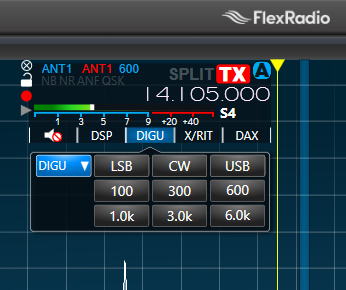
Is the offset now part of SmartSDR+? If you right-click one of the filter settings, do you have the option to set the offset there?
0 -
Hi Len,
Well the digital offset is still availble in the Maestro:
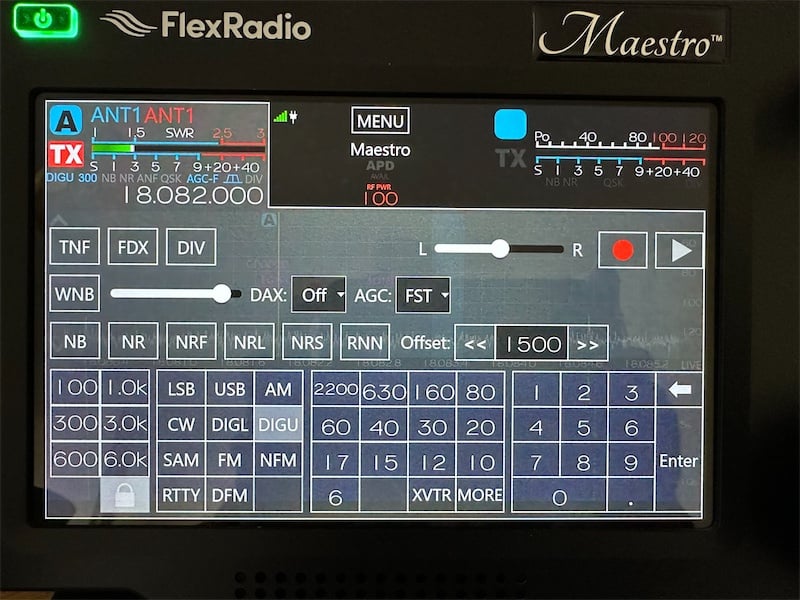
But I can't find it in SmartSDR for Windows, only the RTTY offset. I wonder if anyone else can find it? I hope this isn't another example of Flex accidentally losing controls again 😀
I think the problem you are seeing is that the new filter presets are wrong for DIGU (and probably DIGL), so if I click 300Hz bandwidth it centres it at 150Hz instead of at 1500Hz. But on the Maestro I can then tap the offset up and down to recenter it.
I guess people with early access should be able to correct the bug themselves.
73, Jonathan
0 -
Hi Jonathan, I suppose it is not actually needed if you can easily set the high and low cut filter frequencies by mode. I will give that a shot once the 30 day SmartSDR+ waiting period is over.
For now, I may just leave it at 3.0k which will center it properly without having to mess with the high and low cut values.
0 -
Hi Len, yes leaving it at 3k is a good workaround. So far, 4.2.18 is looking good for everything else I've tested, its working well with SDC Contest in CW and PSK/RTTY modes and RimuSDR on Linux.
Edited to add: the missing digital offset control is still present in SmartSDR for MacOS and RimuSDR for Linux and it works in both those as expected (and also chosing a DIGU filter of <3k correctly centers the passband around the offset). So it looks like its just a SmartSDR for Windows issue and the radio firmware is fine.
73, Jonathan
0 -
So the new DAX V2 is working ok on Windows 10? I was hoping someone would test this out for us. Flex wouldn't answer the question directly. :-)
0 -
It appears to be working fine. I have tried SDC Skimmer, VARA HF and WSJT-X. They all work fine. I did have to reselect the RX and TX audio, as they have changed names under 4.2.18.
1 -
I had an issue where additional panadapters on my 8600 occasionally came up with no panadapter or waterfall data, just audio. I did a factory reset, and that seems to have fixed it.
0



Leave a Comment
Categories
- All Categories
- 401 Community Topics
- 2.2K New Ideas
- 689 The Flea Market
- 8.6K Software
- 196 SmartSDR+
- 6.6K SmartSDR for Windows
- 200 SmartSDR for Maestro and M models
- 460 SmartSDR for Mac
- 279 SmartSDR for iOS
- 268 SmartSDR CAT
- 220 DAX
- 395 SmartSDR API
- 9.6K Radios and Accessories
- 109 Aurora
- 348 FLEX-8000 Signature Series
- 7.2K FLEX-6000 Signature Series
- 999 Maestro
- 58 FlexControl
- 872 FLEX Series (Legacy) Radios
- 975 Genius Products
- 482 Power Genius XL Amplifier
- 358 Tuner Genius XL
- 135 Antenna Genius
- 321 Shack Infrastructure
- 226 Networking
- 483 Remote Operation (SmartLink)
- 145 Contesting
- 847 Peripherals & Station Integration
- 147 Amateur Radio Interests
- 1.1K Third-Party Software