SmartSDR v4.1.5 | SmartSDR v4.1.5 Release Notes
SmartSDR v3.10.15 | SmartSDR v3.10.15 Release Notes
The latest 4O3A Genius Product Software:
The latest 4O3A Genius Product Software and Firmware
If you are needing assistance with FlexRadio products, please refer to the product documentation or check the Help Center for known solutions. Need technical support from FlexRadio? It's as simple as creating a HelpDesk ticket.
Time problem since the start of BST Uk

Then came BST, Now no one talks to me, Time on mac is different to time on the SDRMAC Software.
Any help would be gratefully received please
All the best from Alan
Comments
-
Hello Alan -
This sounds like a time setting issue on your Mac. I’d recommend you visit: and check that everything is set up correctly.
If the problem persists and your settings appear correct, you might try a simple uninstall/re-install of Mac SSDR.
Good luck!
0 -
I do not think a reinstall will help. The MAC has changed to BST as you say Alan but as with ham radio software in general, the expected value is UTC. Merely turn off BST auto-adjustment so that it is aligned with SDRMAC.
0 -
Good Afternoon Bill and Erik,
Thank you for coming back to me, I have read so much on time its doing my head in, what i read is it does not matter about BST/UTC because the FT8 only looks at the position of 0-59 seconds, how does that go along with your thinking.
All the best from Alan & Thank you0 -
Good Afternoon Bill and Erik,
I set the IMAC 2020 Time zone to UTC +00:00 London, the IMAC did not complain about my input, but it fell in line with hours sometimes Min's but the difference between IMAC and SMARTSDR was 20seconds
Totally useless no contacts.
All the best from Alan0 -
Hello Alan,
Do you have your Mac configured to automatically set its time from the internet?
In Settings, General→Date & Time, here's how I have mine and as you can see the time is the same as that indicated in SmartSDR for Mac (allowing for summer time):
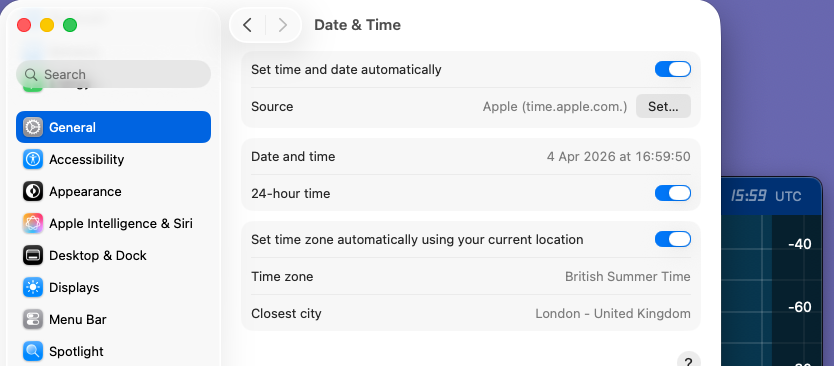
As long as the Mac is getting its time from an internet NTP server (make sure the automatic setting is on) I can't really see how it could be 20 seconds out?
Hope that helps,
73 Jonathan G4IVV0 -
Good Afternoon Jonathan, as you have it displayed in your picture, is how i had it set, but there was 1 hour difference between IMAC and ft8 software which is built in smartsdr for the mac
If i change time zone to UTC+ 00:00 London, then there is 20seconds difference
All the best from Alan0 -
Yes, you must be disabling the NTP time correction when you manually set the timezone. For FT8 you really have to have the NTP switched on so that your Mac clock is within a second (the 1 hour summer time offset doesn't matter, SmartSDR is just displaying UTC).
If you turn on the automatic time setting (NTP) then you should be able to make QSOs again.
0 -
I have set it back to the way you have in Jonathan, as per your picture, still cant contact anyone.
All the best from Alan0




Categories
- All Categories
- 390 Community Topics
- 2.2K New Ideas
- 662 The Flea Market
- 8.4K Software
- 157 SmartSDR+
- 6.5K SmartSDR for Windows
- 186 SmartSDR for Maestro and M models
- 440 SmartSDR for Mac
- 275 SmartSDR for iOS
- 265 SmartSDR CAT
- 204 DAX
- 386 SmartSDR API
- 9.4K Radios and Accessories
- 55 Aurora
- 297 FLEX-8000 Signature Series
- 7.2K FLEX-6000 Signature Series
- 971 Maestro
- 58 FlexControl
- 867 FLEX Series (Legacy) Radios
- 946 Genius Products
- 473 Power Genius XL Amplifier
- 347 Tuner Genius XL
- 126 Antenna Genius
- 308 Shack Infrastructure
- 216 Networking
- 468 Remote Operation (SmartLink)
- 142 Contesting
- 814 Peripherals & Station Integration
- 144 Amateur Radio Interests
- 1.1K Third-Party Software