SmartSDR v4.1.5 | SmartSDR v4.1.5 Release Notes
SmartSDR v3.10.15 | SmartSDR v3.10.15 Release Notes
The latest 4O3A Genius Product Software:
The latest 4O3A Genius Product Software and Firmware
If you are needing assistance with FlexRadio products, please refer to the product documentation or check the Help Center for known solutions. Need technical support from FlexRadio? It's as simple as creating a HelpDesk ticket.
AetherSDR — Open-Source Linux Client for Flex Radios
Comments
-
I have noticed this but this is the same with SmartSDR. Something to look at, What is your "DISPLAY" settings at for the "Rate" and "FPS" having these set at factory or to high can cause a lot of un needed network slow downs, for me I slow these settings down quite a bit from the Factory Defaults and it helps with the Network bandwidth required to run the Radio. I have my "FPS" at 10, "Average" at 15 to 20, and Waterfall "Rate" at 8
This is way easier on the eyes and not near the Network traffic.
Remember all this data needs to go over usually a 100Mb Ethernet port on the 6000 radios and most older computers and Ethernet Switch's.
Also on AetherSDR when it gets built you can change the bandwidth to "Low Bandwidth", this is in the "Setup", "Choose Radio / SmartSDR Setup" tab I think this will help a bunch of us with the OLDER computer hardware once it is implemented. This I think will really benefit many of us that use OLD computer hardware with the LINUX OS.
73
Bret WX7Y
1 -
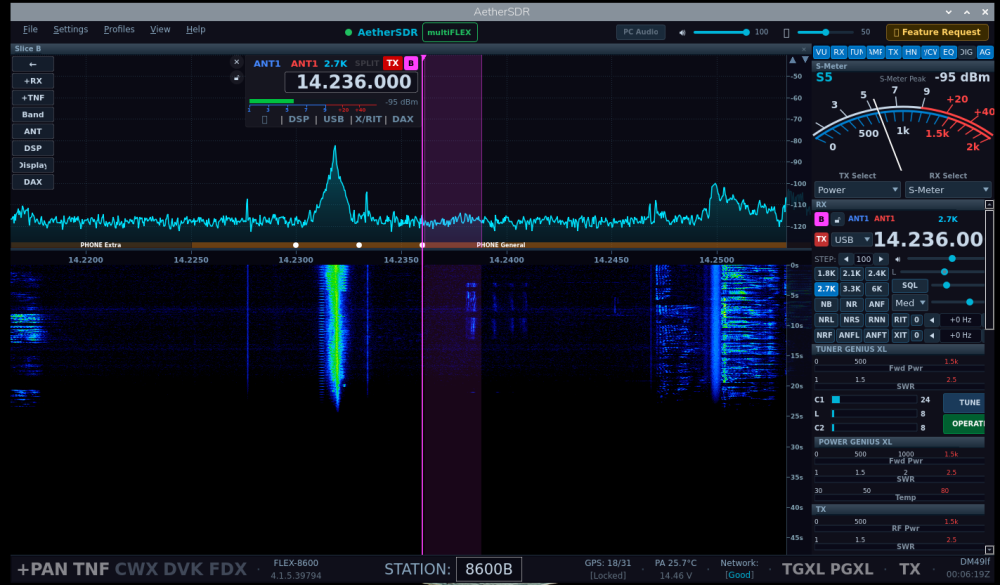
I ran a test Yesterday, I ran the AetherSDR Pi AppImage 0.7.2 on my Raspberry Pi 5 8Gig Ram. It ran surprisingly VERY WELL.
On the same Pi at the same time, I also run my Node-Red server and the FreeDV-FLEX AppImage while slice A was using FreeDVU on receive on my Linux Ubuntu Intel NUC6 AetherSDR.
This I think was a vary hard stress test for the Pi5 CPU at 77, Memory at 17, Temp 177*f, In comparisons with Node-Red server and FreeDV-Flexradio, and the Node-red server running at CPU at 30, Memory at 16, Temp 120*f.
Here is a screen grab and it was consonantly a "good" Network display so the Pi graphics are being handled very well.
It is supposed to run on a Pi4 too but I have not tested that yet, maybe tomorrow.
I think a very promising portable unit.
73 Bret WX7Y
 1
1 -
It's amazing how much power is available in the Raspberry Pi systems. My Anan G2 Saturn Ultra has a Raspberry Pi CM4 module in it. And it just cruises along with no real problems.
Of course PiHPSDR for the Anan radios is pretty light weight compared to Thetis. Or, probably compared to AetherSDR as well.
James
WD5GWY
0 -
Is AetherSDR mature enough to work with the digital modes like FT8? After doing some Googling, I haven't come up with a working configuration. If I do a CAT Test that comes back green and I can change bands just fine. I have the radio set to "FlexRadio SmartSDR Slice A". I have audio input set to DAX Audio RX1 (FlexRadion Systems RX Audio). Putting WSJT-X into "Test PTT" puts the radio into XMIT, however it failes with a the "Test PTT" button coming back red after a second or two. I'm guessing there's something I'm not understanding about DAX, however I'm at a loss.
Any insight would be greatly appreciated.
73 and good DX,
de Roger, NK1I
0


Leave a Comment
Categories
- All Categories
- 389 Community Topics
- 2.2K New Ideas
- 658 The Flea Market
- 8.4K Software
- 157 SmartSDR+
- 6.5K SmartSDR for Windows
- 186 SmartSDR for Maestro and M models
- 439 SmartSDR for Mac
- 275 SmartSDR for iOS
- 265 SmartSDR CAT
- 204 DAX
- 386 SmartSDR API
- 9.4K Radios and Accessories
- 53 Aurora
- 297 FLEX-8000 Signature Series
- 7.2K FLEX-6000 Signature Series
- 971 Maestro
- 58 FlexControl
- 866 FLEX Series (Legacy) Radios
- 945 Genius Products
- 472 Power Genius XL Amplifier
- 347 Tuner Genius XL
- 126 Antenna Genius
- 307 Shack Infrastructure
- 215 Networking
- 468 Remote Operation (SmartLink)
- 142 Contesting
- 811 Peripherals & Station Integration
- 144 Amateur Radio Interests
- 1.1K Third-Party Software