SmartSDR v4.1.5 | SmartSDR v4.1.5 Release Notes
SmartSDR v3.10.15 | SmartSDR v3.10.15 Release Notes
The latest 4O3A Genius Product Software:
The latest 4O3A Genius Product Software and Firmware
If you are needing assistance with FlexRadio products, please refer to the product documentation or check the Help Center for known solutions. Need technical support from FlexRadio? It's as simple as creating a HelpDesk ticket.
Using Flexicraft Utility ?

I have an 8600 and use with an Elecraft KPA/KAT500. This trio works fine except the use of the amp is not sensed by 8600, so I have to always remember to turn down the 8600 pwr when I have the KPA on. the Flexicraft utility as I understand it will fix this issue.
So I am back to trying to get the Flexicraft Utility to work with my 8600 and Win11 pc.
Main hurdle for me is getting the KPA & KAT to connect in the Flexicraft Setup page. I have the KAT "PC Data" cable connected to an 8600 usb port and the KPA "rs232 (xcvr)" cable also connected to an 8600 usb port. Neither show up in the Win 11 device manger comport list. So I was not able to select a comport. I then tried creating CAT ports and use those to connect to Flexicraft. That didn't work either. If both the KAT & KPA are connected to the 8600 usb ports - how are comports created in the PC?
So my question is anyone with an 8xxx successfully using Flexicraft utility and can give a few pointers to get my install to work.
73 Paul w2eck
Answers
-
Hi Paul, there are two RS-232 connections to the KPA500. The one marked RS-232 (XCVR) connects to the USB port on the back of the radio. This connection provides band info to the amp from the radio using the Kenwood CAT command set (but does not use the CAT panel).
This cable needs to be defined in USB Cables:
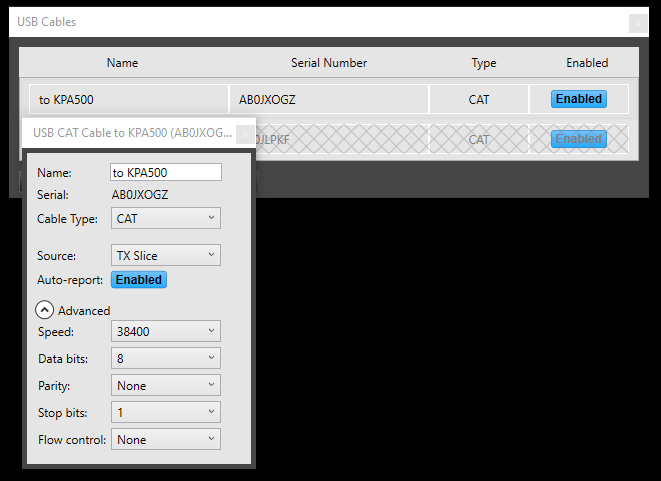
The amp connection marked RS-232(PC) connects to the USB port on your PC and should show up in Windows. This cable takes status info from the amp and sends control info to the amp from the FlexiCraft Utility running on your PC.
The KAT500 cable does not connect to the radio when using the Flexicraft Utility. It needs to connect to a USB port on the PC. This cable takes status info from the tuner and sends control info to the tuner from the FlexiCraft Utility running on your PC.
You do not use the SmartSDR CAT panel to do anything with the tuner or amp. The FlexiCraft Utility talks directly to the tuner and amp without using CAT.
0 -
Len
OK - I have a cable from KPA500 rs232(pc) to win 11 pc and it is showing in Device mgr as com23. And Flexi
Craft seems to connect (see pic), in center box of the Utility it says off and none of other indications appear to be working.
So what am I missing?
73 Pal w2eck
0 -
Hi Paul. can you send a screen shot of the Main tab and the Setup tab? Also, what baud rate is the amp set for? On the amp long press MENU, then use the up or down arrows to get to RS232 P. Long press EDIT. This is the value that you will select in the Setup tab of the utility.
0 -
-
Hi Paul, the screen shots did not come through for some reason. From your previous post, I think you were trying to connect at 4800 baud. Go to the Setup screen and select 38400 and see if that makes a difference.
0 -
try again on screenshots
0 -
Hi Paul, it looks like you do not have SmartSDR, a Maestro or a front panel running. Start SmartSDR or a Maestro.
It also looks like your amp is off. Power the amp on using the switch on the back, then the front panel power button.
The tuner looks like it is using a virtual CAT port specified in SmartSDR CAT. It needs to be a real port on the PC, not one created by SmartSDR CAT. Perhaps 13 is the correct one, I can't really tell, but that is a likely candidate.
I think that you are very close to having this operational.
0 -
len
Ok trying again
SSDR is running, Amp is on and in operate
Question - the amp has the rs232 cable connected to PC, thus comport 23. The Tuner - KAT 500 - is not connected to the PC ( it's PC data cable is connected to the Flex 8600) so how does it get a windows assigned comport??
Com 13 is my Rotor Box
New screenshots attached
73 Paul w2eck
0 -
Hi Paul, the tuner needs to be connected to the PC, not the radio. The Com port that Windows creates for that is the one to use. When you plug the tuner into the PC you will see a new Com Port (possibly COM24).
0 -
Len -
Well that makes a difference - i was using diagram in first attached
So Tuner is connected and buttons in your Utility are working to control Tuner
Not so with the Amp — It says mains off and doesn't show temps - even though says Status Ok but that's
Paul
it
0 -
Hi Paul, are you sure that the correct RS232 cable from the amp is plugged into the computer? It needs to be the one labeled RS232 (PC) on the amp.
The port on the amp labeled RS232(XCVR) should be plugged into one of the USB ports on the radio. Use USB Cables in SmartSDR to set this up
KPA500 menu settings:
RADIO - SERIAL
RS232P - 38400
RS232X - whatever you have in USB Cables in SmartSDR
SER POLL - ON
0 -
Len
I believe we how have it working - see screenshot.
The controls in the Utility are now controlling the appropriate functions in the amp and the power levels on SSDR are conforming to the Power settings in the Utility. So a really useful Utility and thanks for creating.
Think issue was the cable had come loose from the rs232 port on the amp. Which leads me to a problem I have been having with cables since I sold my K4 and came back to Flex and the 8600.
For the rs232 (xcrv) cable I am using a gender bender and this combo cannot be NOT **** into the port on the KPA. The rs232 (pc) cable i have has no screws at all is just pushed into the KPA port ( the one thay was loose). So obviously this is a poor arrangement and I need to correct ASAP.
Where do your cables? And when purchasing - do I need any particular specs in the cable ?
Any recommendations? Does Elecraft sell?
thanks for the help and patience
73 Paul w2eck
0 -
Hi Paul, I'm glad you got it working!
I got my cables from Amazon. They need to specify an FTDI chip. Pay attention to whether the RS232 end is male or female. I am pretty sure that these are not null modem cables, so watch out for that when you purchase them.
0 -
Len Thanks
So I want rs232 to usb cables with FTDI chip and they should be Null Modem cables?
Paul
0 -
Hi Paul, no, I think they are not null modem cables.
0



Leave a Comment
Categories
- All Categories
- 389 Community Topics
- 2.2K New Ideas
- 658 The Flea Market
- 8.4K Software
- 157 SmartSDR+
- 6.5K SmartSDR for Windows
- 186 SmartSDR for Maestro and M models
- 439 SmartSDR for Mac
- 275 SmartSDR for iOS
- 265 SmartSDR CAT
- 204 DAX
- 386 SmartSDR API
- 9.4K Radios and Accessories
- 53 Aurora
- 297 FLEX-8000 Signature Series
- 7.2K FLEX-6000 Signature Series
- 971 Maestro
- 58 FlexControl
- 866 FLEX Series (Legacy) Radios
- 945 Genius Products
- 472 Power Genius XL Amplifier
- 347 Tuner Genius XL
- 126 Antenna Genius
- 307 Shack Infrastructure
- 215 Networking
- 468 Remote Operation (SmartLink)
- 142 Contesting
- 811 Peripherals & Station Integration
- 144 Amateur Radio Interests
- 1.1K Third-Party Software