SmartSDR v4.2.20 | SmartSDR v4.2.20 Release Notes
SmartSDR v3.10.15 | SmartSDR v3.10.15 Release Notes
The latest 4O3A Genius Product Software:
The latest 4O3A Genius Product Software and Firmware
If you are needing assistance with FlexRadio products, please refer to the product documentation or check the Help Center for known solutions. Need technical support from FlexRadio? It's as simple as creating a HelpDesk ticket.
Panels gone

Hi all
The control panels were on the right side of the screen.
Don't know what I did, they went to the left… and now totally disappeared.
What must I do to get them back, and prefereably on the right side of the panadapter please ?
73
Paul F6EXV
Answers
-
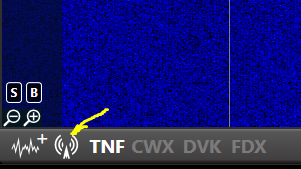
Hi Paul, click this icon in the lower left-hand corner of SmartSDR to toggle the control panel on and off.
 1
1 -
Hi Len
That kind of works, BUT the control panels are outside of the main panadapter.
They used to be united with the main SmartSDR screen, now they are outside of it…. How can I drag it back in?
TU + 73
Paul F6EXV
0 -
Hi Paul, in the upper right-hand corner of the control panel is a little arrow. Click the arrow to re-dock the control panel to the main screen.
0 -
Yesssssss, as simple as that !
Thanks Len !
73
Paul F6EXV
0


Leave a Comment
Categories
- All Categories
- 401 Community Topics
- 2.2K New Ideas
- 689 The Flea Market
- 8.6K Software
- 196 SmartSDR+
- 6.6K SmartSDR for Windows
- 200 SmartSDR for Maestro and M models
- 460 SmartSDR for Mac
- 279 SmartSDR for iOS
- 268 SmartSDR CAT
- 220 DAX
- 395 SmartSDR API
- 9.6K Radios and Accessories
- 109 Aurora
- 348 FLEX-8000 Signature Series
- 7.2K FLEX-6000 Signature Series
- 999 Maestro
- 58 FlexControl
- 872 FLEX Series (Legacy) Radios
- 975 Genius Products
- 482 Power Genius XL Amplifier
- 358 Tuner Genius XL
- 135 Antenna Genius
- 322 Shack Infrastructure
- 227 Networking
- 483 Remote Operation (SmartLink)
- 145 Contesting
- 847 Peripherals & Station Integration
- 147 Amateur Radio Interests
- 1.1K Third-Party Software