SmartSDR v4.1.5 | SmartSDR v4.1.5 Release Notes
SmartSDR v3.10.15 | SmartSDR v3.10.15 Release Notes
The latest 4O3A Genius Product Software and Firmware
Need technical support from FlexRadio? It's as simple as Creating a HelpDesk ticket.
Flex 6600 and Q5 Multi-Band

I am brand new to using a transverter. I just received a Q5 Multi-Band transverter. I bought from a third party, never used before. I do not have any paperwork on it. I am guessing from what I have been able to find this is connected by way of.
My assumptions:
- RX1 from 6600 goes to PTT on transverter
- 10mhz out from 6600 goes to REF on transverter
- XVTR A from 6600 goes to RX IF COM on transverter
- USB cable from flex radio store, have not received yet, goes from flex 6600 usb to the AUX on transverter.
- Power to power.
- Antenna/TX goes to my antenna.
- No need for the sma RX antenna ports???
I am hoping this is correct. The only other questions would be I was reading some are able to do band switching via computer and not have to turn the dial on the transverter. I am interested in this as well.
Any info would be appreciated.
r/
Glenn WT3R
Answers
-
Next question. I was going to order the Flex radio USB cable to connect to the transverter which is about $52 after tax, however shipping is outrageous so wont be buying from them. There is no way it should be $20+ to ship a small cable. That is not satisfactory, just robbery. Does anyone know a good cable I can get from Amazon?
0 -
The shipping is what the shipper charges. It used to be size and weight, but it is the initial destination charge that makes it expensive. We don't use USPS due to high theft (we have had a lot).
If you have a Q5, make sure you get their cable as it makes it plug and play for band changes. I thought it came with the Q5 but I might be wrong.
0 -
So I have everything I need at this point. As it is the multi-band I am seeing, perhaps, an issue.
I need help setting it up I guess.
I have it wired in. My issue is the settings on the flex itself.
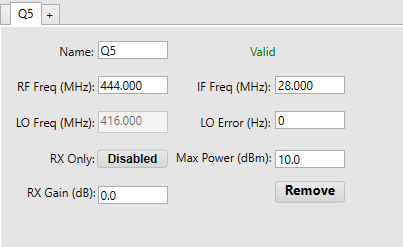
I just entered some numbers. I know the IF Freq is 28Mhz. The Max dBm should be 10.0
Not sure I need an RX Gain entered?? Not sure of a LO Error Hz either.
I guess the biggest issue is the RF Freq setting. As this have multiple bands what would I enter?
I am assuming I make multiple instances.
Im guessing I would make a
QR 144, QR 430, QR 220, ETC. and set the info for each band.
Im also guessing the frequency would be 144, 222, 430, 902, 1296
Any help with the proper setting would be appreciated.
Glenn
0 -
RX gain is only important if you want the dB meter on reception to be accurate. If relative accuracy is all you want, you can leave it at 0dB.
Yes, you need a new instance for each band.
0 -
Hi Glenn, yes one entry per band. The lowest frequency of the band should be associated with 28 MHz (assuming that each band uses the same IF frequency).
0 -
Thank you everyone. I am excited to use this. Just need some antennas for all these bands. Looking to try out satellite ops. Need a second one for that however. So that will take some time.
Glenn
0




Leave a Comment
Categories
- All Categories
- 386 Community Topics
- 2.2K New Ideas
- 656 The Flea Market
- 8.4K Software
- 155 SmartSDR+
- 6.5K SmartSDR for Windows
- 185 SmartSDR for Maestro and M models
- 438 SmartSDR for Mac
- 275 SmartSDR for iOS
- 264 SmartSDR CAT
- 202 DAX
- 385 SmartSDR API
- 9.4K Radios and Accessories
- 52 Aurora
- 294 FLEX-8000 Signature Series
- 7.2K FLEX-6000 Signature Series
- 969 Maestro
- 58 FlexControl
- 866 FLEX Series (Legacy) Radios
- 942 Genius Products
- 470 Power Genius XL Amplifier
- 346 Tuner Genius XL
- 126 Antenna Genius
- 306 Shack Infrastructure
- 215 Networking
- 466 Remote Operation (SmartLink)
- 142 Contesting
- 808 Peripherals & Station Integration
- 144 Amateur Radio Interests
- 1.1K Third-Party Software