SmartSDR v4.2.20 | SmartSDR v4.2.20 Release Notes
SmartSDR v3.10.15 | SmartSDR v3.10.15 Release Notes
The latest 4O3A Genius Product Software:
The latest 4O3A Genius Product Software and Firmware
If you are needing assistance with FlexRadio products, please refer to the product documentation or check the Help Center for known solutions. Need technical support from FlexRadio? It's as simple as creating a HelpDesk ticket.
Idigi CAT with SmarSDR Mac OS ?

I am trying a test version of Idigi, a multimode Mac OS application (FT8, FT4, SSTV, PSK, RTTY, FAX). The CAT config area inserts the localhost IP and Port 5432 when a Flex series radio is selected . That does not appear to work. I tried 5002 and 5003 but no luck.
Anyone figured this software out for use with a Flex ? My Flex uses SmartSDR for Mac OS.
Andy K3UK
Best Answer
-
Hi Andy,
I'm sure John is right, it looks like you have a typo in the IP address, hopefully that will fix your problem.Jonathan
0

Answers
-
Assuming you are writing about the Fldigi application; In the Mac SmartSDR CAT control panel, alter the "Type" definition from "Flexradio CAT" to "Kenwood TS-2000 CAT". Works fine in my shack.
73 de LB2EG Richard0 -
Hello Andrew,
I have iDigi working with SmartSDR for MacOS, it works well. Assuming both programs are running on the same Mac, all you have to do is make sure that the CAT settings are compatible in both apps. Here's a couple of screenshots to help.
First I enabled CAT in SmartSDR for Mac:
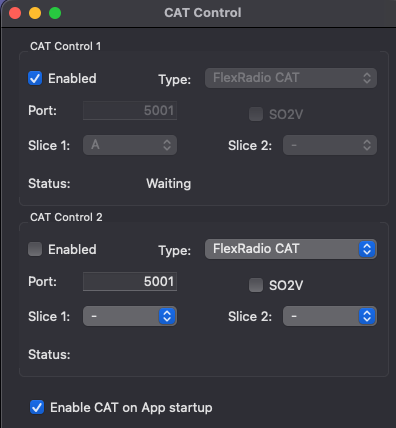
Note that I have the port number set to listen on 5001 and I have mapped the CAT control to slice A.
Then in iDigi we can setup the CAT connection to the same port number:
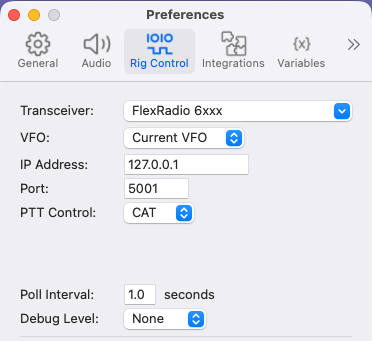
Don't worry that it says 6xxx (thats from HamLib I think), it works fine with the 8xxx series radios as well.
That should get the CAT control working for you. I can also go through the audio setup if that would help.
73,
Jonathan G4IVV0 -
Hello Jonathan,
Hmm, I tried matching your settings but no luck. I have attached a screenshot of my settings . Is there some additions steps in Idigi that I need to make after setting the port and rig type ? I see the CAT icon in Idigi occasionally change from amber to red . If I change bands , the Flex does not follow . No sign of rig control . My receive audio is fine, can't test TX audio until I get PTT/CAT set correctly .
Andy K3UK
0 -
Under your preferences pane you might try 127.0.0.1 for ip address instead of127.1.1.0.
0 -
Yikes !
0 -
Interesting, I fixed the IP address , rebooted and Idigi STILL came up with the former, incorrect IP address . I rebooted a couple more times and it finally stored the correct one. THANKS for all the help. I am looking forward to this application. I have used Fldigi for years (also Multipsk on Windows ) . I assume Idigi does not yet support Reed-Solomon ID tones, I will poke around further .
Andy K3UK
0 -
Where does the audio to decode come from? I get nothing but noise.
0 -
The audio for decoding by iDigi comes from your audio device established in your Mac (kind of like VAC in Windows , or VB Audio ). I use Blackhole . So SmartSDR for Mac OS, under the Radio/Settings/DAX Streaming has to specify your audio client . Then in SmartSDR you need to have DAX set to ON. Plus , the slice flag's DAX button has to specify which Dax port you want. Then in iDigi , PREFERENCES , then AUDIO and then enter your input and output audio path . In my case , it is Blackhole for both . You should be seeing audio in iDigi's waterfall . Chose a mode like FT8 at first , for testing audio in/out.
Andy K3UK
0 -
Thanks Andy. I have Loopback which should do the same thing.
1 -
Yep.
0 -
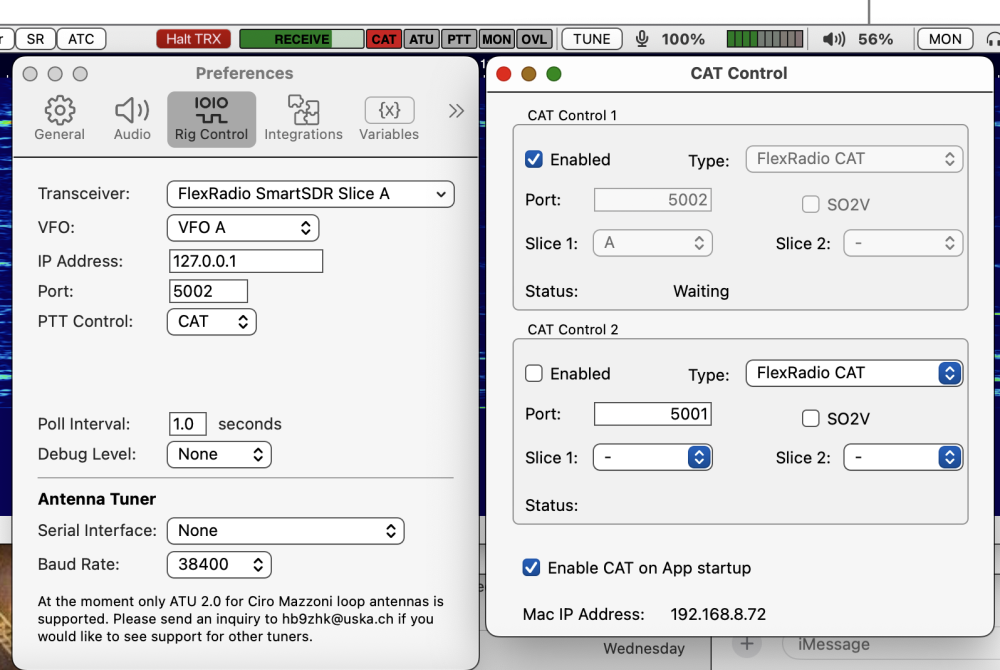
I'm trying iDigi too, and seeing the same thing — I'm using SmartSDR on my Mac, and I have CAT control enabled on port 5002 (slice A). iDigi does not connect when configured for this.
Note that the CAT indicator is red. CAT Control 1 is enabled on port 5002, and iDigi is configured for slice ! on port 5002.
Anybody sort this out yet?
 0
0 -
Hello,
Yes, you don't need to use CAT control in Mac SmartSDR (you can leave it disabled). In iDigi, the "FlexRadio SmartSDR Slice A" comes from the iDigi built-in HamLib library code to directly connect to your Flex radio.
So, in the iDigi "Rig Control" settings you have shown, just make the following changes:
- set the IP Address to that of your Flex radio, rather than the Mac local address 127.0.0.1
- change the Port to the standard Flex API port of 4992.
That should make it work - the rest of your settings are the same as mine.
73, Jonathan
0 -
Thanks - that fixed the CAT Control. Now to figure out how to use the app. :D
0


Leave a Comment
Categories
- All Categories
- 401 Community Topics
- 2.2K New Ideas
- 689 The Flea Market
- 8.6K Software
- 196 SmartSDR+
- 6.6K SmartSDR for Windows
- 200 SmartSDR for Maestro and M models
- 460 SmartSDR for Mac
- 279 SmartSDR for iOS
- 268 SmartSDR CAT
- 220 DAX
- 395 SmartSDR API
- 9.6K Radios and Accessories
- 109 Aurora
- 348 FLEX-8000 Signature Series
- 7.2K FLEX-6000 Signature Series
- 999 Maestro
- 58 FlexControl
- 872 FLEX Series (Legacy) Radios
- 975 Genius Products
- 482 Power Genius XL Amplifier
- 358 Tuner Genius XL
- 135 Antenna Genius
- 322 Shack Infrastructure
- 227 Networking
- 483 Remote Operation (SmartLink)
- 145 Contesting
- 847 Peripherals & Station Integration
- 147 Amateur Radio Interests
- 1.1K Third-Party Software