SmartSDR v4.1.5 | SmartSDR v4.1.5 Release Notes
SmartSDR v3.10.15 | SmartSDR v3.10.15 Release Notes
The latest 4O3A Genius Product Software:
The latest 4O3A Genius Product Software and Firmware
If you are needing assistance with FlexRadio products, please refer to the product documentation or check the Help Center for known solutions. Need technical support from FlexRadio? It's as simple as creating a HelpDesk ticket.
How to add amp and tuner to 8600M

I have the software on the PC talking to the radio now finally. So now on to adding more to the setup. I have a ACOM-1000HF Amp and a LDG AT-1000Proll Autotuner. Other than the coax's, what cabling do I need ? Does anyone have any experience using either of these with a Flex?
Best Answer
-
 2
2


Answers
-
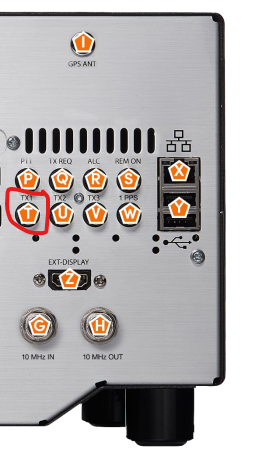
RCA cable from TX1 of radio to PTT In on amp.
Remember to put the amp in standby and press TUNE (next to MOX =) in SmartSDR to generate a carrier to allow LDG to tune (Make sure LDG is in auto mode. Press TUNE again to unkey, then bring ampo to operate and again use TUNE in SmartSDR to generate carrier to tune amp.
You can set TUNE and drive (RF) power in TX Band settings (Settings/TX Band Settings). Also in TX Band Settings, check TX1 for bands where you want to use the amp.
73 Dave wo2x
1 -
this video might help too.
0 -
video might be ok, but he starts off saying all these things are in the download area of the website. There is no such animal that I can find, and find no page matching the one he shows.
0 -
"RCA cable from TX1 of radio to PTT In on amp."
On 8600M I dont see a tx1, perhaps the TX REQ? white, or red avail.
On Amp there is Key in and Key out only. IC7300 used KeyIn so I will assume that is equiv to PTT. willing to try.
0 -
I had the front legs up so the tilt kept me from seeing TX1. Many thanks.
BUT on the ACOM amp there is no PTT, there is key in and key out.
0 -
When I have the amp in staandby and I hit tune the tuner lights up but wont tune. shows pwr down low like it should, but doesnt change the swr, stays maxed out. No cliks or grinds from the tuner.
0 -
and where the heck is the vol control? sound coming from radio not computer.
0


Leave a Comment
Categories
- All Categories
- 390 Community Topics
- 2.2K New Ideas
- 662 The Flea Market
- 8.4K Software
- 157 SmartSDR+
- 6.5K SmartSDR for Windows
- 186 SmartSDR for Maestro and M models
- 440 SmartSDR for Mac
- 275 SmartSDR for iOS
- 265 SmartSDR CAT
- 204 DAX
- 386 SmartSDR API
- 9.4K Radios and Accessories
- 55 Aurora
- 297 FLEX-8000 Signature Series
- 7.2K FLEX-6000 Signature Series
- 971 Maestro
- 58 FlexControl
- 867 FLEX Series (Legacy) Radios
- 945 Genius Products
- 472 Power Genius XL Amplifier
- 347 Tuner Genius XL
- 126 Antenna Genius
- 308 Shack Infrastructure
- 216 Networking
- 468 Remote Operation (SmartLink)
- 142 Contesting
- 814 Peripherals & Station Integration
- 144 Amateur Radio Interests
- 1.1K Third-Party Software