SmartSDR v4.1.5 | SmartSDR v4.1.5 Release Notes
SmartSDR v3.10.15 | SmartSDR v3.10.15 Release Notes
The latest 4O3A Genius Product Software and Firmware
Need technical support from FlexRadio? It's as simple as Creating a HelpDesk ticket.
TeensyMaestro
Comments
-
Hi Len,
I have a 8600, but at startup I only have one slice open. In the meantime, I'm able to attach a file, but I think it may not be good to attach a 100MB file here.
I will try YouTube, but it may take some time.
vy 73 de DF1SD, Kuno
0 -
Hi Len,
is the link to the short video,
vy 73 de DF1SD, Kuno
0 -
Hi Kuno, everything looks perfect to this point. The teensy board is loaded and installed properly, the display is mounted correctly and the radio is being discovered over the network.
Can you check to be sure that the MUX chips are on the board in the correct orientation?
Try starting the TeensyMaestro with the Ethernet cable unplugged to see if it stalls or goes into stand-alone (keyer only) mode.
You are very close to having this working.
0 -
Hi Len,
the MUX chips are in the right position and when I start the TeensyMaestro without Ethernet cable it is kind of stalled. Only the soft/hardware level, the MAC and IP is displayed, IP is 0.0.0.0.
vy 73 de DF1SD, Kuno
0 -
Hi Kuno, if your MUX chips are in sockets, can you remove them and see what that does?
I am working on a new firmware version that better accommodates dual-SCU radios, so I will send you a beta version to try a little later today.
0 -
Hi Kuno, here is a beta version for V2 hardware. It is designed to work with more than two slices. I am sending this in hopes that I accidentally fixed whatever is wrong in your setup. If this doesn't help, I will work on other things to diagnose the problem.
*****************************V 2.003 * ***************************
Fixed problem with more than 2 slices open at once.
Fixed library to allow frequencies over 1,000 MHz to show correctly (thanks to Neil, G7UFO for pointing this out!).
Fixed issue with S Meter readings of 60 dB over S9 and up.
Changed so that SDC doesn't cancel the screen saver when it automatically adjusts AGC-T.
Added ability to select any two slices to be displayed.  A and D are the default.
  If the requested slices aren't open, it uses A & B.  Default can be set on the SD card.
The seemingly odd default of slices A and D is so that you get both slices when in diversity mode. If you have slices A and B open, it will show them. As soon as you open slice D (as diversity or standalone), it will replace B on the screen. 6700 users will want to set this to A and H. Single SCU users will want A and B.
Things to fix:
- S-meters don't work on slices C - H (library issue - I may need Simon, NV0E's help…)
- Need to add ability to dynamically change slices to be displayed (menu item)
- When a MultiFlex station disconnects, the TeensyMaestro freezes and has to be reset
I have not compiled this for HW version 1 yet. A soon as I get some more testing done, I will also compile and test HW version 1. Once I have it working everywhere, I will release both versions on GitHub.
1 -
Hi Len,
it is still the same with the new firmware. Without the MUX chips the display is dark, but TeensyMaestro still connects to the Flex.
vy 73 de DF1SD, Kuno
0 -
Hi Kuno,
I have been following this thread. I've been trying to remember when I saw this behaviour and I think I have recalled it.
When I was trying to put together a UK/Region 1 band plan I found that the config file was unforgiving of any formatting changes and would cause the behaviour you're seeing. Could you re-format the SD card and place an un-modified version of the config file on there?
Alternatively if you want to email me your MMConfig.ini I'll copy it onto my SD card and see if I can replicate.
73, Neil.
0 -
Hi Neil,
I just did send you the file. In the meantime I will try the original version.
vy 73 de DF1SD, Kuno
0 -
Wow, I hope that is the issue. If this is the problem, please send me the offending MMConfig.ini file and I will do what I can to make the firmware more robust.
0 -
Hi Neil, Len,
when using the original MMConfig.ini there is a slight improvement. When the 2nd screen with all the network information is displayed, after about five seconds the characters A and B are display on top of W1AW and TeensyMaestro. After this it is stalled you can press and turn whatever like, nothing does happen.
vy 73 de DF1SD, Kuno
0 -
Hi Kuno, do you have SmartSDR running with at least one slice open?
0 -
Hi Len,
I did the test with either one or two slices open, but always the same result.
vy 73 de DF1SD, Kuno
0 -
Hi Kuno, try unplugging all of the connectors on the back of the main board. I am thinking about a button or something that is stuck.
Another thing may be the MMConfig.ini file. Can you post your MMConfig file here? I will see if I can use it to re-create the issue.
0 -
Hi Len,
I removed all the connectors from the mainboard, but still the same behavior. If the TeensyMaestro is connected it happens that the SSDR response is getting slower. That means changing the frequency or pressing a button using the mouse takes quite some time. To get rid of this problem I have to turn my Flex off and one. Restarting SSDR will not solve the issue. I also noticed that the display is always turned on, shouldn't the screen saver be actived after 20 minutes?
Attached is my MMConfig file.
vy 73 de DF1SD, Kuno
0 -
Hi Kuno, I have your MMConfig.ini file loaded, and it is working perfectly for me.
Near the bottom of the MMConfig.ini file is "Disable GUI Client:". Try changing that to Yes and see if it has any effect. I don't think it will matter, but is easy to try.
Disable GUI Client: Yes ; Default = No "Yes" prevents test of held button at powerup which puts TeensyMaestro into GUI Client mode
It still feels like there is a button that is pushed. Can you re-check that all the buttons show open? Especially the buttons on the encoders.
If the buttons check out OK, then I would suggest removing the Teensy 4.1 board from the main board and use jumpers to connect only the pins for the display, 3.3 V and ground. This will help us to understand if the problem is the Teensy itself or something on the main board.
0 -
Len,
I check the buttons again and they are all working. I also changed the MMConfig file, but the results are still the same. Now I will do the next step, but I have to prepare the jumpers first. I'm not quite sure what exactly I have to do after the Teensy is removed. How many jumpers do I need? Where exactly do I have to insert the jumpers? What should I see after this step is completed?
vy 73 de DF1SD, Kuno
0 -
Using the schematic, place jumpers from the teensy board to the socket for all of the signals that are identified with TFT-. Also jump 3.3v and ground. The goal is to see if the display will get past the point where it stalls.
If that works, then start jumpering in controls until the one causing the issue can be identified. Then that control can be de-soldered.
0 -
Hi Len,
the story continues. I removed the Teensy and added jumpers to 5V, 3.3V, GND and to the five connections labeled TFT_. It seems that I have missed one or more because the display stays dark. Any idea?
vy 73 de DF1SD, Kuno
0 -
Len,
do you have an idea which connection is missing? Which voltage should I measure on the different display pins? Pin 1 is 5V, pin2 is GND. What about the others? I'm pretty sure that there is at least one connection missing, because when I return the Teensy into its socket, the display is working again.
vy 73 de DF1SD, Kuno
0 -
Hi folks!
Thanks to Neil G7UFO and his amazing kit I'm now the proud owner of a TeensyMaestro, which I powered up for the first time last night. I have a couple of questions, if that's ok...
I'm waiting for a 32GB microSD card to arrive so right now my TeensyMaestro is running without the benefit of any inputs from the MMConfig.ini file. It's connected to my Flex 6600, and I'm running V 2.003 beta. I have four slices open on the radio, and as expected when I start the TM I see slices A and D.
1. Is it possible to change the visible slices on the TM? The 2.003 README states "Added ability to select any two slices to be displayed. A and D are the default. " so that indicates to me it should be possible to change the visible and controlled slices but I don't see how. I've tried long pressing the "Select Slice" but that just selects whichever slice that button is near.
2. My large encoders are wired as per Simon NV0E's Slice Encoder Connection directions (https://github.com/rimuadmin/TeensyMaestro-Hardware/wiki/Enclosure-Mounting#slice-encoder-connections), but they seem to be backwards from what I'd expect. Turning the encoder clockwise reduces the frequency, not increases it. Is there a config setting to reverse the encoder direction, or am I about to rewire my my encoders? :)
Thanks again for a great project, and thanks to Neil for such a well put together kit!
73, Adrian
K7RJS0 -
Hi Adrian, Congratulations! I hope you enjoy it as much as I enjoy mine.
- Yes, using the MMConfig file:
SliceLeft: A

SliceRight: D
If you open slices A and B, they should both show. If they don't, that is because of the version. I have it working on the latest (unreleased) version. Once I get a little further with the testing, I will add the ability to choose slices in the menu. A and D are the default so that you can see the diversity slice when you hit the DIV button.
2. Yep, you need to swap the A Phase and B phase lines to the encoder, there is no option to swap in software.
I am currently battling a problem with multiFLEX, but I should have that tamed soon so that I can get this new version out there.
0 -
Hi Len.
Yup, A and D are opening just fine. I was looking to see if there was a way to select any of the four open slices from the front panel. I'll look forward to that being implemented when your time and schedule permit. Thank you!
I figured the phase lines were the culprits. Just thought there might be MMconfig.ini flags for swapping them programmatically. Guess I'll be doing that this afternoon. Thanks! :)
One other question - I'm seeing that my second slice "D" in this case is sitting at S9+60 all the time, regardless of the actual S level on the slice. I haven't done any testing on SSDR to see if that happens across all bands - I've got the slice sitting on 20m right now and the noise floor is at S7, but the TM is reporting S9+60 and the meter is solid red. I'll try band changes and see if that makes any difference to the reporting on the TM, but any ideas what might be causing it?
Thanks for your help! I'm really enjoying this!
Edit: Just confirmed. The S meter remains pegged on the D slice at S9 + 60 on all bands no matter what I do. Any thoughts are welcomed.
Thanks!
73, Adrian
K7RJS0 -
Hi Adrian, The S-meter issue is resolved in this beta release. The original library only accounted for two slices, and therefore, two S-meters. I thought I would struggle with that aspect, but it turned out to be an easy fix.
Here is V 2.003 Beta 2 if you want to give it a try.
*****************************V 2.003 ****************************
Fixed problem with more than 2 slices open at once.
Fixed library to allow frequencies over 1,000 MHz to show correctly (thanks to Neil, G7UFO for pointing this out!).
Fixed issue with S Meter readings of 60 dB over S9 and up.
Fixed occasional keyer lock-up condition when in C (cootie-key) mode.
Changed so that SDC doesn't cancel the screen saver when it automatically adjusts AGC-T.
Added ability to select any two slices to be displayed.  A and D are the default.  If the requested slices aren't open, it uses the lowest named open slices.  Default can be set on the SD card.
Added ability to display s-meters C - H (2 - 7).
There is a known issue in this version with multiFLEX. When the first station disconnects, then re-connects, the Teensy crashes and the Flex re-boots (yikes…). The second station can come and go without issue. I believe that I built in a problem when I modified the library to handle multiple stations. I suspect that I am violatoing an array bound somewhere.
If you try this version, please let me know if you spot any other issues. I will try to get to the bottom of the multiFLEX issue and get the next release out to GitHub.
0 -
Dang! I was expecting to hear that it was solder flash on my end, or a shorted pin on one of my MUXs! That's beautiful! Thank you, and thanks for such a rapid response. The S meter issue is fixed!
It's looking great. No rush, and no pressure at ALL (I spent enough years writing code that I'm very familiar with unrealistic user expectations) but I'm looking forward to being able to select which slices are displayed programmatically when more than two are open on the radio. :)
Great work!
73, Adrian
K7RJS0 -
Hi Adrian, I found the multiFLEX issue. It has been there for a very long time; I just never tested the exact circumstance that caused it. Here is Beta 3 so that you don't crash your rig (no damage, just a very annoying reboot).
Now that this is solved, I will add the menu item to allow on-the-fly user selection of which slice pairs to display. I should have it ready in a day or two. I will post it here as a beta version so that you can test it. After a week or so, if it behaves, I will release it to GitHub.
0 -
I added a menu item to choose which slices to display. I also compiled it for HW version 1. Here is V 2.003 Beta 4. I anticipate this to be the last beta version before releasing to GitHub next week.
Hardware Version 1:
Hardware Version 2:
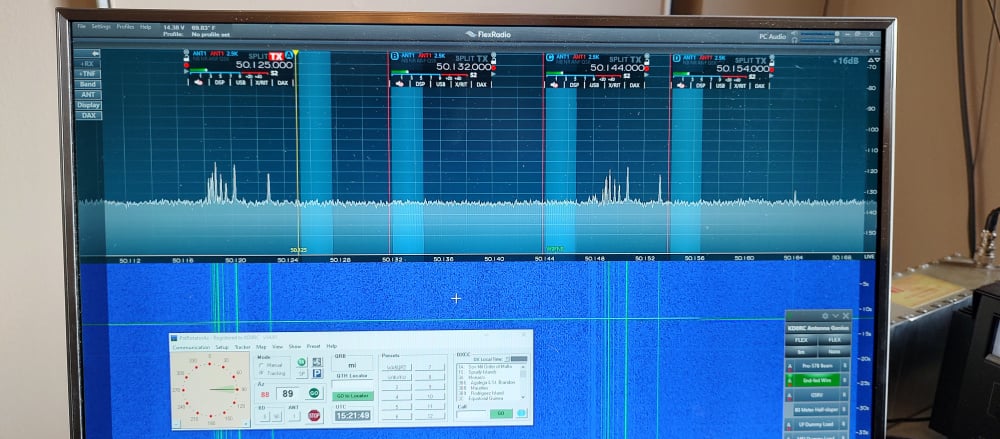
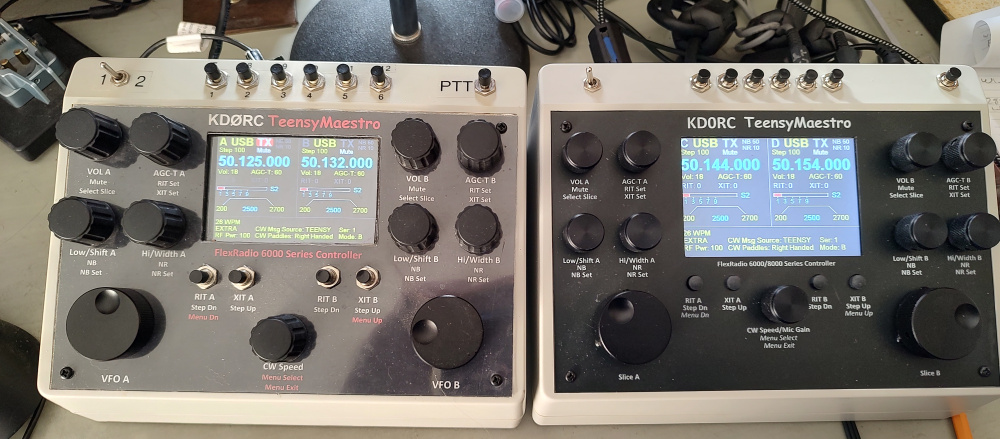
Now I can control all four slices with a pair of TeensyMaestros! If I only had enough desk space, I might actually do this…
multiFLEX also works properly now. You can use a menu item to select which station to bind the TeensyMaestro to and it will only control that station.
0 -
OK, I'm blown away and totally impressed. I'm now running .003.B4 and it's incredible. I can change slices easily, and the simplicity of operating my 6600 from a physical device is wonderful. Thank you so much! I'll put it through its paces over the next couple of days, although I don't expect to find any substantial bugs after all the work you've done on it.
Thank you!
73, Adrian
K7RJS2 -
Thanks Adrian, I appreciate it!
It has been a fun project and a really useful device. I can hardly operate without it!
0 -
Len,
the display is working now. It also requires a jumper for I2C_SCL and I2C_SDA. Unfortunately, the behavior is still the same. A few seconds after displaying the network stuff it shows a A and B on the top line on top of the network information. I imagine that the screen should be cleared before. At this point, does it mean the Teensy is not working as expected, or could be one of the chips be the culprit?
vy 73 de DF1SD, Kuno
0




Leave a Comment
Categories
- All Categories
- 386 Community Topics
- 2.2K New Ideas
- 654 The Flea Market
- 8.4K Software
- 155 SmartSDR+
- 6.5K SmartSDR for Windows
- 185 SmartSDR for Maestro and M models
- 438 SmartSDR for Mac
- 274 SmartSDR for iOS
- 264 SmartSDR CAT
- 202 DAX
- 385 SmartSDR API
- 9.4K Radios and Accessories
- 52 Aurora
- 293 FLEX-8000 Signature Series
- 7.2K FLEX-6000 Signature Series
- 968 Maestro
- 58 FlexControl
- 866 FLEX Series (Legacy) Radios
- 940 Genius Products
- 470 Power Genius XL Amplifier
- 344 Tuner Genius XL
- 126 Antenna Genius
- 306 Shack Infrastructure
- 215 Networking
- 466 Remote Operation (SmartLink)
- 142 Contesting
- 808 Peripherals & Station Integration
- 143 Amateur Radio Interests
- 1K Third-Party Software