SmartSDR v4.2.20 | SmartSDR v4.2.20 Release Notes
SmartSDR v3.10.15 | SmartSDR v3.10.15 Release Notes
The latest 4O3A Genius Product Software:
The latest 4O3A Genius Product Software and Firmware
If you are needing assistance with FlexRadio products, please refer to the product documentation or check the Help Center for known solutions. Need technical support from FlexRadio? It's as simple as creating a HelpDesk ticket.
8400M no pan adapter

I fired up my 8400M this morning and I have no response on my pan adapter. The waterfall works, although I had to totally reconfigure all of the controls. I just can't figure out how to get the pan adapter to work.
I don't know why this happened. I turned off the radio properly last night. And this morning both the pan adapter and waterfall were not working. BTW, the display is on the Smart SDR on my computer monitor. On the display on the radio, both are working.
The settings on the Display above the horizontal line (for the pan adapter) are:
AVG: 70
FPS: 28
FILL: 90
Weighted Average: OFF
Please help.
Andy VA6SZ
Comments
-
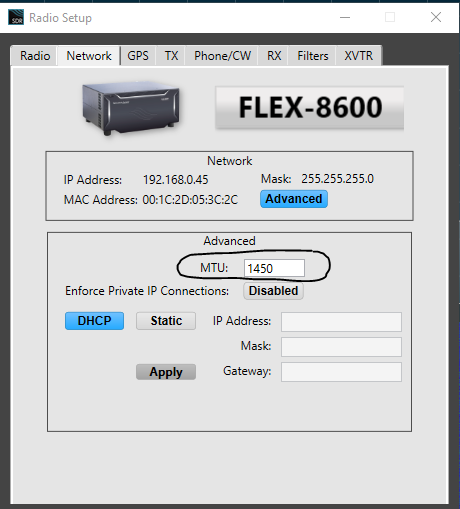
Hi Andy, Try setting your MTU to 1450:
 0
0 -
Thank you Len for the suggestion. It already is set at 1450. But the "Private IP connections" is enabled. would that make a difference?
The "+16dB WIDE" at the top right are dim.
0 -
The "Wide" indicates that SmartSDR on the radio and on the Pc are on different bands. That's probably why the spectrum line isn't visible on your pc.
James
WD5GWY
0 -
Hi Andy, I doubt that is it. Are the computer and radio on the same network segment? Are they plugged into the same router or switch?
0 -
Well Len, I haven't changed a thing from yesterday when it was working. I just checked the network diagnostics, and it says excellent. No issues there.
What I'm thinking is that there's some simple setting that I don't have turned on, or adjusted right. Why wouldn't the pan adapter be working? The waterfall is.
0 -
@James WD5GWY
YES, when I switch to a different band, the +16 sometimes disappears. On a different band, sometimes both disappear. and yet another band, they appear. Maybe we're onto something…?
The problem is, the pan adapter doesn't work on any band.
And I just noticed that my GNSS (GPS) doesn't work either.
0 -
If you are seeing signals in the Waterfall and cannot see the spectrum line, then click and hold on the spectrum scale on the right side of the screen and pull it up until the spectrum line is visible. At the very worst, you might have to do a reset ( save your Profiles) of the radio to get the display back.
James
WD5GWY
0 -
James!! Got it! I had to pull it up to about -90 to start to see it.
WOW. I thought it was something simple. Looks like you solved it for me!!
Andy
1 -
Glad you got it going! Sometimes it's the simple things that we overlook.
James
WD5GWY
0



Leave a Comment
Categories
- All Categories
- 401 Community Topics
- 2.2K New Ideas
- 689 The Flea Market
- 8.6K Software
- 196 SmartSDR+
- 6.6K SmartSDR for Windows
- 200 SmartSDR for Maestro and M models
- 460 SmartSDR for Mac
- 279 SmartSDR for iOS
- 268 SmartSDR CAT
- 220 DAX
- 395 SmartSDR API
- 9.6K Radios and Accessories
- 109 Aurora
- 348 FLEX-8000 Signature Series
- 7.2K FLEX-6000 Signature Series
- 999 Maestro
- 58 FlexControl
- 872 FLEX Series (Legacy) Radios
- 975 Genius Products
- 482 Power Genius XL Amplifier
- 358 Tuner Genius XL
- 135 Antenna Genius
- 322 Shack Infrastructure
- 227 Networking
- 483 Remote Operation (SmartLink)
- 145 Contesting
- 847 Peripherals & Station Integration
- 147 Amateur Radio Interests
- 1.1K Third-Party Software