SmartSDR v4.2.20 | SmartSDR v4.2.20 Release Notes
SmartSDR v3.10.15 | SmartSDR v3.10.15 Release Notes
The latest 4O3A Genius Product Software:
The latest 4O3A Genius Product Software and Firmware
If you are needing assistance with FlexRadio products, please refer to the product documentation or check the Help Center for known solutions. Need technical support from FlexRadio? It's as simple as creating a HelpDesk ticket.
Does FlexControl USB Control Have PTT Capability?

Best Answers
-
Bill,
I should have looked at the manual. This sounds like what Jeff was looking for in the 1st place.
 0
0 -

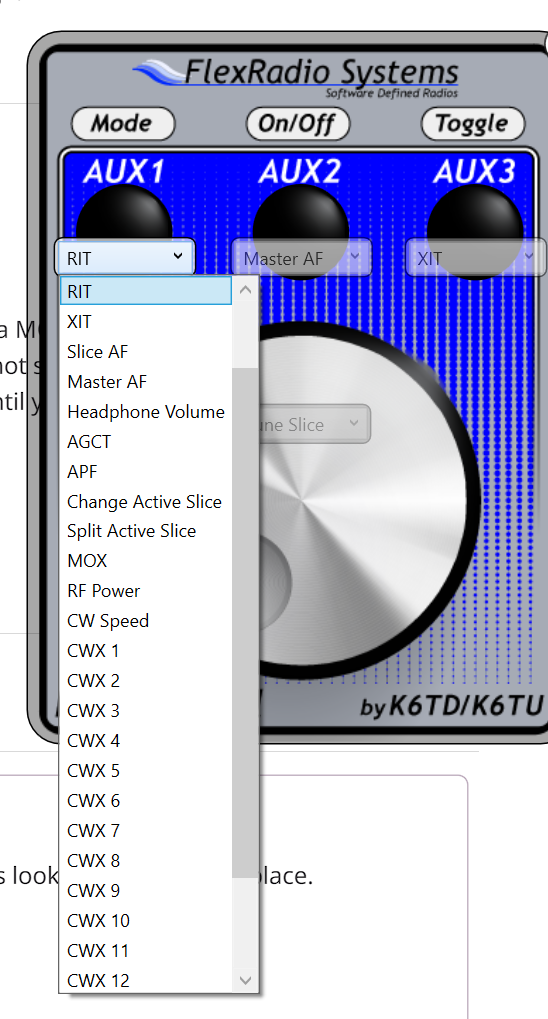
seleting MOX will enable the Mox when you push the Flex knob.
0


Answers
-
This was on a site called DC3CB.com and for FTDXRC CAT control software, using a FlexControl unit to control the Yaesu HF (FTDX-5000, FT-2000, FT-950) radio for remote operation. So I have no idea if the actual FlexControl software for Flex Radios is the same button options or not. But this is what I found.
The FlexControl knob is used to tune VFO A, VFO B and/or the Clarifier. The three push buttons (AUX1, AUX2, AUX3) and the knob itself have three different states (single click, double click, long click) that can be assigned to different radio actions:
noneTune
VFO A
Tune VFO B
Tune Step Up
Tune Step Down
Tuning Acceleration
Swap VFOs
Copy VFO A to B
Toggle Split
Toggle Sub RX On/Off
Tune Clarifier
Clear Clarifier
Toggle TX
Clarifier On/Off
Toggle RX Clarifier On/Off
Altogether, you have 15 options. Are these the same button options in the Flex Control software?
So if I'm reading this correctly it would look like "Toggle TX" would be the same as a PTT button if programmed into one of the AUX buttons. Please verify if anyone knows this is the case and I'll order a FlexControl USB device. I'd probably use some of the others as well, but the main functions I'm looking for are Tuning (dial) and PTT.0 -
Pressing CR button could possibly toggle PTT. It works in PSDR
Tom
0 -
null
Hello Tom, looking at the pictures online I don't see a "CR" button. I see 3 AUX buttons and the main dial knob. It sounds like all of them have a press function as well according to what I've read. Is there another CR button on it that I'm not seeing on the pictures? Can one of the buttons be programmed for that function. I don't know what PSDR is that you mentioned. Please clarify if you have time.0 -
You could also just build a foot switch to send MOX off and MOX On commands via SmartCAT.
0 -
I'm not a foot switch fan, especially when you're sitting back in a lounge chair or something like that. A hand PTT button is not out of the question, but I guess that my reason for asking about the flexControl USB device sold by Flex Radio. Apparently either nobody has or uses one, or I would think someone would know if any of the buttons can be programmed for the PTT (MOX). I might buy it just for the dial feature, but at $200 it would be great if the PTT was available with it as well. VOX really won't work in most outdoor conditions due to ambient noise in the area.0
-
Jeff,
The Nano Every is easy to shoe horn into a small space. You could also load FRStack as it has support for a hot keys. You could also put it on a Stream Deck. Some of the guys at our club take the cheap way out and use the space bar as it will run the last command you clicked on. It becomes the toggle switch until you click on something else. It sounds like may a stream deck or hotkey may work for you.
0 -
I'm not at all familiar with Nano Every, FRstack, or Stream Deck, but I'll do some Google research and try to figure out what you're referring to. I may try to contact Flex Radio in some way to find out if the FlexControl USB in their accessories area is capable of the PTT function. I just assumed that there would be someone in the group here that would have a FlexControl hooked up and in use on their computer, but I may have assumed wrong. Thanks for the replies and I'll check out the things you mentioned.0
-
CR- a long key at the bottom of the keyboard.
0 -
Oh okay, "carriage return", haven't heard it called that since the 70's. I'm trying to get away from the keyboard which is why my original question was about the FlexControl USB remote controller unit. This unit is available under the Flex Radio accessories pages, top row on the 2nd page of the listings. However it must not be a very popular item because it seems nobody out here in the community has one. I'm just wondering if one of the buttons on that device has PTT capability. Thanks for the reply though.0
-
Hi Jeff,
I have a FlexControl and have just verified for you that it indeed has a MOX setting. You can program one of the buttons to do the MOX function just remember that it is always hot so it can be inadvertently activated by incidental contact. You push it once to transmit which stays active until you push it again.
73,
Bill AB7AA
0 -
 Mike-VA3MW Administrator, FlexRadio Employee, Community Manager, Super Elmer, Moderator adminOptions
 -
Thanks Bill, that's exactly what I was looking for. I knew there had to be somebody out there with one that could answer. I'll order one right away, it will probably get here long before the radio.
Thanks again... Jeff S.0 -
Thanks Mick, that will work great.
Jeff S.0 -
I just tested it and it does not work like I had commented. I set each of the buttons to MOX and found that pressing the knob button did not do anything. I had to press the actual button to get MOX to work. It works but still not ideal in my opinion..
0 -
Hi Mick, so you're saying you setup one of the 3 AUX buttons for MOX and when you pressed it, it does nothing? I mean you have the Dial (for changing frequency I assume) and the 3 AUX buttons. If you assign and of the AUX buttons to MOX (PTT), does pressing it activate the transmit function?0
-
You can set each of the 3 buttons to MOX. Then depressing the individual button will turn on MOX when depressed. Depressing it again will turn it off. I was hoping the Flex Knob button would turn actually turn MOX on/off.
0 -
Thanks Mick, I guess the dial would be nice, although they maybe think you might bump the frequency when pressing it. Any of the 3 AUX buttons will be fine and do what I want. I just wanted to make sure it would work before ordering one. Thanks to all!0


Leave a Comment
Categories
- All Categories
- 401 Community Topics
- 2.2K New Ideas
- 681 The Flea Market
- 8.6K Software
- 194 SmartSDR+
- 6.6K SmartSDR for Windows
- 197 SmartSDR for Maestro and M models
- 456 SmartSDR for Mac
- 278 SmartSDR for iOS
- 268 SmartSDR CAT
- 218 DAX
- 394 SmartSDR API
- 9.6K Radios and Accessories
- 98 Aurora
- 339 FLEX-8000 Signature Series
- 7.2K FLEX-6000 Signature Series
- 991 Maestro
- 58 FlexControl
- 872 FLEX Series (Legacy) Radios
- 965 Genius Products
- 480 Power Genius XL Amplifier
- 353 Tuner Genius XL
- 132 Antenna Genius
- 319 Shack Infrastructure
- 224 Networking
- 482 Remote Operation (SmartLink)
- 144 Contesting
- 845 Peripherals & Station Integration
- 147 Amateur Radio Interests
- 1.1K Third-Party Software