SmartSDR v4.1.5 | SmartSDR v4.1.5 Release Notes
SmartSDR v3.10.15 | SmartSDR v3.10.15 Release Notes
The latest 4O3A Genius Product Software:
The latest 4O3A Genius Product Software and Firmware
If you are needing assistance with FlexRadio products, please refer to the product documentation or check the Help Center for known solutions. Need technical support from FlexRadio? It's as simple as creating a HelpDesk ticket.
Using Flex 6400 for MARS

I MARS we switch from voice to digital back and forth during the net. My problem. My flex microphone is connected to the Flex and the digital comes from the PC. is there a way to setup slice A the do audio at the Mic input and slice B to do digital from the PC so both slices send from their needed output without changing the MIC source setting all the time?
Any help accomplishing this setup would be most helpful.
Thanks
Walter W9KJO
Answers
-
Moving from SSB to Digital are different Mode Groups.
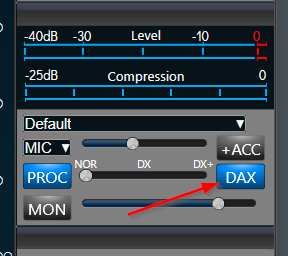
If you move from SSB to DIGU you should only have to turn off DAX TX. It doesn't matter what MIC input you have selected as that is only used with SSB and not Digital Modes. I think this is the easiest.
You could also set up a full 2nd Panadapter on the same frequency and have one in SSB mode and the other in DIGU and then just move your TX focus.
The 3rd way would be to have 2 Different Global Profiles, one for SSB and the other for DIGU and just load the one you need.
0 -
if your mic is connected to the rear of the radio and you use the rear panel PTT, it will disable DAX during voice transmissions (SSB and AM).
If using PC audio, you’ll need to toggle DAX TX on & off.0



Leave a Comment
Categories
- All Categories
- 388 Community Topics
- 2.2K New Ideas
- 658 The Flea Market
- 8.4K Software
- 156 SmartSDR+
- 6.5K SmartSDR for Windows
- 186 SmartSDR for Maestro and M models
- 439 SmartSDR for Mac
- 275 SmartSDR for iOS
- 265 SmartSDR CAT
- 204 DAX
- 386 SmartSDR API
- 9.4K Radios and Accessories
- 53 Aurora
- 297 FLEX-8000 Signature Series
- 7.2K FLEX-6000 Signature Series
- 970 Maestro
- 58 FlexControl
- 866 FLEX Series (Legacy) Radios
- 944 Genius Products
- 471 Power Genius XL Amplifier
- 347 Tuner Genius XL
- 126 Antenna Genius
- 306 Shack Infrastructure
- 215 Networking
- 468 Remote Operation (SmartLink)
- 142 Contesting
- 811 Peripherals & Station Integration
- 144 Amateur Radio Interests
- 1.1K Third-Party Software