SmartSDR v4.2.20 | SmartSDR v4.2.20 Release Notes
SmartSDR v3.10.15 | SmartSDR v3.10.15 Release Notes
The latest 4O3A Genius Product Software:
The latest 4O3A Genius Product Software and Firmware
If you are needing assistance with FlexRadio products, please refer to the product documentation or check the Help Center for known solutions. Need technical support from FlexRadio? It's as simple as creating a HelpDesk ticket.
MSHV Setup for Flexradio 8400M

Good Afternoon Flexradio Community,
I am looking for some help with using MSHV with my Flexradio 8400M. Especially when connecting my radio to the software program in the Options/Interface Control Section. I have read that the program is able to make multiple contacts at the same time. And it could be that I didn't word that correctly either. It would be nice to be able to take advantage of both slices at the same time. And preferably on the same band. Has anyone been able to do this and can help me with the setup? I do have the program Slicemaster. But the only programs it shows is CW Skimmer and WSJT. I do not know how I can add additional programs to choose in Slicemaster.Thanks for your assistance.
Mark KB3Z
Answers
-
Mark,
install MSHV and when you start Slicemaster you will see options which program to use on FT8/FT4. If you choose MSHV Slicemaster will configure it.
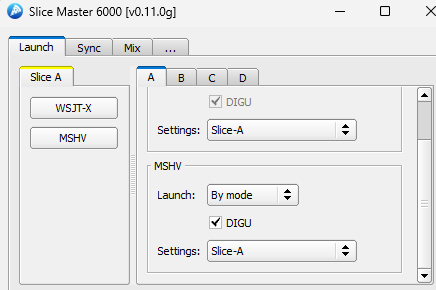
73 Boyan
0 -
You do not need multiple slices for the multi contacts at the same time function in MSHV.
What you need though is to be on a different frequency than the normal FT8 frequencies.
That is why expedition are calling on 14.090 for example instead of 14.074. In dxpedition mode in MSHV you will be able to select how many different transmit signals you want. It can be 2, 3, 4 or more but your power is being split by the number of signals transmitted.
As far as slicemaster is concerned if it does not find MSHV it is because you probably installed it on a folder which is not the "normal" one. In this case you have to edit the config of slice master and put the link to your MSHV.
0


Leave a Comment
Categories
- All Categories
- 401 Community Topics
- 2.2K New Ideas
- 689 The Flea Market
- 8.6K Software
- 196 SmartSDR+
- 6.6K SmartSDR for Windows
- 200 SmartSDR for Maestro and M models
- 460 SmartSDR for Mac
- 279 SmartSDR for iOS
- 268 SmartSDR CAT
- 220 DAX
- 395 SmartSDR API
- 9.6K Radios and Accessories
- 109 Aurora
- 348 FLEX-8000 Signature Series
- 7.2K FLEX-6000 Signature Series
- 999 Maestro
- 58 FlexControl
- 872 FLEX Series (Legacy) Radios
- 975 Genius Products
- 482 Power Genius XL Amplifier
- 358 Tuner Genius XL
- 135 Antenna Genius
- 322 Shack Infrastructure
- 227 Networking
- 483 Remote Operation (SmartLink)
- 145 Contesting
- 847 Peripherals & Station Integration
- 147 Amateur Radio Interests
- 1.1K Third-Party Software