SmartSDR v4.2.20 | SmartSDR v4.2.20 Release Notes
SmartSDR v3.10.15 | SmartSDR v3.10.15 Release Notes
The latest 4O3A Genius Product Software:
The latest 4O3A Genius Product Software and Firmware
If you are needing assistance with FlexRadio products, please refer to the product documentation or check the Help Center for known solutions. Need technical support from FlexRadio? It's as simple as creating a HelpDesk ticket.
SmartSDR & WJST-X Developer Edition

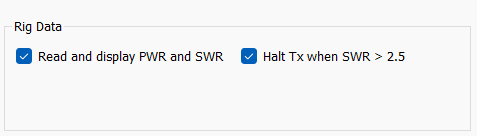
With the Flex connected via TCP, these RIG DATA fields are unavailable.
Is there a way to enable this to stop TX when SWR is high?
Is there a setting in SmartSDR to stop TX when SWR is high OR enable auto-tune to tune it out?
Answers
-
Revisiting this question.
 0
0 -
No answers from Flex ? Perhaps something to add the features list ?
Andy K3UK
0 -
 Mike-VA3MW Administrator, FlexRadio Employee, Community Manager, Super Elmer, Moderator adminOptions
The data is available on the radio if the developers know how to pull it. Please check with them and if it doesn't work, there is a path for the developers to reach out. I suspect this is a Hamlib issue maybe?
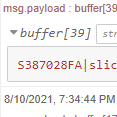
(It does work, because I use it within NodeRed).
0 -
Mike, WSJT-X uses CAT to get the data from the radio. In our case it is SmartCAT. I debugged the CAT interface and found that there is no CAT command to get the SWR from the radio (according to the SmartCAT reference manual). I don't see how this feature can work unless :
- Flex creates a CAT command to fetch the SWR data
- WSJT-X starts using the TCP/IP interface and subscribes to SWR meter data.
Regards
0 -
Mike-VA3MW Administrator, FlexRadio Employee, Community Manager, Super Elmer, Moderator adminOptions
Correct, there is no CAT command to get this data.
In order to get the data, it has to do a TCP connection and subscribe to the meter data and not use a tradition CAT connection.
Maybe the developers will move in that direction as there is so much more data available.
0


Leave a Comment
Categories
- All Categories
- 401 Community Topics
- 2.2K New Ideas
- 689 The Flea Market
- 8.6K Software
- 196 SmartSDR+
- 6.6K SmartSDR for Windows
- 200 SmartSDR for Maestro and M models
- 460 SmartSDR for Mac
- 279 SmartSDR for iOS
- 268 SmartSDR CAT
- 220 DAX
- 395 SmartSDR API
- 9.6K Radios and Accessories
- 109 Aurora
- 348 FLEX-8000 Signature Series
- 7.2K FLEX-6000 Signature Series
- 999 Maestro
- 58 FlexControl
- 872 FLEX Series (Legacy) Radios
- 975 Genius Products
- 482 Power Genius XL Amplifier
- 358 Tuner Genius XL
- 135 Antenna Genius
- 322 Shack Infrastructure
- 227 Networking
- 483 Remote Operation (SmartLink)
- 145 Contesting
- 847 Peripherals & Station Integration
- 147 Amateur Radio Interests
- 1.1K Third-Party Software