SmartSDR v4.1.5 | SmartSDR v4.1.5 Release Notes
SmartSDR v3.10.15 | SmartSDR v3.10.15 Release Notes
The latest 4O3A Genius Product Software:
The latest 4O3A Genius Product Software and Firmware
If you are needing assistance with FlexRadio products, please refer to the product documentation or check the Help Center for known solutions. Need technical support from FlexRadio? It's as simple as creating a HelpDesk ticket.
WSJTX POWER AND SWR

How do I get wsjtx power and swr feature to work with my 6600m ?
Answers
-
0
-
I don't think that WSJT does power and swr, but maybe I am missing something?
73
0 -
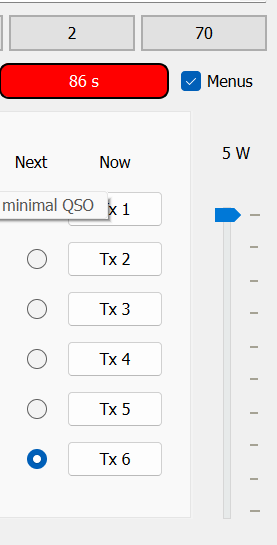
It does. However I only got the power level to show up. It appears on the power slider on the right side of the main panel.

 0
0 -
what version of WSJT is that?
0 -
wsjt-x_improved0
-
It sounds like you need to reach out to the author and see what radios it is supported with. Those value are available from a FlexRadio on a TCP/IP connection but the application software needs to support it.
0 -
Here is the version number…

Here is the info in the release notes…
Transmitted Power and SWR can be displayed (as reported by the radio) in a Status Bar label. Transmission can be stopped automatically if SWR exceeds 2.5. These features work with most modern radios controlled via Hamlib or FLRig.
0 -
If that was to work, and I can't see if Hamlib actually supports it with FlexRadio at the moment, you would need to be connected to the radio via TCP/IP. If you aren't doing that already, you might want to give it a try.
0 -
I can see the Power data but cannot see any SWR data
0 -
I loaded the latest WSJT-Improved and I do not even see Power or SWR.
0 -
I'm not near the radio, but if I recall correctly, the enable checkboxes are on the Settings—General tab at the lower right.
0 -
I have the latest WSJTX Improved (installed yesterday ) and there is a setting for SWR and PWR under WSJTX "Radio" tab. I checked the boxes but it does not seem to work . It does work on my FT-710
Andy K3UK
0 -
Check with the WSJT developers. The data is available.
0 -
I did some testing yesterday and it looks like WSJT-X is using the Kenwood and Flex CAT commands.

When I click tune on WSJT-X I see :
-01-23 12:30:01.348 TCP 60000 [rcvd]: TX
2026-01-23 12:30:01.367 TCP 60000 [rcvd]: ID
2026-01-23 12:30:01.368 TCP 60000 [sent]: ID909
2026-01-23 12:30:01.775 TCP 60000 [rcvd]: MD
2026-01-23 12:30:01.776 TCP 60000 [sent]: MD9
2026-01-23 12:30:01.795 TCP 60000 [rcvd]: ZZFI
2026-01-23 12:30:01.796 TCP 60000 [sent]: ZZFI01
2026-01-23 12:30:01.814 TCP 60000 [rcvd]: ZZPC
2026-01-23 12:30:01.815 TCP 60000 [sent]: ZZPC001
2026-01-23 12:30:02.276 TCP 60000 [rcvd]: IF
2026-01-23 12:30:02.278 TCP 60000 [sent]: IF000181000000100+0000000000190000000
2026-01-23 12:30:02.297 TCP 60000 [rcvd]: ZZPC
2026-01-23 12:30:02.297 TCP 60000 [sent]: ZZPC001
2026-01-23 12:30:02.769 TCP 60000 [rcvd]: FA
2026-01-23 12:30:02.770 TCP 60000 [sent]: FA00018100000
2026-01-23 12:30:02.789 TCP 60000 [rcvd]: ZZPC
2026-01-23 12:30:02.790 TCP 60000 [sent]: ZZPC001
2026-01-23 12:30:03.268 TCP 60000 [rcvd]: IF
2026-01-23 12:30:03.269 TCP 60000 [sent]: IF000181000000100+0000000000190000000
2026-01-23 12:30:03.288 TCP 60000 [rcvd]: MD
2026-01-23 12:30:03.289 TCP 60000 [sent]: MD9
2026-01-23 12:30:03.310 TCP 60000 [rcvd]: ZZFI
2026-01-23 12:30:03.311 TCP 60000 [sent]: ZZFI01
2026-01-23 12:30:03.329 TCP 60000 [rcvd]: ZZPC
2026-01-23 12:30:03.330 TCP 60000 [sent]: ZZPC001
2026-01-23 12:30:03.524 TCP 60000 [rcvd]: RX
The TX and RX command is the Kenwood CAT command to set the transceiver state. The ZZ commands are Flex commands. ZZPC sets the drive level which does show up on the power slider. The IF command is for the transceiver status which does not include swr data. Reviewing the SmartCAT reference manual I don't see any command to get the current SWR from the CAT interface. With out this there is not way to have WSJT-X disable xmit when the SWR > 2.5.
0






Leave a Comment
Categories
- All Categories
- 388 Community Topics
- 2.2K New Ideas
- 658 The Flea Market
- 8.4K Software
- 156 SmartSDR+
- 6.5K SmartSDR for Windows
- 186 SmartSDR for Maestro and M models
- 439 SmartSDR for Mac
- 275 SmartSDR for iOS
- 265 SmartSDR CAT
- 204 DAX
- 386 SmartSDR API
- 9.4K Radios and Accessories
- 52 Aurora
- 297 FLEX-8000 Signature Series
- 7.2K FLEX-6000 Signature Series
- 970 Maestro
- 58 FlexControl
- 866 FLEX Series (Legacy) Radios
- 944 Genius Products
- 471 Power Genius XL Amplifier
- 347 Tuner Genius XL
- 126 Antenna Genius
- 306 Shack Infrastructure
- 215 Networking
- 468 Remote Operation (SmartLink)
- 142 Contesting
- 811 Peripherals & Station Integration
- 144 Amateur Radio Interests
- 1.1K Third-Party Software