SmartSDR v4.1.5 | SmartSDR v4.1.5 Release Notes
SmartSDR v3.10.15 | SmartSDR v3.10.15 Release Notes
The latest 4O3A Genius Product Software:
The latest 4O3A Genius Product Software and Firmware
If you are needing assistance with FlexRadio products, please refer to the product documentation or check the Help Center for known solutions. Need technical support from FlexRadio? It's as simple as creating a HelpDesk ticket.
Connecting from a remote pc

okay, so this is probably a dumb question but here goes. I am trying to run an app on a different pc than the pc running the radio. Let's call that pc#1. I set up a cat port on the radio pc#1 and tried to connect to it from pc #2. I am seeing a "port connection refused" error on pc#2. Anyone's guess what that really means but it almost sounds like some sort of permission fault. Firewall is off on pc#1. I think it is on for pc#2. Maybe the issue is there. I can try turning off the firewall on pc#2 I wonder can I even make this connection at all? Am I in lala land for even trying this? I've ha no trouble when the app is running on the same pc as the radio. Localhost:portnumber. But not so much from another machine using ipaddress:portnumber. Seems like a reasonable idea except it didn't seem to work.
Answers
-
You are close.
On both PCs you don't connect to each other, but you connect to the radio.
- Install SmartSDR on both PCs and normal
- On both PCs start CAT and DAX and have them connect to radio (not the other PC)
That should get you going.
Mike va3mw
0 -
Yeah - I believe that only works if I turn on multi-flex. I knew that was an option. There are other options as well. I could run either HRD or something with an HRD type engine like slicemaster. Frankly Slicemaster is probably a little lighter than HRD but either would work. At this point I wasn't just trying to solve the problem at any cost I was trying to understand why I can't setup a port using smartCat and connect to it across the network. Maybe the explanation is as simple as SmartCat only creates virtual ports. Seems unfortunate but if that was the intent then it is what it is. I made the assumption the port was "real" to the extent it would have ethernet exposure. I guess not. Seems like a utility to port forward or passthru from a virtual smartcat socket to an actual ethernet listening port would be handy. WIth a limited single objective, it should be pretty resource light as well. Oh well. Hey, I am just an appliance type guy ya know. I only pretend to know how stuff works. : ) Hey maybe this functionality already exists with something as simple as a function in some library someplace. It should. Seems like a handy tool to have. Sort of like COM to COM works by passing virtual ports to physical ports for serial connections.
0 -
No, multiflex is not required.
I do what you do daily and I run my Maestro of PC at my house and then I have another PC by the radio that I run all my digital programs on and connect via remote desktop (the same as you want to do, but just a bit different).
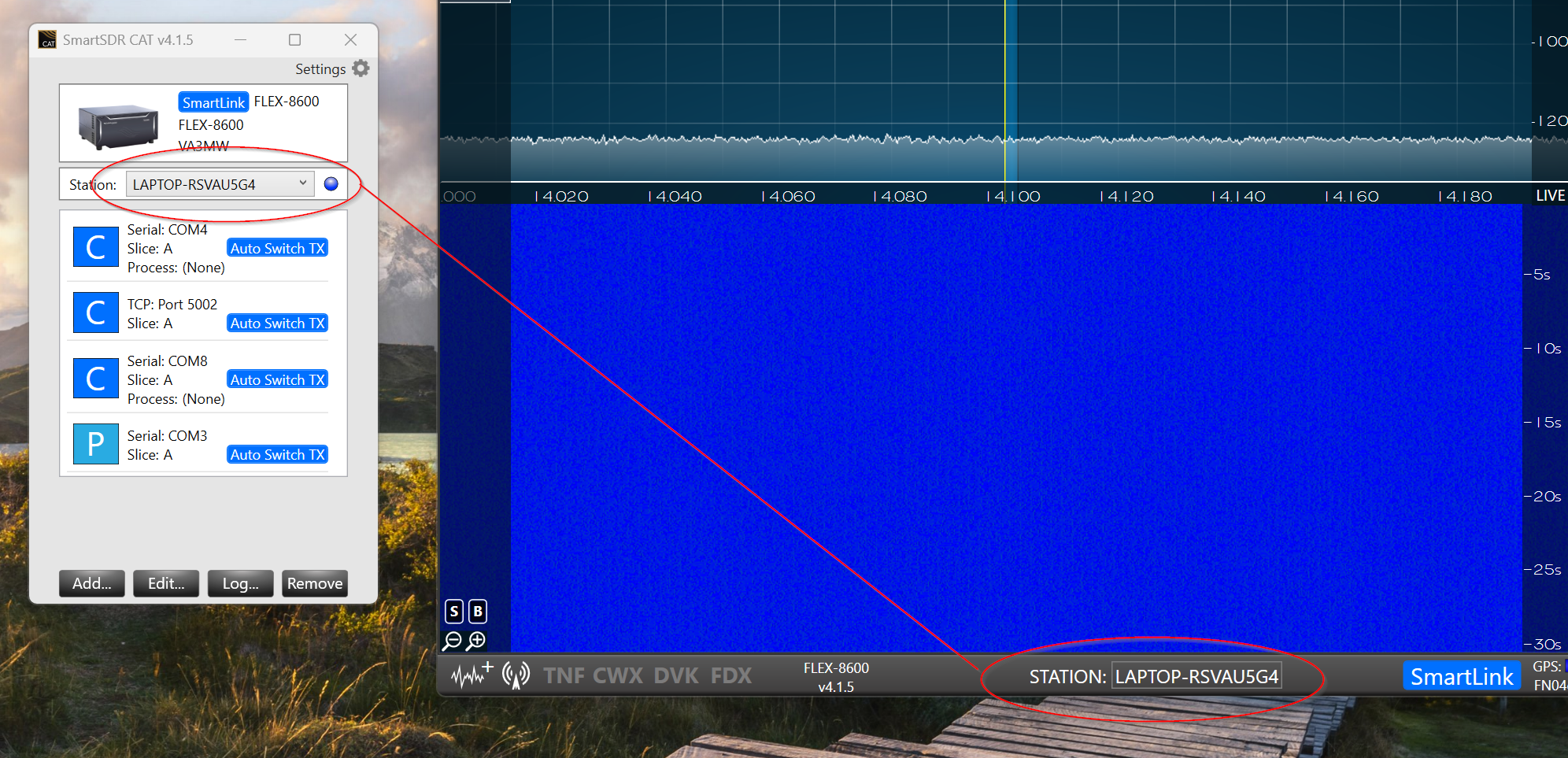
PC1 - Logging program with SmartSDR CAT (and DAX if required). You associate CAT with the other client (top of the CAT application).
PC2 - SmartSDR user application.
In this picture, you can see the Station Name that associates CAT with the user client. Can can run on any computer on the network.
 0
0


Leave a Comment
Categories
- All Categories
- 389 Community Topics
- 2.2K New Ideas
- 658 The Flea Market
- 8.4K Software
- 157 SmartSDR+
- 6.5K SmartSDR for Windows
- 186 SmartSDR for Maestro and M models
- 439 SmartSDR for Mac
- 275 SmartSDR for iOS
- 265 SmartSDR CAT
- 204 DAX
- 386 SmartSDR API
- 9.4K Radios and Accessories
- 53 Aurora
- 297 FLEX-8000 Signature Series
- 7.2K FLEX-6000 Signature Series
- 971 Maestro
- 58 FlexControl
- 866 FLEX Series (Legacy) Radios
- 945 Genius Products
- 472 Power Genius XL Amplifier
- 347 Tuner Genius XL
- 126 Antenna Genius
- 307 Shack Infrastructure
- 215 Networking
- 468 Remote Operation (SmartLink)
- 142 Contesting
- 811 Peripherals & Station Integration
- 144 Amateur Radio Interests
- 1.1K Third-Party Software