SmartSDR v4.1.5 | SmartSDR v4.1.5 Release Notes
SmartSDR v3.10.15 | SmartSDR v3.10.15 Release Notes
The latest 4O3A Genius Product Software:
The latest 4O3A Genius Product Software and Firmware
If you are needing assistance with FlexRadio products, please refer to the product documentation or check the Help Center for known solutions. Need technical support from FlexRadio? It's as simple as creating a HelpDesk ticket.
Anyone having issue's using RXA receive antennas?

Is anyone getting distortion in the panadapter/waterfall when using a dedicated receive antenna? If you're using 100w to 1500w, basically at any power level.
Dave
k4em
Comments
-
I have a W6LVP receive loop on RXA separated by about 60 feet from a G5RV Jr. The G5RV Jr. is driven by a 6600M or a 6300, so a max of 100W. I have not observed distortion effects in the pan adapter when transmitting. I have the null of the loop pointed at the TX antenna.
How far is your RX antenna from the TX antenna?0 -
Dave, can you share a screen shot of what you are seeing please.
0 -
And some description of the antenna setup? Type, distance between, directionality, etc.
0 -
I also have a W6LVP receive loop on RXA. I have it mounted on a 4ft tripod. It came with the optional T/R switch which is controlled by RCA TX1. The T/R switch disconnects and grounds the RXA input such that it can not be overloaded by RF during TX. Works good. I use it on higher bands with +8 to +16db pre amp setting. I can achieve a higher S/N in most cases. Loop On the Ground (LoG) is another good RX antenna - 60ft square, 15ft on each side laying on the ground. Very quiet. Dan WA1QZX.
0 -
I also use a Loop on Ground. Only effective one at the previous QTH next to an Army post. Also less affected by TX. Only drawback I noticed is variable directionality.
1 -
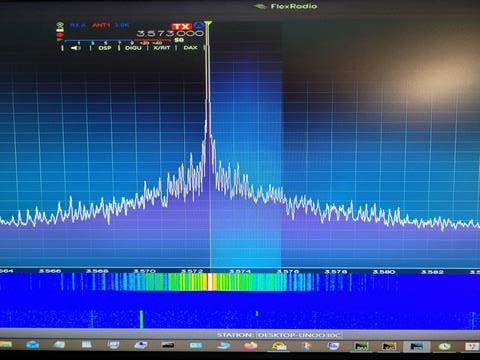
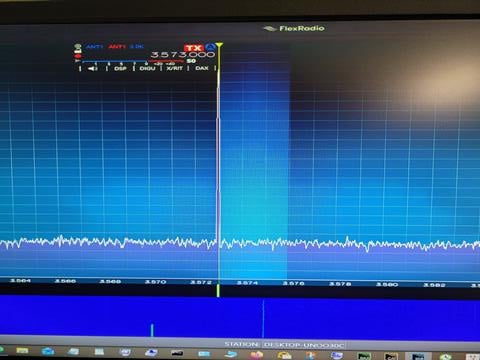
Here are some Pics of a normal display and a distorted one. This occurs on any band, any antenna any power level.
Dave
k4em
PS I tried to post some pics, from my computer and phone,in several different formats; jpg, bmp, png, and get a permission error.
0 -
Hi Dave, if you send the pics to my QRZ email, I will post them here for you. Once you have more activity here, the automatic anti-spam thing will let you post pics.
0 -
Here are the pictures that Dave sent:
 0
0 -
@k4em I have had many Flex radios 6400,6600,8400,8600 and tried many things to get that to stop causing the many spikes on TX even shutting off the external RX ant during TX etc. The RX antennas were both 3 ft Loop type and DXE vertical RX antennas with both the 12ft and 23ft verticals for the antenna. This was also at 3 completely different QTH locations with minimum RX antenna distance from TX antennas of 100ft. Made no difference. Another DXer friend and I tried to clean this up at both our locations, he tried 6400,6600 and 8400 so far and different loops , verticals etc but only 60ft at his QTH. We tried isolators, broadcast band filters, you name it but NOTHING made a change Actually the upper pic (which shows an external RX antenna connected) looks relatively tame compared to some Bands. Good luck as my friend and I could never get an answer and we have been trying for years to solve this. Actually we did solve it by using a remote 8 circle array fed into an couple RSPdx SDR's to pipe back to our main stations. Probably not what you were looking for but an honest report anyhow. Good luck de K1UO
BTW: It looks bad on the scope but does not appear to be actually transmitted as far as we could determine.
0 -
When you view your transmitted signal on the panadapter/bandscope, you are seeing it before the final RF output filtering. Because of that, the display can look misleading and worse than what is actually transmitted.
If you monitor the signal using a second slice on a different antenna port, you’ll see a very different result — this view represents what is actually leaving the radio after filtering. You can use the scale on the right side of the panadapter to verify how far down any harmonics or skirts are in dB.
It’s also expected that when transmitting while using a different RX antenna (such as a loop or active receive antenna), the TX panadapter can appear degraded. Again, this is because the display is intentionally showing the signal prior to RF filtering. This was a deliberate design choice to provide visibility into the signal at that stage. As Larry noted, what you’re seeing is not what’s going out over the air.
If I didn't fully answer your concern or maybe I got it wrong, let me know and I will expand on it.
1








Categories
- All Categories
- 389 Community Topics
- 2.2K New Ideas
- 658 The Flea Market
- 8.4K Software
- 157 SmartSDR+
- 6.5K SmartSDR for Windows
- 186 SmartSDR for Maestro and M models
- 439 SmartSDR for Mac
- 275 SmartSDR for iOS
- 265 SmartSDR CAT
- 204 DAX
- 386 SmartSDR API
- 9.4K Radios and Accessories
- 53 Aurora
- 297 FLEX-8000 Signature Series
- 7.2K FLEX-6000 Signature Series
- 971 Maestro
- 58 FlexControl
- 866 FLEX Series (Legacy) Radios
- 945 Genius Products
- 472 Power Genius XL Amplifier
- 347 Tuner Genius XL
- 126 Antenna Genius
- 307 Shack Infrastructure
- 215 Networking
- 468 Remote Operation (SmartLink)
- 142 Contesting
- 811 Peripherals & Station Integration
- 144 Amateur Radio Interests
- 1.1K Third-Party Software