SmartSDR v4.1.5 | SmartSDR v4.1.5 Release Notes
SmartSDR v3.10.15 | SmartSDR v3.10.15 Release Notes
The latest 4O3A Genius Product Software:
The latest 4O3A Genius Product Software and Firmware
If you are needing assistance with FlexRadio products, please refer to the product documentation or check the Help Center for known solutions. Need technical support from FlexRadio? It's as simple as creating a HelpDesk ticket.
Use of +ACC

The user guide states:
ACC button: Clicking this button will enable audio input and output on the ACC connector on
the rear of the FLEX-6000 at the same time as a different primary audio source.
Does anyone use this function and if so how?
Thanks.
Answers
-
Hi,
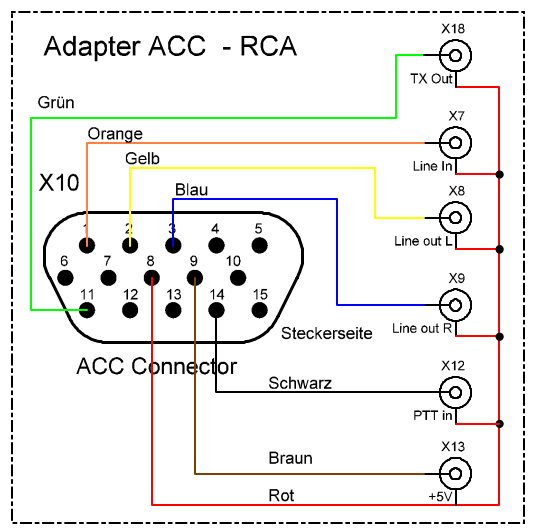
I have connected my Rode microphone via the UR6QW equalizer to this connector on my 8600 and it works well.Since this is a line-in connector, I assume that a normal microphone signal will not be sufficient.
My connection ACC-adapter:
 0
0 -
Thanks for the info. I've had two responses so far. The other was using the connector for a PACTOR modem.
0 -
Now, PACTOR is not my area of expertise.
But as far as I know about these modems, their audio signals operate in the range of 10 mV - 2 V p-p,
which corresponds to the Line I/O specification.Therefore, I think this port is exactly the right one.
73,
Klaus DF3RP0


Leave a Comment
Categories
- All Categories
- 388 Community Topics
- 2.2K New Ideas
- 658 The Flea Market
- 8.4K Software
- 156 SmartSDR+
- 6.5K SmartSDR for Windows
- 186 SmartSDR for Maestro and M models
- 439 SmartSDR for Mac
- 275 SmartSDR for iOS
- 265 SmartSDR CAT
- 204 DAX
- 386 SmartSDR API
- 9.4K Radios and Accessories
- 53 Aurora
- 297 FLEX-8000 Signature Series
- 7.2K FLEX-6000 Signature Series
- 970 Maestro
- 58 FlexControl
- 866 FLEX Series (Legacy) Radios
- 944 Genius Products
- 471 Power Genius XL Amplifier
- 347 Tuner Genius XL
- 126 Antenna Genius
- 306 Shack Infrastructure
- 215 Networking
- 468 Remote Operation (SmartLink)
- 142 Contesting
- 811 Peripherals & Station Integration
- 144 Amateur Radio Interests
- 1.1K Third-Party Software