SmartSDR v4.1.5 | SmartSDR v4.1.5 Release Notes
SmartSDR v3.10.15 | SmartSDR v3.10.15 Release Notes
The latest 4O3A Genius Product Software:
The latest 4O3A Genius Product Software and Firmware
If you are needing assistance with FlexRadio products, please refer to the product documentation or check the Help Center for known solutions. Need technical support from FlexRadio? It's as simple as creating a HelpDesk ticket.
Flex User Monitor

I have a new utility available on GitHub. The setup file is in the Releases section on the right side of the GitHub page.
Utility to allow monitoring and controlling Flex radios that multiple
people can log into.  Has a security file to allow only listed stations
to connect.  Stations can be set to allow or disallow transmit.  Designed
to make it easier to manage club or shared radios.

If you want to manage a club station that has one or more Flex radios, this should make it easier. Only stations listed in the security file can connect to the radio. Anyone with the optional xmit=no parameter can connect but not transmit. This should be good for club members who are not licensed yet.
People often ask me if they should buy a Flex radio. Since not every radio is best for every ham, I like to let them operate mine so that they can decide for themselves if a Flex is for them. Now I can feel more confident in sharing - I just set the xmit=no parameter. When I want to operate, I just take their station name out of the file, and I never know that they were there until I check the log file.
Another trick that I use is to set up a guest SmartLink account. I unregister my radio(s) from my main SmartLink account and register them to the guest account. Now I don't have to worry about changing the main account password all the time. When I am done sharing, I re-register to the main account.
Here is a sample security file. It is plain text and is editable in NotePad.
LENBIGLAPTOP xmit=yes

LenBigLaptop xmit=yes

LEN-LAPTOP xmit=no
Here is a sample of the log file when someone who is not on the allowed list tries to log in:
12/29/2025 9:44:27 AM Len.8600    LENBIGLAPTOP1 connected with SmartSDR-Win.    Not on allowed list - DISCONNECTED

12/29/2025 9:44:27 AM Len.8600    LENBIGLAPTOP1 disconnected
The easiest way to get club members' station name is to have them attempt a connect. They will show up in the log with the keyword DISCONNECTED. Search for that to find them, then copy their station name into the security file and save it. The Refresh Security button will highlight in red indicating that a change has been made. Click it and the person now has access to the radio.
Note that the utility does not use SmartLink. It needs to be running on a PC at the radio site. If it could be run remotely, then anyone could start controlling access - probably not a good thing… TeamViewer, AnyDesk, etc, etc can be used to operate the utility.
I hope this makes it easier to manage a Flex club station. If you try it, let me know what you think.
Comments
-
I have a new beta version of Flex User Monitor ready to test. Be sure to uninstall the previous version if you already installed it. I started the user manual and anticipate having it done early next week. .
*********************** V1.01 ***********************
Added ANY as a radio selection.
Increased radio selection box size to hold more discovered radios.
Widened radio selection box to accommodate longer station names.
Blank Radio Information when radio disconnects.
Added code to preserve the Log Events checkbox status.
Added ";" as a comment indicator in the security file.
Added call= parameter to allow associating a call to the station.
Fixed code to properly use the FindSliceByIndex method in FlexLib.
Fixed issue where connect isn't complete before attempting to populate fields.
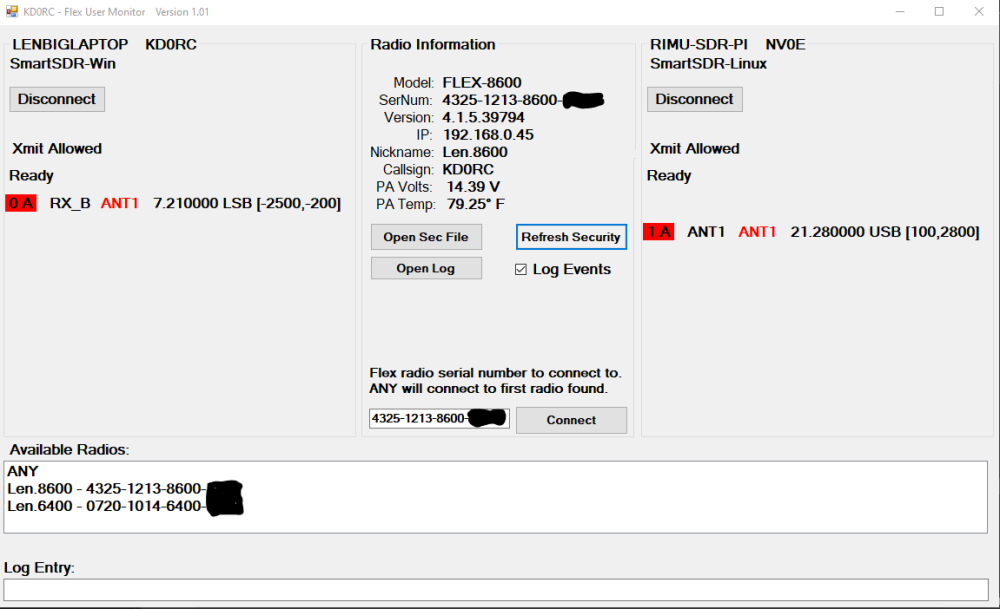
This is what the security file looks like:
LENBIGLAPTOP  xmit=yes call=KD0RC ;anything here

LenBigLaptop xmit=yes call=KD0RC

LEN-LAPTOP xmit=yes call=KD0RC

SIMON-PC-2022 xmit=no call=NV0E

SIMON-MS-7D25 xmit=no call=NV0E

RIMU-SDR-PI xmit=no call=NV0E
Thanks to John, K1ESE for the preliminary testing and his suggestion about allowing comments. John, I took it one level further and added the call= parameter. This will cause the call to show on the main screen. I will also add this to the logging before I release it to GitHub.
You might notice that the second station (MultiFlex) is Simon on his Raspberry Pi! He is not ready for beta testers yet but has his Linux S/W working on a Pi! He was able to successfully operate my 8600 over SmartLink using this setup.
1 -
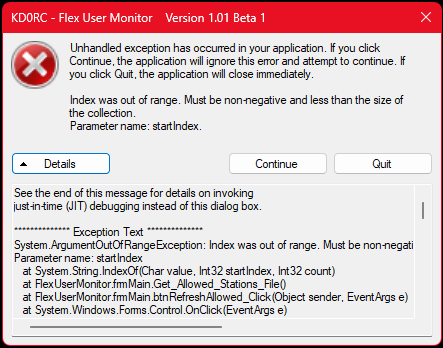
Great concept. It will be very useful as soon as I get past this
73 de K1ESE
John0 -
Hi John, thanks for posting this. It is clearly a problem in my code. I should be able to find this pretty quickly. I'll post a new beta version as soon as I get it fixed.
0 -
Hi John, can you send me your AllowedStations.txt file? It is in the root drive, \KD0RC\FlexUserMonitor folder. You can paste in the entries here, or if you prefer not to make that info public, you can send me an email.
0 -
Well I learned something new. I thought (for no good reason…) that spaces were not allowed in station names. Turns out they are, so I just updated FlexUserMonitor to use the comma as a parameter delimiter instead of spaces. Spaces are still allowed between parameters for readability, but they are not necessary.
Thanks to John, K1ESE for finding this issue! I have sent him a beta version to verify that it now works for his station. If it looks good, I will release it later today or tomorrow. I have also fixed some other annoying issues and added some functionality.
Sneak preview…
*********************** V1.01 ***********************
Added ANY as a radio selection.
Increased radio selection box size to hold more discovered radios.
Widened radio selection box to accommodate longer station names.
Blank Radio Information when radio disconnects.
Added code to preserve the Log Events checkbox status.
Added ";" as a comment indicator in the security file.
Added call= parameter to allow associating a call to the station.
Added call to main page display.
Added Allow All check box.  Mostly used to log all connections so that
  the station names can be copied into the security file.
Fixed code to properly use the FindSliceByIndex method in FlexLib.
Fixed issue where connect isn't complete before attempting to populate fields.
Fixed issue where blanks were not allowed in station name. (Thanks to John, K1ESE
  for finding this!)
If anyone else is using this (or thinking about it), I would love to hear from you. We are just rolling it out to a club here in the Denver area, so I don't have a lot of real-world experience with it yet. It has worked well for managing and sharing my own Flex radios, but its real value is with club stations.
1 -
Hi John, I tried to send you the latest Beta version, but it wouldn't go over e-mail. Sorry I didn't notice the rejection until now.
Here is V1.01 Beta 3 that should work. I will send your AllowedStations.txt file via e-mail to preserve privacy. Please give this a try along with the AllowedStations file that I modified and let me know how it works.
The new format is to use commas instead of blanks as parameter delimiters. Spaces are stillowed for readability.
Sample AllowedStations.txt file:
LENBIGLAPTOP, xmit=yes, call=Len KD0RC, ; anything here

LenBigLaptop, xmit=yes, call=Len KD0RC,

LEN-LAPTOP, xmit=yes, call=Len KD0RC,

some other station, xmit=no, call=Simon NV0E,

yet another, xmit=no, call=Simon NV0E,
;some station, xmit=yes, call=W1AW,  ; Commented out station to remove access without deleting the line
0 -
I uninstalled the prior version and installed 1.01 Beta 3.
Eureka!!!
It works great.
73 de K1ESE
John0 -
Great, thanks John! I will prep it for release and put it out there on GitHub shortly.
0 -
Version 1.01 is now available on GitHub:
*********************** V1.01 ***********************
Added ANY as a radio selection.
Increased radio selection box size to hold more discovered radios.
Widened radio selection box to accommodate longer station names.
Blank Radio Information when radio disconnects.
Added code to preserve the Log Events checkbox status.
Added ";" as a comment indicator in the security file.
Added call= parameter to allow associating a call to the station.
Added call to main page display.
Added Allow All check box.  Mostly used to log all connections so that
  the station names can be copied into the security file.
Fixed code to properly use the FindSliceByIndex method in FlexLib.
Fixed issue where connect isn't complete before attempting to populate fields.
Fixed issue where blanks were not allowed in station name. (Thanks to John, K1ESE
  for finding this!)
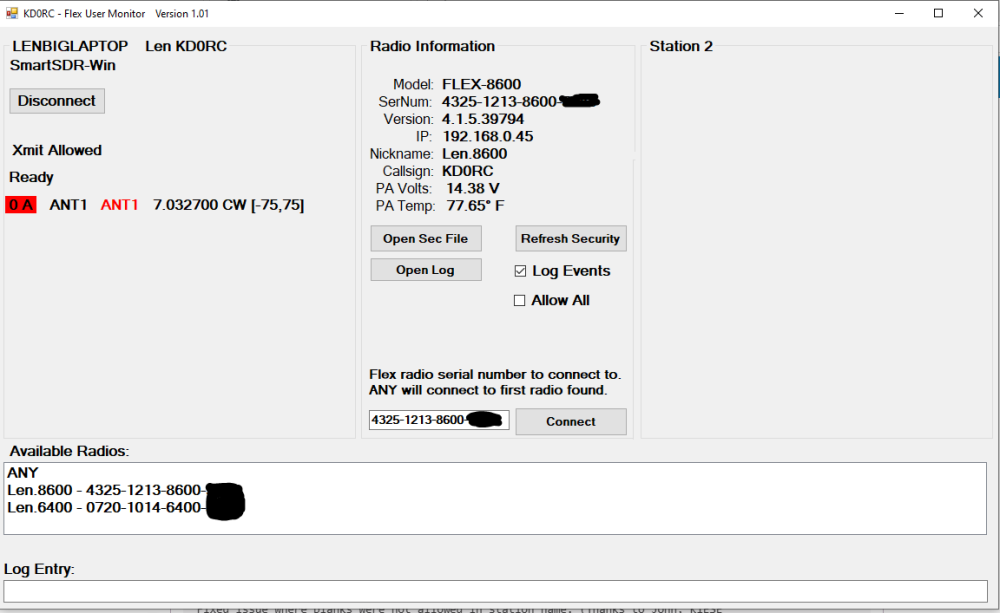
Sample AllowedStations.txt file:
LENBIGLAPTOP, xmit=yes, call=Len KD0RC, ; anything here
LenBigLaptop, xmit=yes, call=Len KD0RC,
LEN-LAPTOP, xmit=yes, call=Len KD0RC,
some other station, xmit=no, call=Simon NV0E,
yet another, xmit=no, call=Simon NV0E,
;some station, xmit=yes, call=W1AW,  ; Commented out station to remove access without deleting the line
1 -
Len, when I first saw your Flex User Monitor software I didn't pay much attention to this because I mistakenly thought it for use with SmartLink, and SmartLink will always be a no go for me from now til . . . due to it's inability to get past CGNAT/double NAT.
I re-read your first post, "the utility does not use SmartLink", now I can get my head around this. Nicely done!
May I suggest to simplify use for the administrator/owner, create a button, ADMIN OVERRIDE, that when enabled would allow only admin station access and ignore other station names. This will save you from manually removing stations from security file, then re-entering them when your done.
I had to go into Window Security to allow the app through the firewall. Then it worked. See's both 8600 and 6700 I had SSDR connected to 8600. When I disconnected that via FlexUserMonitor, it did disconnect but it also reset the radio. Anyone else experience that?
0 -
Hi Mike, good idea - I will think about how to do that. In the meantime, simply add a semi-colon to the front of the line to effectively remove the station from access. Delete the semi when you want to grant access again.
Another trick that you can use is to rename the AllowedStations.txt file and create a new one with just admin station names in it. Rename back when you are done.
0 -
ok Ken. I'm playing around with the source file. Got some other radio data that I thought would be good to know like confirming radio is connected to the internet, also moving some things around just to getting use to this environment.
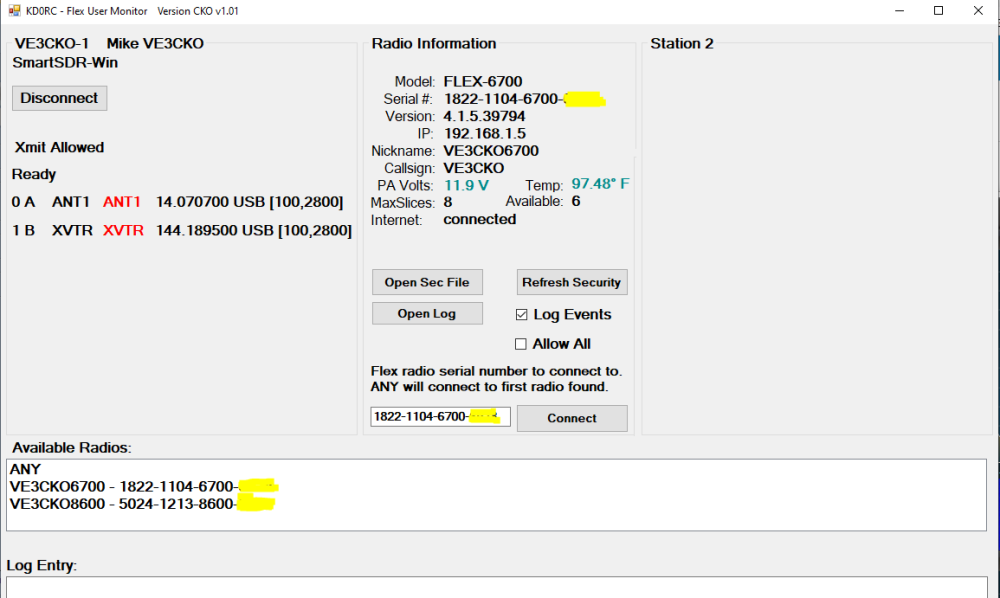
I looked for new data in v4 like when the license was issued and highest major version. I have managed to get this info via node-red but so far can't find reference to these in the Assembly FlexLib. Is the Flexlib the very latest ? If not what time frame from a new release would this be made available to developers?
0 -
Hi Mike, it looks like you have a good handle on all of this! I re-compiled the latest FlexLib as of 4.1.3, so it is reasonably up to date. I am pretty sure that the licensed version info is in the latest FlexLib, but I haven't tried to use it. You might want to wire-shark it to see if it is in the discovery packet or possibly one of the big info packets that happen at connect time.
I don't know anything about release timeframes from Flex, so I can't answer that one.
0 -
Version 1.02 is now available on GitHub:
*********************** V1.02 ***********************
- Added parameter to limit access to admin=yes stations when the Admin Only
- checkbox is checked. Thanks to Mike, VE3CKO for the idea!
The new admin= parameter in action:
LENBIGLAPTOP, admin=yes, xmit=yes, call=Len KD0RC, ; anything here

LenBigLaptop, xmit=yes, call=Len KD0RC,

LEN-LAPTOP, xmit=yes, call=Len KD0RC,
In this example, if the Admin Only checkbox is checked, only LENBIGLAPTOP would be allowed to connect.
Another use for this would be if the club wants to use their station for a contest with only a select few able to connect during the contest. Just add the admin=yes parameter to those stations and click the Admin Only checkbox. When the contest is over, either set admin=no, or remove the admin= parameter.
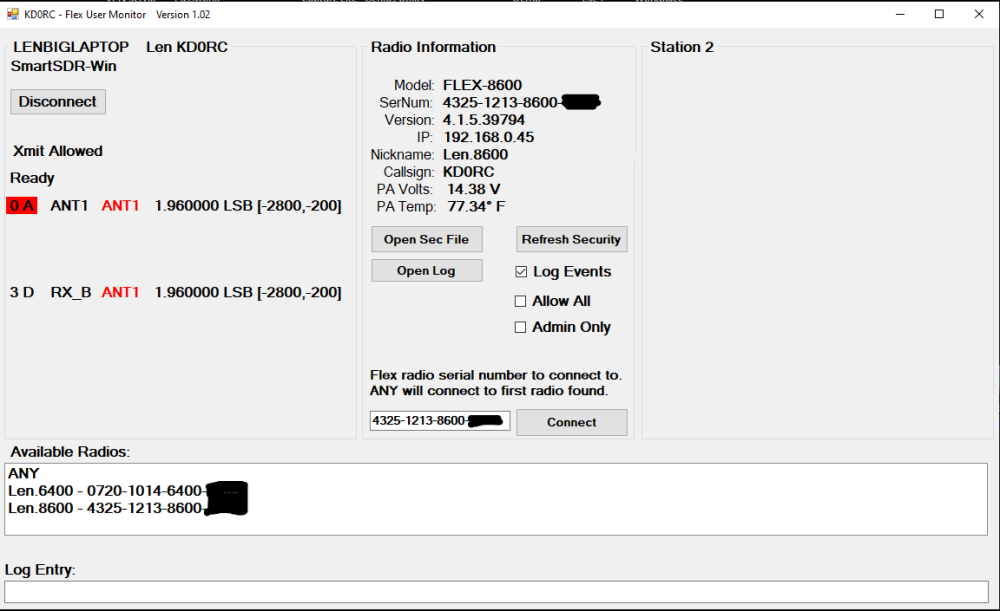
Thanks to Mike, VE3CKO for the idea! For club stations, this will be a good addition.
0 -
Lacking this capability was a show stopper for our club using a Flex.
0 -
Len, been doing some more playing getting more data sorted out. Can get the freq, FilterHigh, FilterLow using:
string LeftFreq0 = _thisRadio.FindSliceByIndex(slice).Freq.ToString();
string LeftFilterHigh0 = _thisRadio.FindSliceByIndex(slice).FilterHigh.ToString();
string LeftFilterLow0 = _thisRadio.FindSliceByIndex(slice).FilterLow.ToString();
Trying to get mode as well as other bits data, just need a point in the right direction. Tried a variety to get mode with no luck so far:
string ModeTest1 = = _thisRadio.ActiveSlice.Mode;
string ModeTest2 = _thisRadio.FindSliceByIndex(slice).Mode;
0 -
Hi Mike, try DemodMode instead of Mode. Be careful with ActiveSlice when in MultiFlex mode as there can be two active slices, one on each connected station. You will need to watch the ClientHandle.
To find the properties, methods and events of an object like slice (assuming Visual Studio), type in "slice." and the dropdown will show you everything available for that object.
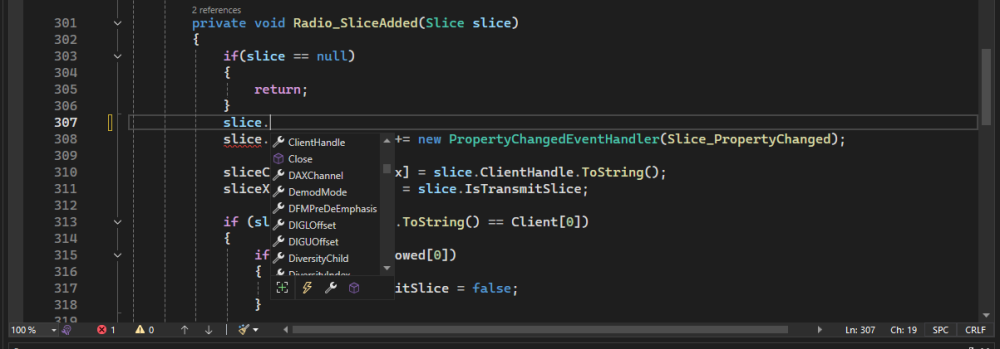
If you look for Mode, it isn't there. Go through the list and you will find DemodMode. It is not always immediately obvious what the name of the desired property is, but with some poking around, you can usually find the appropriate property or whatever you are looking for.
If you are not in a routine that passes in the slice object, you can do what you are suggesting in your post and use the _thisRadio.FindSliceByIndex method. Be sure that the slice you are looking at is not on a different client than the one you are trying to report on. slice.ClientHandle can be very helpful for checking this.
0 -
Perfect, thanks Len. From screenshot below you can see where I'm going with this, lol.
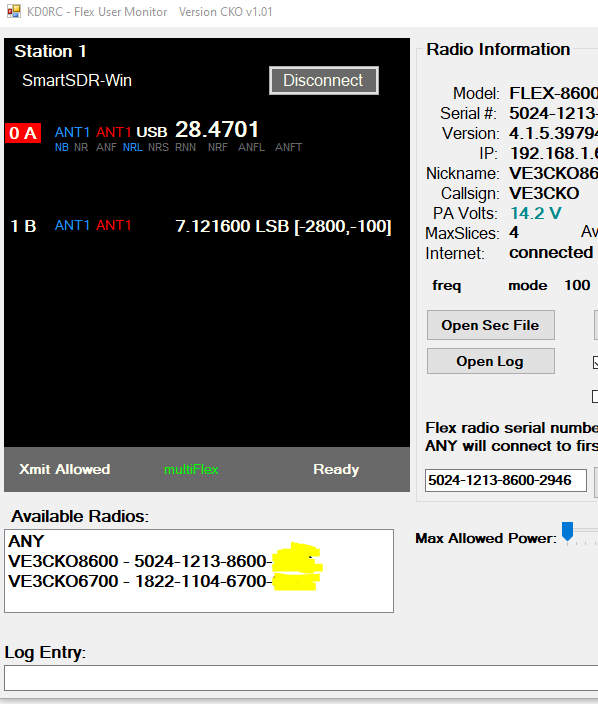 1
1 -
Latest v1.02 and it works nicely with whatever two stations I've allowed in the allowed file. I understand this app allows stations to connect to one radio.
I've come across and issue that you may or may not be aware of. In my scenario I have two radios, 8600 and 6700. When I have SSDR on my laptop connected to 8600 and I try to connect to the 6700 from any device, it won't allow that connection.
In other words I have to shut the app down in order for me to use two different radios. That's easy enough just to close the app when I want to operate two separate radios myself. That defeats the purpose of your app. Ideally, one radio could be for external stations and the second for self usage.
I've confirmed it does this if the laptop is in the allowed file or not. You'll have to ignore any other radio connections if the app is already connected to one radio, something like that.
0 -
Hi Mike, I have two radios here as well and have not seen that behavior. I will take a look and see if I can recreate the issue.
0 -
Len, I sent an email to your arrl.net account, is that ok or is there a better one to use ?
0 -
HI Mike, I do not see the behavior at all. One thing to check is that you don't have another instance of the utility running. It could be on the same computer or on another one. I have one instance on my old laptop watching my 6400 and another instance on my current laptop watching my 8600.
Another thing to watch for is that you have changed your AllowedStations.txt file to use commas as parameter delimiters instead of spaces.
If none of this is the problem, maybe we could use Zoom or something to try and find the issue.
I will look for your e-mail.
0 -
I made sure there was no other instances of the app running but you got me thinking, using the Task Manager I found a ghost SmarSDR (32-bit) process open on the computer running the Flex User Monitor. That was the cause. It must have been connected to the 6700 which would explain why I couldn't connect. Glad that this issue was not your app, sorry for the red herring.
About click events on whatever slice, say case 0 for slice0, how would I keep the properties so I can set them from click or TrackBar event?
0 -
Hi Mike, I'm glad you found the issue. That kind of thing can be really hard to diagnose!
If the property is boolean and you want to toggle it, just read it, then set it to the opposite value. If you are using a checkbox, just set it to the .checked value of the checkbox.
You can see how I did that with the TX (isTransmitSlice) when disallowing TX based on the AllowedStations file.
If needed, you can keep a global variable that is initially populated at slice creation, and kept up to date with slice updated events.
Be careful that you don't set a property in the event routine that handles that property or you will get a runaway condition that will crash the app, and possibly the radio.
0 -
I have two things going on, A & B.
A. Toggling NB from SSDR client: code is in case 0: inside private void Slice_PropertyChanged(object sender, PropertyChangedEventArgs e). This works, each click of the NB in DSP toggles the NR indicator in the form, but stops working if I add the code Toggling NB from form (see below).
                        if (_thisRadio.FindSliceByIndex(slice).NBOn)   //  NB from radio
                        {
                            lblLeftNB0.ForeColor = Color.DodgerBlue;
                        } else {
                            lblLeftNB0.ForeColor = Color.DimGray;
                        }
B. Toggling NB from form: I'm toggling the boolean property NB0status (not shown) in the NB click event no prob and it is global. The code below is also in case 0: inside private void Slice_PropertyChanged(object sender, PropertyChangedEventArgs e). I can confirmed by toggling NB indicator on form it does change both the NB indication on the form and the NB in DSP on the SSDR client but only after I refresh anything from SSDR like adjust freq.
NOTE when this code is inserted, Toggling NB from SSDR client tries to work. Specifically, if NB0status is true, the NB in DSP momentarily goes off, then goes back on. The NB indicator on the form does not change. Alternately, if NB0status is false, the NB in DSP momentarily goes on, then goes back off. The NB indicator on the form does not change.
                    if (NB0status)
                    {
                         lblLeftNB0.ForeColor = Color.DodgerBlue;
                         _thisRadio.FindSliceByIndex(slice).NBOn = true;
                    }
                    else
                    {
                         lblLeftNB0.ForeColor = Color.DimGray;
                         _thisRadio.FindSliceByIndex(slice).NBOn = false;

                    }
Hope I'm not confusing you with too much detail.
 0
0 -
Hi Mike, I think what you are trying to do is to display a slice and its properties (NBOn, etc) then click on the control that displays the property to toggle it on and off. If that is not it, let me know.
In the slice property changed event, you will get a property name in the e.PropertyName parameter. I don't know what that is offhand for NB, but you can display it to find out. if you test for that name, then set the color of your control (probably a label) to indicate that the NB is on or off. I think you have that working, although I don't see that you are checking e.PropertyName. You can get away without it, but as you get more and more code written, you will start changing form controls that are already set. This can cause slowdowns and flickering.
You have to be sure that you are not changing the NB status in the property changed event, or it will trigger itself and can run off into the weeds and even crash the radio. It can also cause it to have the problem you mention where it turns on, then right back off or off then back on.
When you make the change in the Click or MouseClick event, you can read and change the status of the NBOn property right there. For example:
_thisRadio.FindSliceByIndex(slice).NBOn = !_thisRadio.FindSliceByIndex(slice).NBOn;
For this to work, you have to know the slice number. If this label is always associated with slice 0, then you can hard-code a zero in place of the slice variable in my example.
Let me know if this helps.
0 -
I didn't know to replace slice with the actual slice # in the event. That was it, EXCELLENT !
_thisRadio.FindSliceByIndex(0).NBOn = !_thisRadio.FindSliceByIndex(0).NBOn;
0 -
HI Len,
I am trying the program but I am a bit confused how it is supposed to be used.
If I want other people to actually use my radio, I still have to give them the login and password to smartlink correct ?
0 -
Yes, that is correct. SmartLink only allows one set of login credentials, so that has to be shared among the people who get access to your radio.
The utility has a list of allowed station names. Anyone who connects, but is not on the list will be immediately disconnected and will appear in the log. Anyone who connects and is on the list will stay connected and will be able to use the radio normally.
You can also prevent transmission for individual users with the xmit=no parameter.
I hope to have a user manual available soon.
0 -
Ok very clear thanks for explanation. The only thing you should add in the readme of github is just to mention that we need to create the allowstation file and how it should be name with a line example.
Thanks for the tool will change my password and try with someone
0





Leave a Comment
Categories
- All Categories
- 388 Community Topics
- 2.2K New Ideas
- 658 The Flea Market
- 8.4K Software
- 156 SmartSDR+
- 6.5K SmartSDR for Windows
- 186 SmartSDR for Maestro and M models
- 439 SmartSDR for Mac
- 275 SmartSDR for iOS
- 265 SmartSDR CAT
- 204 DAX
- 386 SmartSDR API
- 9.4K Radios and Accessories
- 52 Aurora
- 297 FLEX-8000 Signature Series
- 7.2K FLEX-6000 Signature Series
- 970 Maestro
- 58 FlexControl
- 866 FLEX Series (Legacy) Radios
- 944 Genius Products
- 471 Power Genius XL Amplifier
- 347 Tuner Genius XL
- 126 Antenna Genius
- 306 Shack Infrastructure
- 215 Networking
- 468 Remote Operation (SmartLink)
- 142 Contesting
- 811 Peripherals & Station Integration
- 144 Amateur Radio Interests
- 1.1K Third-Party Software