SmartSDR v4.2.20 | SmartSDR v4.2.20 Release Notes
SmartSDR v3.10.15 | SmartSDR v3.10.15 Release Notes
The latest 4O3A Genius Product Software:
The latest 4O3A Genius Product Software and Firmware
If you are needing assistance with FlexRadio products, please refer to the product documentation or check the Help Center for known solutions. Need technical support from FlexRadio? It's as simple as creating a HelpDesk ticket.
Flex User Monitor
Comments
-
You can start the utility without a file, and it will create it for you. Then, use the Open Sec File button to edit the file.
Here is the latest file that I have. The station name must start at the beginning of the line. All other parameters can be in any order. Anything after a semi-colon (;) will be ignored. This makes it easy to temporarily suspend connection privileges just by commenting out a line.
; this is a comment

LENBIGLAPTOP, admin=yes, xmit=yes, call=Len KD0RC, ; anything here

LenBigLaptop, admin=yes, xmit=yes, call=Len KD0RC,

LEN-LAPTOP, admin=yes, xmit=yes, call=Len KD0RC,
XXXXX-XX-XXXX, xmit=no, call=Simon NV0E,

XXXXX-XX-XXXX, xmit=no, call=Simon NV0E,

XXXX-****-PI, xmit=no, call=NV0E,

XXXXXXXXXX, xmit=no, call=Simon NV0E,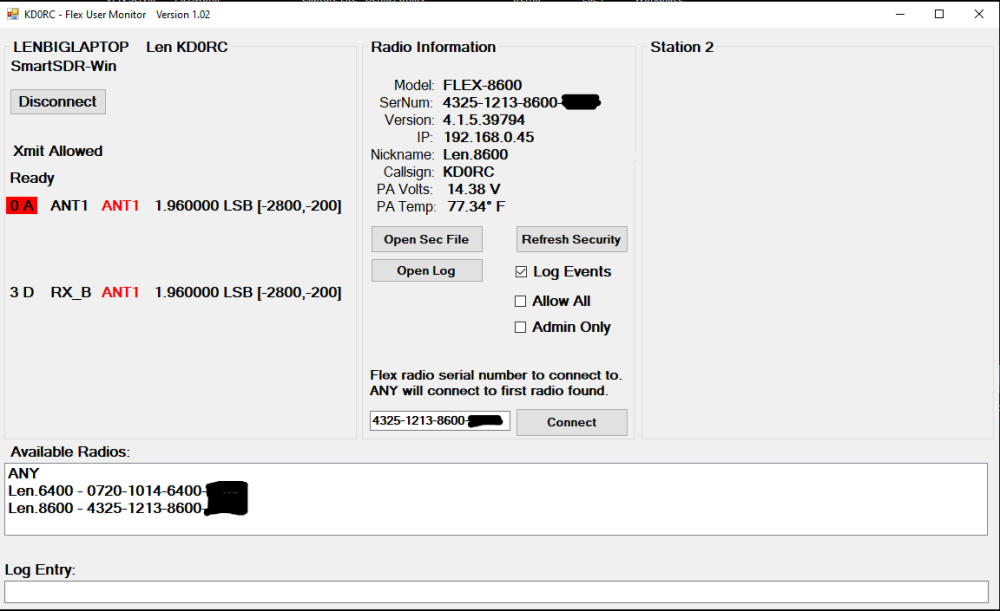
With this setup, I can easily keep everyone (including my good friend Simon) out while I am operating or possibly doing some utility testing. I set myself up as admin=yes, then just click the Admin Only button.
For our local club station, the station manager has the Allow All box checked so that anyone with the SmartLink credentials (i.e. club members) can use the station. As they connect, their station names will be captured in the log and later copy/pasted into the security file. Once the first wave of club members are in the file, the Allow All checkbox will be unchecked. Going forward, club members will be instructed to connect via SmartLink, then post a note to the club manager asking for permission to use the station. At that time their info can be transferred over to the security file.
0 -
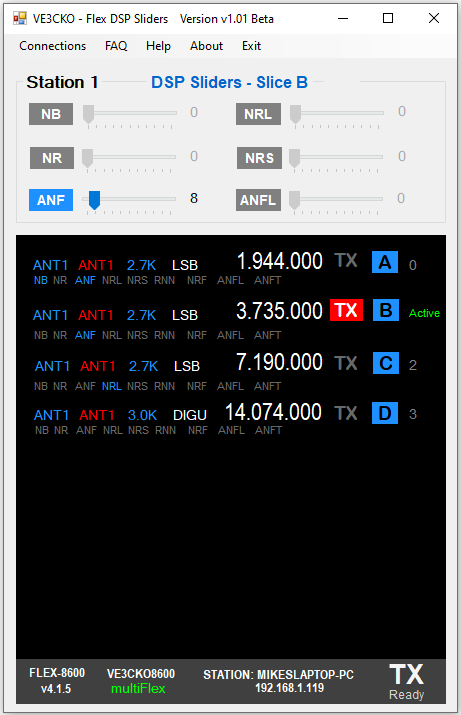
Len, thanks for some of the direction you gave. I've got this app completed, just about ready to release it. Basically whatever slice is ACTIVE, selected by a client or by clicking on slice Letter in the app, you can adjust the DSP levels for said slice as shown. Would you like to test it out ?
 1
1 -
Hi Mike - Very cool! Sure, I would love to give it a try.
0 -
I'm using VS 2026 and while preparing the Setup Project, I discovered a bug that is a known issue. Visual Studio Installer Projects 2022(2.0.1) doesn’t work in Visual Studio Community 2026. From what I've gathered in the community, Microsoft has confirmed this and says there is no fix yet and the workaround is to use VS 2022.
So I'm installing VS 2022 on another PC, hopefully, pending no further issues, I'll get you an executable shortly. Is a .zip file ok to email you ?
0 -
I had the same issue going from VS 2019 to VS 2022. It eventually got worked out by MS. A zip file would be great. You can send it to me using the Message facility in this Community. That leaves it on the proper computer here.
0 -
Got VS 2022 installed along with the VC Installer Projects 2022(2.0.1) and the next step was to get the code from the other PC with VS 2026 to VS 2022. Created the Setup Project, so far so good. The setup.exe was generated. I've tested it on yet another PC and seemed to install correctly, but have to make sure allow app through the firewall.
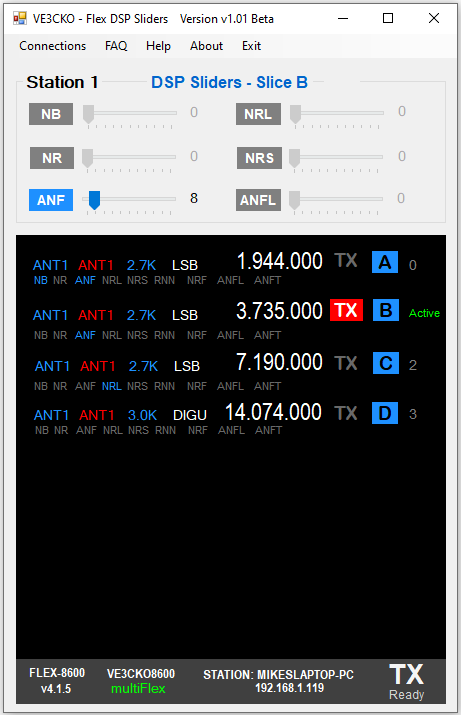
A few notes when first loaded it will connect to a radio, and the slices are shown and the Active slice as selected by the client is indicated in green. However be sure to click the slice letter of the slice you want to us as the Active slice so to control the DSP.
The Station 1 in blue "DSP Sliders - Slice A " indicates what slice you can toggle on/off and adjust levels. Again, to change the slice, click on the slice Letter in the slice section below.
RIght now just in slice 0, you can also toggle NB, NR etc. by clicking direction on NB, NR etc. This is disabled in other slices in use for the Beta release.
In the menu at the top, each item is a work in progress, content to be added, in About has a link to my website that isn't activated yet.
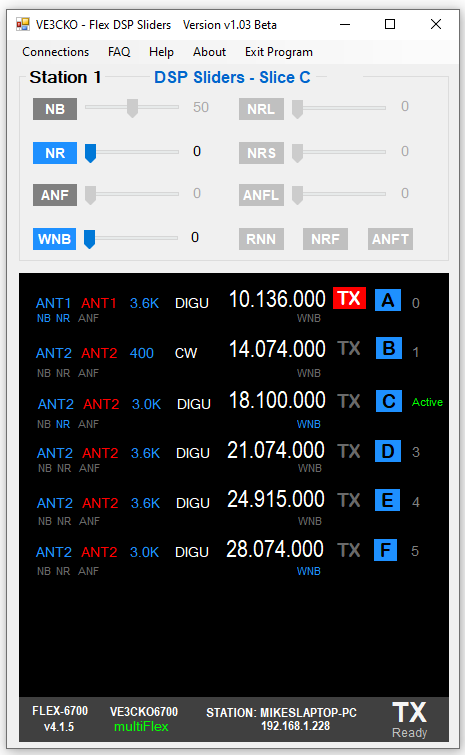
Next version will have WNB with slider and toggling RNN, NRF and ANFT. Also up to 8 slices to cover the 6700.
Also it could be my computer as I don't often reset it, but sometimes leaves a ghost FlexDSPsliders.exe in the processes, so keep an eye on that and let me know if it happens to you. This could be a problem.
Message with attachment sent, I look forward to your comments.
 1
1 -
The version I sent you had an issue with DSP levels that I broke earlier and thought I fixed it before sending you. New version pending.
1 -
Big UPDATE !: Remember the bug of building setup project for VS 2026, (see previous post), as the only workaround for developers was to use an older version, so I did that using VS 2022 on another computer where the VC Installer Projects 2022(2.0.1) works fine. Ran into an issue and I figured it out how to get shortcut proper in the Start Menu upon installation. Then while working updating the code and testing the installation on yet another computer, the setup builds stopped creating both msi and exe files. This threw me off but I quickly determined by going to Manage Extensions and looking at the installed VC Installer Projects 2022(2.0.1), was disabled due to a brand new update today, VC Installer Projects 2022(3.0.0).
This got me excited to went back to my main PC where VS 2026 is on, did the update for VC Installer Projects 2022(3.0.0) and BINGO. Microsoft came through and can now build setup projects. There was something like 1.5 million users of VC Installer Projects 2022(2.0.1) and tons of developer **** that all their projects were on hold. Again, Microsoft fixed the bug. So back to normal programming, literally.
As a result I've come up with a new version 1.03 Beta, I need some immediate feedback as I'd like to do a release ASAP.
Len, I've messaged you v1.03 zipped, the Help and FAQ briefly explain use and known limitations. Not sure if you had a chance to look at previous version so won't go into any details here. Below is an example of a 6700 connected.
 1
1 -
Version 1.04 is now available on GitHub:
*********************** V1.04 ***********************
Fixed issue where Admin Only check box caused a crash.

*********************** V1.03 ***********************
Fixed issue where the refresh button crashes the app if a radio is not yet connected.
Fixed a couple of annoying bugs.
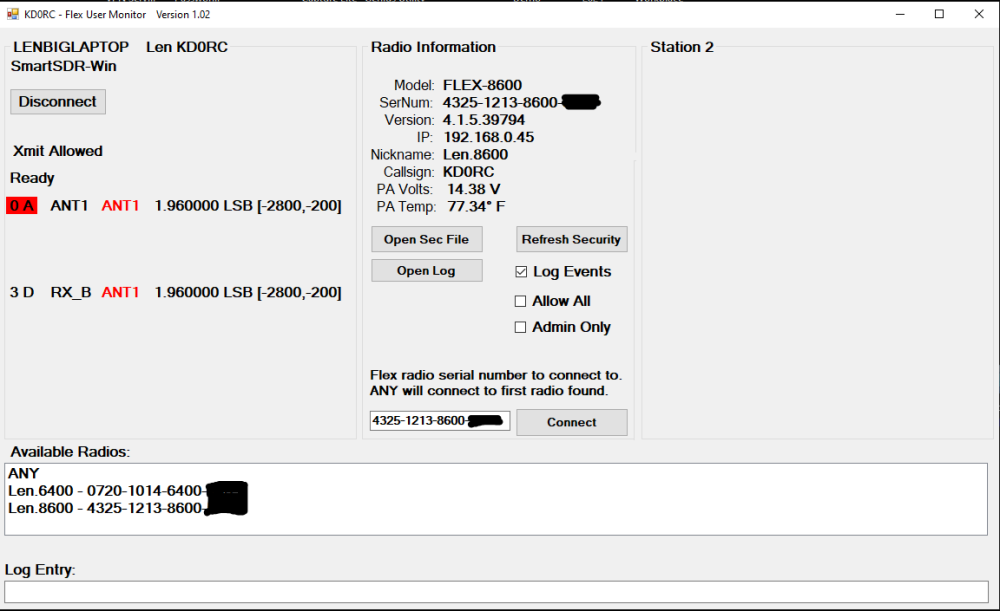
Note that I did not release V1.03 - I just went straight to V1.04 because of the Admin Only bug.
Is anyone else using FlexUserMonitor for a club or personal station? I would be interested to hear how it is working for you. We have it in "Allow All" mode right now for the 285 TechConnect Club to gather station names of club members. Next week we will lock it down. Going forward club members just need to submit an email to the station manager to get access.
I have been using it at my home station to control access to my 6400 and 8600. It has been a great way to show friends how the new SmartSDR+ noise reduction works so that they can decide if they want it or not. I also let folks connect so that they can test drive my Flex to help decide if they need one in their shack.
The biggest use lately has been so that Simon, NV0E can use my rigs to test out his new SmartSDR for Linux (or whatever it will be called…) using SmartLink. So far, it is working really well!
0





Leave a Comment
Categories
- All Categories
- 401 Community Topics
- 2.2K New Ideas
- 689 The Flea Market
- 8.6K Software
- 196 SmartSDR+
- 6.6K SmartSDR for Windows
- 200 SmartSDR for Maestro and M models
- 460 SmartSDR for Mac
- 279 SmartSDR for iOS
- 268 SmartSDR CAT
- 220 DAX
- 395 SmartSDR API
- 9.6K Radios and Accessories
- 109 Aurora
- 348 FLEX-8000 Signature Series
- 7.2K FLEX-6000 Signature Series
- 999 Maestro
- 58 FlexControl
- 872 FLEX Series (Legacy) Radios
- 975 Genius Products
- 482 Power Genius XL Amplifier
- 358 Tuner Genius XL
- 135 Antenna Genius
- 322 Shack Infrastructure
- 227 Networking
- 483 Remote Operation (SmartLink)
- 145 Contesting
- 847 Peripherals & Station Integration
- 147 Amateur Radio Interests
- 1.1K Third-Party Software