SmartSDR v4.1.5 | SmartSDR v4.1.5 Release Notes
SmartSDR v3.10.15 | SmartSDR v3.10.15 Release Notes
The latest 4O3A Genius Product Software:
The latest 4O3A Genius Product Software and Firmware
If you are needing assistance with FlexRadio products, please refer to the product documentation or check the Help Center for known solutions. Need technical support from FlexRadio? It's as simple as creating a HelpDesk ticket.
SmartSDR v4 – Noise Mitigation Quick Reference

Comments
-
When is FLEX radio going to give features we used to have back us??? I have asked this question ever since you folks started charging for your updated software and Version 4. I used to take care of my noisy environment here in the city, but now I can't. You guys took away the adjustment for the Noise Blanker and a few other noise mitigation tools. What are you thinking I now have SmartSDR Early Access and I still can't adjust anything. Come on FLEX. You just made my 6400M into a SWAN 500.
5 -
Hey @Mike-VA3MW — thanks for the chart. Can you/Tim clarify one point for me? It says : "no user-adjustable parameters" — is that "we thought it was one-size-fits-all so we took out the sliders"? Or "no adjustment possible", as in, "there's nowhere in this new code for the user to provide hints to the NR"?
0 -
I’ve also wondered why user adjustments to the noise reduction algorithms were removed. However, since multiple algorithms can be used together, giving each one its own adjustment slider would make the Maestro’s interface overwhelmingly large. On top of that, the number of possible combinations would be practically endless, meaning the time spent filtering through them would take far too long. Overall - I love some of the new filters, I just have to remeber that some of the new ones take 1 to 3 seconds to realy take effect.-1
-
Using the new filter from SamrtSDR+ EarlyAcces
My primary use try to mitigate the noise for weak DX station
RNN for DX Station in noise, the signal disappear unusable for week signal in noise, the voice rx cutoff on-off-on-off sequence, lost the complete message, i cant use this, maybe if can adjust the level of the filter (now it is fixed), only work for reduce noise in signal S6+ for ragshew
NRS Reduce the noise a bit more than NR, the combination of the NR and NRS is the best approach for noise reduction but don’t enough
NRL for weak signal add watery noise
NRF add like eco to the weak signal
0 -
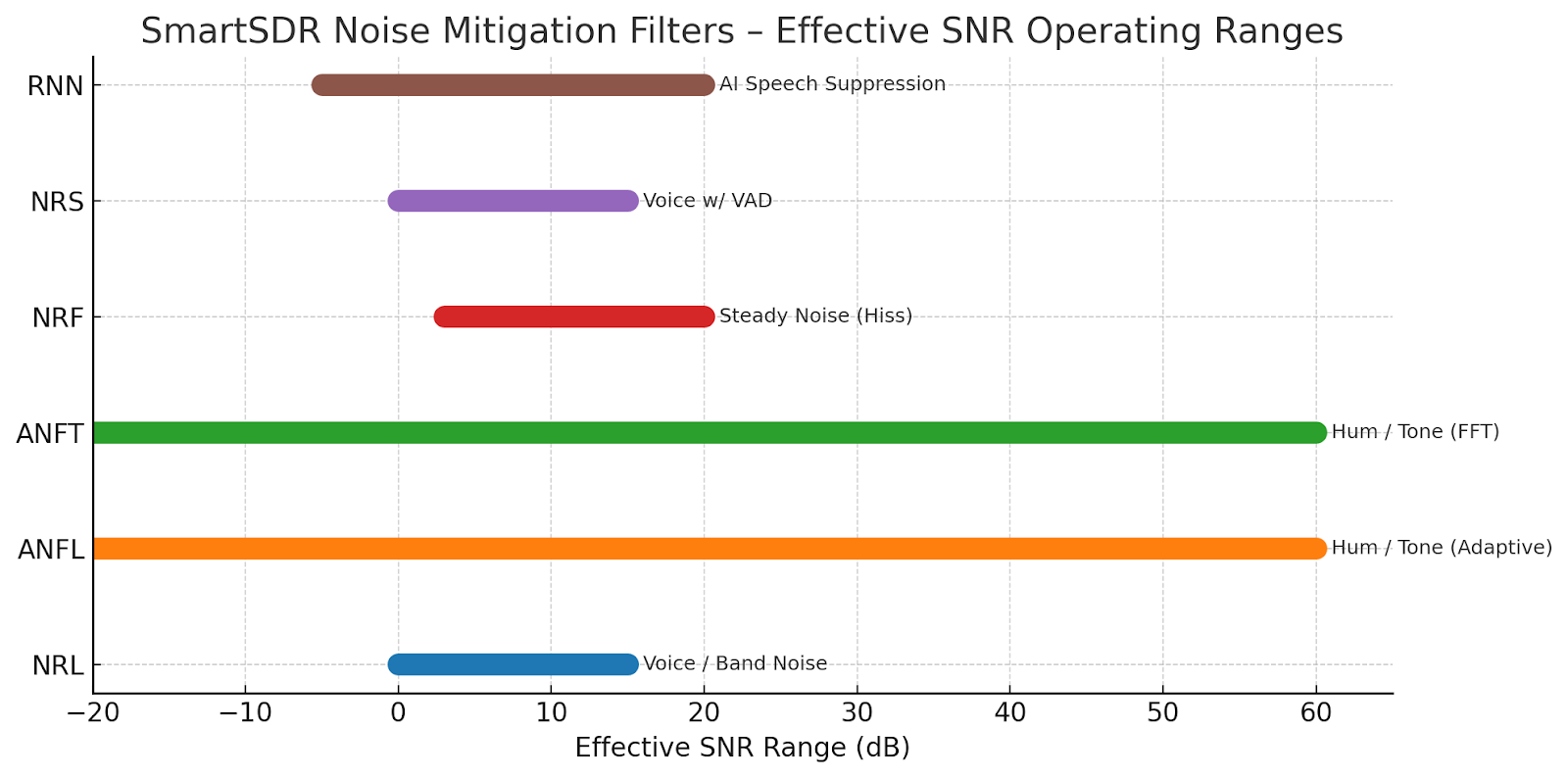
Here is the very approximate ranges:
🔹 General Rule of Thumb
Most digital noise reduction systems in SmartSDR (and SDRs in general) perform best when the SNR of the desired signal is between about 0 dB and +20 dB.
Below 0 dB, there’s too little structure for the algorithms to reliably distinguish signal from noise.
Above +20 dB, the noise is already low enough that filtering offers little benefit and may start to color the audio unnecessarily.Filter-by-Filter SNR Guidelines
NRL – Noise Reduction Leaky
- Optimal SNR Range: ≈ 0 dB → +15 dB
- Why: NRL relies on correlation detection — it can track structured content like speech or CW as long as there’s at least a small margin above the noise floor.
- Below 0 dB: The filter struggles to lock onto the desired signal and may flatten or “wash out” speech.
- Above +15 dB: Little improvement; may add mild “watery” artifacts.
ANFL – Adaptive Notch Filter Leaky
- Optimal SNR Range: Any SNR (works even with negative SNR)
- Why: It targets tonal interference, not random noise, so it doesn’t depend on SNR of the desired signal — only on the strength of the interfering tone relative to total signal power.
- Rule: The tone must be at least 10 dB stronger than the background to be recognized and notched effectively.
ANFT – Adaptive Notch Filter FFT
- Optimal SNR Range: Any, provided tone amplitude ≥ –110 dBFS and ≥ 10 dB above background.
- Why: FFT-based detection looks for narrow, stable spectral peaks. SNR of the main signal is largely irrelevant; what matters is tone prominence.
- Caution: In very low SNR conditions with fluctuating tones, detection latency may increase.
NRF – Noise Reduction Filter
- Optimal SNR Range: +3 dB → +20 dB
- Why: Spectral subtraction assumes the signal spectrum is distinct from the stationary noise floor.
- Below +3 dB: Noise and signal spectra overlap, causing audible “musical noise” or speech clipping.
- Above +20 dB: Filtering has negligible benefit.
NRS – Noise Reduction Speech
- Optimal SNR Range: 0 dB → +15 dB
- Why: The VAD component can detect speech reliably down to about 0 dB SNR; below that, it may misclassify weak speech as noise during syllable gaps.
- Benefit: Best audible quieting for average voice signals near the noise floor (3–10 dB SNR typical).
RNN – Recurrent Neural Network
- Operational SNR Range: –5 dB → +20 dB
- Why: The neural network is trained to recover speech even when buried below noise — it can function at slightly negative SNR because it models speech characteristics rather than statistical separation.
- Below –5 dB: Speech recovery becomes unreliable; noise dominates all features.
- Above +15 dB: Processing may subtly dull transients; otherwise transparent.
🔹 Summary Table
Filter
Best SNR Range (approx.)
Notes
NRL
0 → +15 dB
Adaptive LMS; needs correlated content.
ANFL
Any; tone ≥ +10 dB over noise
Works on tonal hums, not dependent on SNR.
ANFT
Any; tone ≥ –110 dBFS and ≥ 10 dB above background
Multi-tone FFT notch; tone prominence matters.
NRF
+3 → +20 dB
Spectral subtraction; best for steady noise.
NRS
0 → +15 dB
Adds voice activity detection for speech.
RNN
–5 → +20 dB
Deep-learning model; effective even below noise.
Takeaway
- For weak voice signals (SNR 0–10 dB): Try RNN, NRS, or NRL.
- For steady hums or carriers: Use ANFL or ANFT — they’re insensitive to speech SNR.
- For clean but slightly noisy audio (> 10 dB SNR): NRF provides subtle polish.
- For deep noise (negative SNR): Only RNN has any hope of recovering intelligible speech.
 5
5 - Optimal SNR Range: ≈ 0 dB → +15 dB
-
Thanks Mike, great insight
1 -
Mike don't judge me, even though I've been a Flex fan since 2005, but in this period I'm using and I recommend you test Thetis, you'll see how NR and NB work as well as lots of free news
lou
3 -
Mike. All these filter option are great if you own an 8000 series. They are currently greyed out on my 6600 and some aren’t even available. NR, NB, AND ANF are either On or Off. No level adjustment possible. NR does not work as well as it did on v3. Please bring back the sliders.
5 -
2 thumbs up on the new upgrade. Noise setting are working great.
2 -
I remember when we used to pay big $$$ for filters. None of them were this good. 😀
1 -
Outstanding! but I can not remember ?
0 -
There was an error rendering this rich post.
0 -
Hi,
I share some of the comments above about these new filters being worse than V3. The only one that seems to make any difference on CW is NR and that difference is slight. Neither APF nor NRL seem to do anything. The others have no effect or make the sound worse. Is there some trick to making these work?
Regards,
James Charlton
8600M1 -
total silence from the Flex staff
1 -
By selecting AGC: Fast, cw pitch at 700 Hz, using NRS this will lower the background noise for very weak signals copy at 250 hz bandwidth. Of course my normal local 40 m noise -105 dB (S4, 250 hz), 20 m - 10 m are -118 dB (S3) all on yagi.
Very difficult to compare a location to another.
0 -
Hi, new flex user (been in radio for 40 years, even as a professional) so bear with me, but I purchased the smartSDR+ and have the new filters. However, I haven't found any of them that work to my liking for SSB on 40 meters. (I am running 4.1.5 and was told by tech support due to some issues, not do go back to 3.) I heard the filters actually worked better in 3? - but I am new and haven't used 3 enough to know.
It seems all of my filter options cut out or distort the incoming audio on certain signals on SSB. therefore, I basically wasted my money on the subscription- as listing to the noise is better than the distorted audio going up and down in volume, etc.
for reference, my old kenwood ts2000 did a great job of "beat cancel" i guess auto notch filter is the closest to that- but smartSDR distorts the sound of the voice with that filter on (not every signal, just some. for example, maybe the user has a grainy voice, the software tries to remove his graininess and therefore distorts his voice), even the advanced versions. my ft950 did a great job of beat cancel automatically without harming the audio quality. I cant seem to get carrier suppression or beat cancel I would call it to work dependably. I tried all of them, and one signal will sound ok, then the next will get distorted like an online teams meeting where the internet is slow, this kind of sound. anyway, i would think this should at least compare to those older radios? I am using the rf gain set to "1" and using the agc to medium and the slider typically to mid or 1/3 up. in case those settings affect the filters. I know that you are not supposed to run all filters all of the time, but I think that some filters, like beat cancel, should be able to just "leave on" as you never know when the tuner uper is going to drop by.
using new pc, windows 11, fast connections, fast pc. new I7 with lots of memory. should not be any issues with the computer.
73 K4KFI MN
thanks, MN0 -
Just curious, do you have your AGC-T set correctly. New users tend to have it set too high and that will create a noisier receiver.
1 -
Mike I agree with K4KFI. I have my AGCT between 20 and 30. I leave all the new filters turned of and just use the TNF and get better sounding. I sometimes use 3 to 4 TNF to get rid of the unwanted noise. I also feel the same also I have wasted my money on the new version 4
Richard WH6S0 -
My 6700 and club 6600 agree with K4KFI and others. All of the noise reduction filters, available on these models, do nothing but destroy the built-in audio quality by either significantly reducing all the high-end output audio or add so much audio distortion they become useless.
ESC: Still does nothing - Neither beam forming or noise reduction, even with a noise antenna. The FR5000 did this well, providing over 20db phased reduction. Feature was dropped in Pre-release V1, reintroduced in V4, not yet fixed. That's about 12 years and counting
Probably unknown to FR. 2nd Nyquest zone on 6700: The Wideband Noise Blanker now picks up signals from the 1st Nyquest zone and adds it to received signals.
0 -
I purchased the SDR + on Nov 20. I'm I supposed to get and email advising me to download the software for the SDR +? It seems to be in my maestro but not of the buttons work just yet. Any help would be appreciated. Rick N4WRW Flex 8400 owner.
0 -
Have you clicked on the " Refresh " button in the same Tab that you ordered the version you wanted yet? Till you do, it won't activate the new features for your particular model of radio.
James
WD5GWY
0 -
There was an error rendering this rich post.
0 -
Ill try posting again.... Please bring back the adjustable slide for NR as the auto in V4 doesn't work as well as V3 on CW using 250 or 500 BW Filters. Also, there is a blank space in the box where the sliders were originally. Any chance of adding the 500 Hz Filter button on the side panel along with the 250 and 400? (Maybe Swap with the 50 hz, as not needed for CW ops).0
-
Please don't take the 50 Hz filter off the RX control panel when in CW. I am a CW op and I use it a LOT. I agree that the 500 Hz filter is useful, but not at the expense of the 50 Hz filter. Instead, I would put the 500 Hz in the line-up and pull the 3.0K filter.
1 -
I just updated to V4.1.5 and still no sliders? WOW! 50 Hz on CW? Sharp ears ;)0
-
Just read this …. Please note that version 4.1.5 of SmartSDR+ does not include any new features. 😓
0 -
@WY1U — 4.1.5 has all the features available depending on your radio family and your license you have purchased.
0 -
Hi Mike,
What I meant was "SmartSDR v4.1.5 is a maintenance/bug fix update." In other words …. Please note that version 4.1.5 of SmartSDR+ does not include any new features. lol
I guess what I was hoping for, was the return of the original NR slider! 😕
0 -
If you have a look at the release notes, it will show what was fixed/changed. You can find them on this page (rather then me retyping them).
0












Leave a Comment
Categories
- All Categories
- 390 Community Topics
- 2.2K New Ideas
- 662 The Flea Market
- 8.4K Software
- 157 SmartSDR+
- 6.5K SmartSDR for Windows
- 186 SmartSDR for Maestro and M models
- 440 SmartSDR for Mac
- 275 SmartSDR for iOS
- 265 SmartSDR CAT
- 204 DAX
- 386 SmartSDR API
- 9.4K Radios and Accessories
- 54 Aurora
- 297 FLEX-8000 Signature Series
- 7.2K FLEX-6000 Signature Series
- 971 Maestro
- 58 FlexControl
- 867 FLEX Series (Legacy) Radios
- 945 Genius Products
- 472 Power Genius XL Amplifier
- 347 Tuner Genius XL
- 126 Antenna Genius
- 308 Shack Infrastructure
- 216 Networking
- 468 Remote Operation (SmartLink)
- 142 Contesting
- 814 Peripherals & Station Integration
- 144 Amateur Radio Interests
- 1.1K Third-Party Software