SmartSDR v4.1.5 | SmartSDR v4.1.5 Release Notes
SmartSDR v3.10.15 | SmartSDR v3.10.15 Release Notes
The latest 4O3A Genius Product Software:
The latest 4O3A Genius Product Software and Firmware
If you are needing assistance with FlexRadio products, please refer to the product documentation or check the Help Center for known solutions. Need technical support from FlexRadio? It's as simple as creating a HelpDesk ticket.
Configuring RTTY for first time questions
Hello,
I have only used my Flex-8600 in CW mode so far.
I would like to now add RTTY capability.
What are the built in RTTY capabilities of the 8600?
I see that in settings there is a configuration item 'RTTY mark default'. I assume this relates to the the RTTY mark and space frequencies. When I receive in RTTY mode I see a double vertical line on the panoramic display, again I assume it relates the the mark and space frequencies.
If so, this implies that SMARTSDR has some RTTY functionality on receive, what about transmit? Does the software package for RTTY need to be FLEX/SMARTSDR aware? That is, being setup in the software as a flex8600 in my case?
I haven't used RTTY for decades, so its like starting from scratch for me.
Phil, NC3S
Comments
-
Hi Phil, there is no built-in RTTY in the Flex. You just use one of the "soundcard" RTTY programs (FlDigi, MMTTY, etc). The audio in and out uses DAX. To the RTTY program, DAX looks like a soundcard.
0 -
Here is an easy video from Mike VA3MW to watch, which guides you through the set-up, it will be the same for the 8600. If you are using a different logger the same set-up will apply just in its own screens.
https://www.youtube.com/watch?v=QBmBlMaVJzc&t=4s
0 -
OK thanks, I'll watch it.
0 -
Hi, @PhilM
I use RTTY, PSK-31. I came from the old-school Chemical City Terminal Unit, 88mH telephone-toroids, and later Exar2206 chips, all with Model 15 (page-printer), typing-reperfs, and tape-reader units. Ahhh.. the smell of hot 3-in-1 oil and the satisfying "clunks" and cycling gears … :-)
</reminisce>
The Flex 6400 I've used, these days, is fabulous for digital modes. There are a couple of things that happen when you select RTTY mode in SmartSDR … all filtering.
First, I suggest you adjust your Digital Mode filtering to "low latency". I see this under Settings → Phone/CW.
You'll also see, in this same screen, the RTTY Mark Default. Pretty much meaningless to set this at 2125 (haha - and 2295 burned into my brain for Space!). You'll likely use some software like Fldigi, which injects 170Hz-separated tones of any frequency which matches what you are receiving on-screen. I often tune somewhat closely to the RTTY signal I'm hearing, then click-to-accurately-tune using FLdigi. That may well be around 800Hz (for example), and FLdigi will then match that frequency when you transmit. Super-easy! Super-nice! You're always zero-beat with the other station (well, unless you choose to do differently).
When you receive RTTY, yes, the double-vertical line are the Mark and Space tones. But they can be any frequency you wish, and you pass these over to your RTTY program. Your RTTY program will perhaps also have it's own waterfall, showing the Mark and Space tones, and you click-set the decode lines atop … Bob's your Uncle! You should be receiving.
Key is to understand you'll need separate RTTY software. The RTTY settings in SmartSDR can help you combat adjacent interference.
HTH!! Have fun!
1 -
I found this documentation https://helpdesk.flexradio.com/hc/en-us/articles/28304136340763-How-to-Configure-Fldigi-for-the-FLEX-6000-8000-Radios
0 -
Hello everyone. I installed and configured FLDIGI, and it appears correct as far as I can determine.
The issue I currently have is that everything I receive appears to be random letters etc. So not 100% sure I have the RX config correct. (maybe i was tuning in something other than rtty)
Trying to understand the interface too. Is there any documentation how to use the interface to communicate? I see the row of macro buttons across the bottom but I'll just forget about those for now.
Also, can I use the smartsdr adaptive predistortion for afsk, it seems to me it should work being it is an audio signal.
Thanks
Phil, NC3S
0 -
It's Saturday Dec 20, and right now there is an RTTY contest on! Perfect for testing
for filtering / mode, in SmartSDR, I suggest you use DigiU. This is a wide, flat pass-filter for digital modes, not restricted in any way for RTTY, nor any particular spot in the audio passband. With such a wide pass, you then use Fldigi to select among the RTTY signals you may be able to see / hear, at the same time.
In Fldigi, you'll need to select Mode → RTTY. Traditional and most RTTY contests are 45 baud (170Hz shift).
See if this gets you going. You may also want to try reversing the RTTY (swapping mark/space), but in my experience DigiU (USB) on 20-meters is correct and Fldigi "just works".
Is this now letting you receive something?
0 -
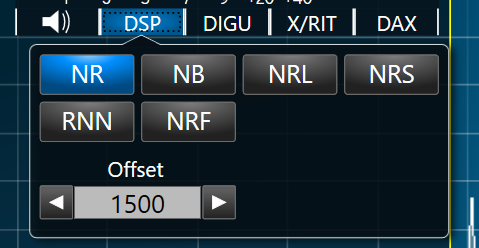
I noticed that when the flex is in DIGU mode, under the DSP options there is an adjustment for OFFSET. I couldn't find a definition for that. My guess is it represents an offset within the passband for the DSP to work on?
73's Phil NC3S
0 -
When I use RTTY I only use RTTY mode with 2 Tone and the other contesting programs. Can you give that a try? Also, it doesn't hurt to post some screen shots.
0 -
I think I have things going well now but I have two related questions?
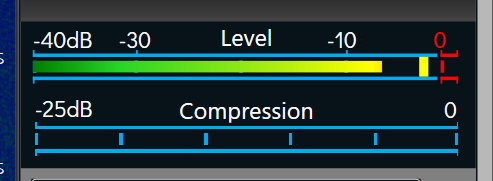
1.) I'm not sure what the top yellow bar is, is that the max level reached ? even though its not at that level now?
2.) How is the offset used? it seems to be positioned in the center of the pass band.
Many Thanks
Phil, NC3S
0 -
Hi Phil, the little yellow rectangle is the peak audio level indicator. It should not exceed 0 dB or there will be distortion. The peak in your screenshot is great as long as it does not go higher. The long yellow bar behind it is the average level and is not important in adjusting audio.
Offset moves the passband to better center it on the digital signal. I don't do a lot with the digital modes, but when I get on VarAC, I just leave it at 1500 and everything works great. Hopefully others with more experience with digital modes will expand on this.
0 -
wish I still had my Model 28 ASR.
0 -
@Neil D Friedman N3DF Mine is holding down the raft we use for swimming. :)
0






Leave a Comment
Categories
- All Categories
- 388 Community Topics
- 2.2K New Ideas
- 658 The Flea Market
- 8.4K Software
- 156 SmartSDR+
- 6.5K SmartSDR for Windows
- 186 SmartSDR for Maestro and M models
- 439 SmartSDR for Mac
- 275 SmartSDR for iOS
- 265 SmartSDR CAT
- 204 DAX
- 386 SmartSDR API
- 9.4K Radios and Accessories
- 53 Aurora
- 297 FLEX-8000 Signature Series
- 7.2K FLEX-6000 Signature Series
- 970 Maestro
- 58 FlexControl
- 866 FLEX Series (Legacy) Radios
- 944 Genius Products
- 471 Power Genius XL Amplifier
- 347 Tuner Genius XL
- 126 Antenna Genius
- 306 Shack Infrastructure
- 215 Networking
- 468 Remote Operation (SmartLink)
- 142 Contesting
- 811 Peripherals & Station Integration
- 144 Amateur Radio Interests
- 1.1K Third-Party Software