SmartSDR v4.2.20 | SmartSDR v4.2.20 Release Notes
SmartSDR v3.10.15 | SmartSDR v3.10.15 Release Notes
The latest 4O3A Genius Product Software:
The latest 4O3A Genius Product Software and Firmware
If you are needing assistance with FlexRadio products, please refer to the product documentation or check the Help Center for known solutions. Need technical support from FlexRadio? It's as simple as creating a HelpDesk ticket.
Remote with SoftEther VPN - Connecting Maestro Disconnects SmartSDR from 6700

Any suggestions for me?
SoftEther VPN installed to overcome CG-NAT
6700 at remote site accessed via AnyDesk to power on and off
Maestro at home site sees the 6700 and when I connect, it disconnects the 6700 from SmartSDR (both units up to date with version 4.0.1)
The Maestro only shows the top 1.5 inches of the screen, no audio, no frequency dsplay but it worked at the remote site when I did the software updates
I had help from Gerry, W1VE, on setting up the VPN, and he indicated the VPN tested OK.
Thanks for any suggestions! 73 from K1HC
Answers
-
Update 11/28:
Tried with a laptop loaded with SmartSDR 4.0.1 instead of the Maestro and still no luck getting it to run.
The laptop gives me an alert that SmartSDR is not responding.
Any sugestions for what to test next? Thanks from K1HC0 -
Update 12/3:
Looing at the Maestro in more detail, it looks like it did not retain the software update to 4.0.1 so perhaps that is why it is only loading the top inch of its screen and is disconnecting SmartSDR on the 6700 when I try to connect through the VPN.
I will take the Maestro back up to the remote site next week and do the upgrade to 4.1.3 for all radios ad the Maestro and see what happens. When I bring the Maestro back to home, I will try this all again.
Although the comments from the Flex staff on the Flex Enthusiasts FB page recommends posting over here in the Flex community instead of there, I am wondering why no one has had any comment over here.0 -
Update 12/17: Back home after the Maestro (and the 6700 and 6600) updated at the remote site, and the Maestro is exhibiting the same problems. While up at the remote site, the Maestro was displaying normally. I guess I will look for input on the Flex Enthusiasts FB page because I have had no comments over here.
0 -
I had used SoftEther on and off for a long time, but it has been a couple years since I used it and wouldn't you know it, it would not connect remotely through my cellphone hotspot but it would connect when on the local wifi LAN so today I decided to get to the source of this problem.
I just posted my solution in another post:
I have identified the problem why my SoftEther no longer could connect remotely. I confirmed I am behind both CG-NAT and double NAT.
After some research I found that it was suggested to use VPN Azure.
- If the firewall is more restricted and the NAT Traversal of SoftEther VPN doesn't work correctly, instead use VPN Azure to **** such a firewall.
- a works around strick firewalls
- gets through double NAT etc.
To fix this you have to enable VPN Azure in the SoftEther VPN Server Manager, this will take your Dynamic DNS hostname such as mystationvpn.softether.net and make a new one mystationvpn.vpnazure.net you then would need to copy the new Host Name and replace it in your SoftEther Client Manager.
To do this, open up SoftEther VPN Server Manager and then Manage VPN Server by clicking CONNECT. You should already have a Dynamic DNS Setting from the original server setup. You can enable VPN Azure by going to VPN Azure Setting button, and selecting Enable VPN Azure radio-button it will take a short bit for the status to say: Status: Connected
Then copy the new hostname and edit your VPN Client Manager user on the computer you use to remotely login. Open up the VPN Client Manager and right click on the user, select Properties. You will see xxxxx.softether.net in the Host Name field. Replace this with the hostname you copied (xxxxx.vpnazure.net), click OK.
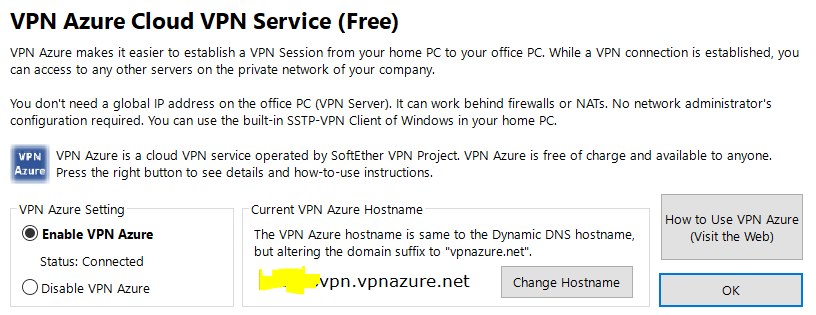
That's it !
0


Leave a Comment
Categories
- All Categories
- 401 Community Topics
- 2.2K New Ideas
- 689 The Flea Market
- 8.6K Software
- 197 SmartSDR+
- 6.6K SmartSDR for Windows
- 200 SmartSDR for Maestro and M models
- 460 SmartSDR for Mac
- 279 SmartSDR for iOS
- 268 SmartSDR CAT
- 220 DAX
- 395 SmartSDR API
- 9.6K Radios and Accessories
- 109 Aurora
- 348 FLEX-8000 Signature Series
- 7.2K FLEX-6000 Signature Series
- 999 Maestro
- 58 FlexControl
- 872 FLEX Series (Legacy) Radios
- 975 Genius Products
- 482 Power Genius XL Amplifier
- 358 Tuner Genius XL
- 135 Antenna Genius
- 322 Shack Infrastructure
- 227 Networking
- 483 Remote Operation (SmartLink)
- 145 Contesting
- 847 Peripherals & Station Integration
- 147 Amateur Radio Interests
- 1.1K Third-Party Software