Welcome to the FlexRadio Community! Please review the new Community Rules and other important new Community information on the Message Board.
The latest SmartSDR Software:
SmartSDR v4.2.20 | SmartSDR v4.2.20 Release Notes
SmartSDR v3.10.15 | SmartSDR v3.10.15 Release Notes
The latest 4O3A Genius Product Software:
The latest 4O3A Genius Product Software and Firmware
SmartSDR v4.2.20 | SmartSDR v4.2.20 Release Notes
SmartSDR v3.10.15 | SmartSDR v3.10.15 Release Notes
The latest 4O3A Genius Product Software:
The latest 4O3A Genius Product Software and Firmware
How to Receive Technical Support::
If you are needing assistance with FlexRadio products, please refer to the product documentation or check the Help Center for known solutions. Need technical support from FlexRadio? It's as simple as creating a HelpDesk ticket.
If you are needing assistance with FlexRadio products, please refer to the product documentation or check the Help Center for known solutions. Need technical support from FlexRadio? It's as simple as creating a HelpDesk ticket.
8400 Installation - short ground stud and GNSS
Options

wjresq
Member ✭✭
Just got my 8400 installed, having upgraded from a 6500. The 8400 is a great device, although I do miss the 6500 display panel to show status and call sign.
My primary installation nit is that the ground stud is too short and will only hold one ground lug. It should be longer. The 6500 design was better, as it used a small bolt that threaded into the chassis to which several lugs could attach. I also don't think that the wingnut on the stud provides great tightening force.
My only other nit is the GNSS. It seems kind of useless and I'd like to be able to turn it off in the software. My rig is not near a window and my computer time is very accurate with Meinberg NPT. I believe someone has submitted a feature request for a software turn off.
My primary installation nit is that the ground stud is too short and will only hold one ground lug. It should be longer. The 6500 design was better, as it used a small bolt that threaded into the chassis to which several lugs could attach. I also don't think that the wingnut on the stud provides great tightening force.
My only other nit is the GNSS. It seems kind of useless and I'd like to be able to turn it off in the software. My rig is not near a window and my computer time is very accurate with Meinberg NPT. I believe someone has submitted a feature request for a software turn off.
0
Comments
-
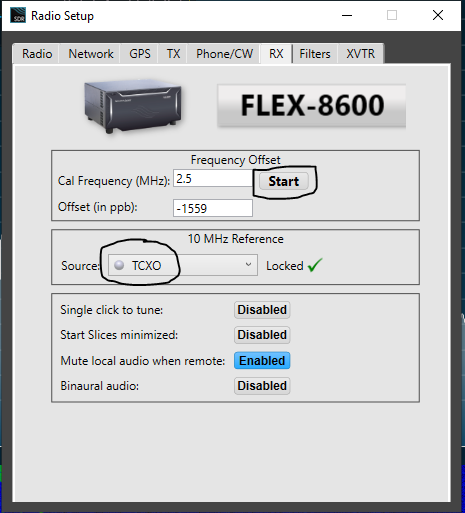
The GNSS is primarily for frequency accuracy, not time. You can turn it off and use the internal TCXO without the GNSS discipline. If you select TCXO, be sure to do a frequency calibration - click the Start button in the Frequency Offset section after selecting the appropriate WWV signal for your area. I live 50 miles from WWV in Ft. Collins, so 2.5 MHz is normally best for me. Use the one based on where you are and the time of day.
 0
0 -
Wow. That was simple. Thanks!0


Leave a Comment
Categories
- All Categories
- 401 Community Topics
- 2.2K New Ideas
- 689 The Flea Market
- 8.6K Software
- 197 SmartSDR+
- 6.6K SmartSDR for Windows
- 200 SmartSDR for Maestro and M models
- 460 SmartSDR for Mac
- 279 SmartSDR for iOS
- 268 SmartSDR CAT
- 220 DAX
- 395 SmartSDR API
- 9.6K Radios and Accessories
- 109 Aurora
- 348 FLEX-8000 Signature Series
- 7.2K FLEX-6000 Signature Series
- 999 Maestro
- 58 FlexControl
- 872 FLEX Series (Legacy) Radios
- 975 Genius Products
- 482 Power Genius XL Amplifier
- 358 Tuner Genius XL
- 135 Antenna Genius
- 322 Shack Infrastructure
- 227 Networking
- 483 Remote Operation (SmartLink)
- 145 Contesting
- 847 Peripherals & Station Integration
- 147 Amateur Radio Interests
- 1.1K Third-Party Software