SmartSDR v4.1.5 | SmartSDR v4.1.5 Release Notes
SmartSDR v3.10.15 | SmartSDR v3.10.15 Release Notes
The latest 4O3A Genius Product Software:
The latest 4O3A Genius Product Software and Firmware
If you are needing assistance with FlexRadio products, please refer to the product documentation or check the Help Center for known solutions. Need technical support from FlexRadio? It's as simple as creating a HelpDesk ticket.
A message to FlexRadio about SSDR 4.XX

I have been working constantly since SSDR 4.0.1 came out. No matter what I do I cannot get it to work any length of time with more than two slices open. I am a heavy user and need at least four slices to meet my MARS mission requirements. I have been through four ethernet switches and can't get it to work well with any of them. I have worked on this daily since I first downloaded 4.0.1, only a couple of hours after you announced it. It is the same with 4.1.3, which I hoped would fix things. I purchased two subscriptions for each of my 6700s. This price plus the price of three ethernet switches has run my investment up to a couple of thousand dollars, and in spite of that I don't have a system that works.
I have given up and have reverted to 3.0.15 on both machines.
Before the 8000 series came out I was extremely happy with two top-of-the-line machines. Now I feel that FlexRadio has left me in the dust as your intent is to press on with this POS software and your newest equipment. I have in excess of $20,000 worth of Flex equipment, and wonder how long it will be before you stop maintaining the hardware and software for the now nearly obsolete equipment.
A year ago I was absolutely sold on FlexRadio. Now I am wondering what I can replace this gear with, if I live that long.
Sign me “one absolutely disgusted former Flex fan”.
Comments
-
@edwinhigg Have you opened a HelpDesk ticket?
0 -
Weird other 6700 users appear to be content if not pleased with v4.x. I traded my 6700 which I also loved for a new 8600. Love it as well and the trade in program likewise. No other provider offers such a deal.
Hopefully you find out what is wrong.
0 -
No issues whatso ever here. Using my 8600. I am running 2 PC's with 2 slices open on each and it never even burps.0
-
Have you followed the instructions in the release notes to reset the radio if any weirdness happens?
This resolves most issues.
0 -
I also have 2 6700's and have the same issues as Edwin. Flex makes their money selling new radios so I can see then emphasizing software for them. Hope the don't leave us 6700 operators out to hang. Someday when they come out with a 9000 series they could leave the 8000's behind also.
0 -
I followed the instructions over and over and over again. I need to use a minimum of 4 slices daily for my MARS operation. I could get two to work most of the time, but when I added the third and fourth slices the program crashed. I thought it was an issue with the ethernet router, so I tries several. I even created a VLAN so I could separate the Flex from the rest of the system. That fixed the drop-outs at the 15-30 minute mark, but would never work with more than two slices on the radio.
For what it's worth, ChatGPT says that Flex is aware of this problem, and that some 8600 user are experiencing it also.
0 -
How about some of you 8600 owners opening up four slices and see if your system is stable for an hour or more. This would be some good info to work with. All Flex support will do is to send me routines that I already have and have tried many times.
0 -
No issues here, currently running 4 slices on my 8600 with 4.0.1, have not felt a need to upgrade to the next release yet. Early adopter enjoying the new features.
0 -
I have 4 slices open now on my 8600 running 4.1.3 . . . Been that way since I got the radio on Thursday. Have not shut it off at all and it has been running flawlessly. Did have to put a Mix 31 on my lan cable as rf was messing with the network connection on 10m but all is well now.0
-
I have been running my 8600 with 4 slices a lot lately, and have had no stability issues at all.
I wonder if the issue is with the computer running SmartSDR?
0 -
Hi Edwin… I don't know if you've opened a Help Desk ticket, but as mentioned previously, I would strongly recommend it. The guys are pretty good at working through diagnostics to try to find the root cause of the problem.
That said, more info on the nature of the 'crash' would be helpful… What environment are you running — SmartSDR or SSDR for iOS? what version of Windows? Anything else running simultaneously? For you, what exactly does a 'crash' look like? Does SSDR simply stop responding or does a message come up? Are you seeing any red flashes on the front panel of the Flex? Is the crash situation repeatable? or is it intermittent? when does the crash occur — one the first slice, the second, the third, the fourth? What software is running on each of the slices? Etc, Etc. Etc.
We want to help, and as I say the Help Desk are really good at working through this with you. I'd give them a try.
0 -
To add to Don's comment always list what other hardware/software your running when asking for help or a Help desk ticket, this can be a big issue that many people including my self overlook.
I know a BIG problem that AI have tracked down is with the TGXL connection to the FLEX Radio's still has bugs in it BUT 4.1.3 is a MUCH better Firmware then 4.0 was and a lot less crashed,
I have both a 6700 and 8600 and run them both sometimes with 4 slices running and just ever now and again the Radio will shutdown by it self even running one slice, BOTH Radios Crash SmartSDR and takes a bit to get SmartSDR to totally close itself so I can restart it, sometimes it Task Manager to **** the broken SmartSDR remnants or a windows computer reset.
I really don't think it is anything to do with either Radio Hardware (6700 or 8600) but rather SmartSDR that causes this.
For a test, Save your Profiles then Power off the TGXL, PGXL, and ANY 3rd party programs if you have them, Do a HARD RESET not just a DC power reset and run your test again with all 8 slices running, if it crashes it's your Computer, SmartSDR, the Radio itself or maybe your Network, If it does NOT crash then the problem is with a Profile, other software, or Hardware that is causing the issue.
I really like both Radios the same BUT I REALLY like the new DSP filtering that the 8600 has that the 6700 does not.
0 -
… and to add to Bret's comment, an even better idea after you export your profiles, is to do a FACTORY reset of your radio (the white light thing — see the manual for full instructions for your rig), then BEFORE you import the profiles, try running the radio the way which would cause a crash. if it crashes, then it's most likely something in the SSDR firmware or your setup/rig.
If it doesn't crash after a good long run, then try importing your profiles. Do a shutdown and startup, then try the crash scenario again. If it crashes, it's likely that your profile 'file' has become corrupt and you'll need to recreate your profiles from scratch (sorry) after another factory reset.
I'm not the 'diagnostic guru', but these are some of the steps the guys at the Help Desk ran me thru when we were trying to nail down an intermittent problem. (It eventually turned out to be a bad TX board :-))
0 -
Can I recommend this test @edwinhigg
- Update the radio to 4.1.3 (or the latest version)
- Reset the Radio
- Power cycle the radio
- Do not connect any 3rd part programs
- Open 4 slices and see how long they stay before the crash
If the above test fails, open a support ticket for a hardware problem.
0 -
I’m running an 8600, so not exactly the same hardware:
- Are you running all four slices on the same machine?
In my setup, I run Message Center on one laptop using two slices, and I handle NET operations on a second laptop with the other two slices—no issues at all.
If you have an extra computer available, try opening all four slices there, or at least test with two of the four. I use this setup regularly for MARS operations without any problems. That said, this is on an 8600, and my laptops can’t reliably handle four slices on a single machine since they’re basic Lenovo systems.
I actually prefer using multiple inexpensive computers for redundancy rather than relying on a single high-end system, which would create a single point of failure.
0 -
Edwin and Bill,
Sorry to hear that you're having trouble running SmartSDR v4. I have a 6700 on my desk that I use every day and haven't run into this issue. That doesn't mean there isn't an issue, but it means that we are having a different experience. If you can help us identify steps that cause what you're seeing, we're much more likely to be able to replicate the problem and get it addressed. This is the same thing we would say on the helpdesk once we have been through some troubleshooting (probably things you have already tried, but it makes sense to verify that known solutions have been exhausted).
In an ideal world, the set of steps would be something like this:
- Load SmartSDR v4.1.5 (released this morning — worth trying).
- Factory reset the radio (for a common starting point)
- Open 2 additional Slices in the original Panadapter.
- Observe the application crash.
This is just an example and I don't actually see a crash when I do this on my radio, but it is a list of steps like this that can help us replicate a systemic software issue. Once we can replicate the problem, this greatly accelerates getting a fix out.
0 -
Thanks Eric for taking the time to listen to our problems.
I have solved most of my V4 issues by doing a factory reset even though the current update instructions only call for a "cold reboot". My one remaining issue is inconsistent display connection to the TGXL.
It will take me a few days to upload v4.1.5 in both radios and give an extensive test. I'll report back later.
73,
Bill AB7AA
0 -
Hi Bill
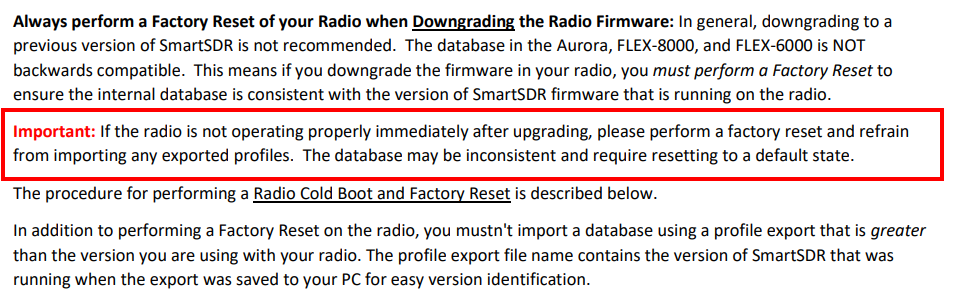
You might have missed it.
 0
0 -
Hi Mike,
I must have totally missed this note so I unknowingly had reloaded my previous profile file. Still my experience continues to have greatly improved after the factory reset.
Bill
1 -
It is so easy to miss. I am the king of missing stuff like that! :)
I only know it is there because Tim has told me a few hundred times! :)
0 -
I'm glad to hear that a factory reset helped you Bill. Edwin, have you tried a factory reset?
0 -
I worked with Edwin today on a different issue but suggested he do a factory reset. It solved his disconnect issues.
73 Dave wo2x
3 -
For some of the gang that is having some weirdness with their radios Ill add a little story. When i went to do an upgrade this last time the software ran twice on its own, i have no idea why but the 6500 was really acting squirrely after everything was restarted and cold boot etc. I've gotten spoiled as its been fairly smooth except one time previously in the last several years. But that double update thing bothered me. And things were a mess. I did delete all of the v 4 directories and downloaded. But i came from windows IT background. Installed a fresh new 4.1.5 and recreated profiles. It was a frustrating couple hours, but things were working when i was done. You just never know when a windows machine is going to self destruct during any software update whether windows, or ssdr. Just don't panic. And don't do what i did unless you know your way around under the hood. Erika K0DD
2











Leave a Comment
Categories
- All Categories
- 388 Community Topics
- 2.2K New Ideas
- 658 The Flea Market
- 8.4K Software
- 156 SmartSDR+
- 6.5K SmartSDR for Windows
- 186 SmartSDR for Maestro and M models
- 439 SmartSDR for Mac
- 275 SmartSDR for iOS
- 265 SmartSDR CAT
- 204 DAX
- 386 SmartSDR API
- 9.4K Radios and Accessories
- 53 Aurora
- 297 FLEX-8000 Signature Series
- 7.2K FLEX-6000 Signature Series
- 970 Maestro
- 58 FlexControl
- 866 FLEX Series (Legacy) Radios
- 944 Genius Products
- 471 Power Genius XL Amplifier
- 347 Tuner Genius XL
- 126 Antenna Genius
- 306 Shack Infrastructure
- 215 Networking
- 468 Remote Operation (SmartLink)
- 142 Contesting
- 811 Peripherals & Station Integration
- 144 Amateur Radio Interests
- 1.1K Third-Party Software