SmartSDR v4.1.5 | SmartSDR v4.1.5 Release Notes
SmartSDR v3.10.15 | SmartSDR v3.10.15 Release Notes
The latest 4O3A Genius Product Software:
The latest 4O3A Genius Product Software and Firmware
If you are needing assistance with FlexRadio products, please refer to the product documentation or check the Help Center for known solutions. Need technical support from FlexRadio? It's as simple as creating a HelpDesk ticket.
StationPilot (was FlexPilot)
Comments
-
Thanks for the update. It explains why it won't work on my M1 ARM Mac Studio PC. I haven't had an Intel Mac for several years now!
Regards
0 -
Yes sorry i didn’t get to doing a new release today. Been working on it all day with lots of improvements and calling it a day at midnight now. Will publish a new release tomorrow
1 -
Not sure what kind of benefit it could bring me but if there is a trial period one day I will try it.
Thanks
1 -
SmartLink - remote operation
Reworked panadapter UI
Fix MacOS specific bugs
Split Operation
Profiles compatible with SmartSDR
Settings for USB cables
Start Implementing auto update
0 -
I will also try it when there is a trial available0
-
@serialcoder Still unusable as v1.04. It freezes SmartSDR.
0 -
I'm sorry to report that the ARM version doesn't work on my Mac Studio. I copy it to the Applications folder, run the xattr script in terminal. When I click on the icon in Applications I get an error message "The application "StationPilot" can't be opened.
0 -
This looks awesome. just need to wait for the licence key - ive sent an email. im going to try and install it on the Arduino Q - lets see if it runs on debian with the arduino on the back to run midi control panel etc..
Nigel - G0JKN
0 -
@Nigel sent you a mail, check your spam if you don't see anything.
0 -
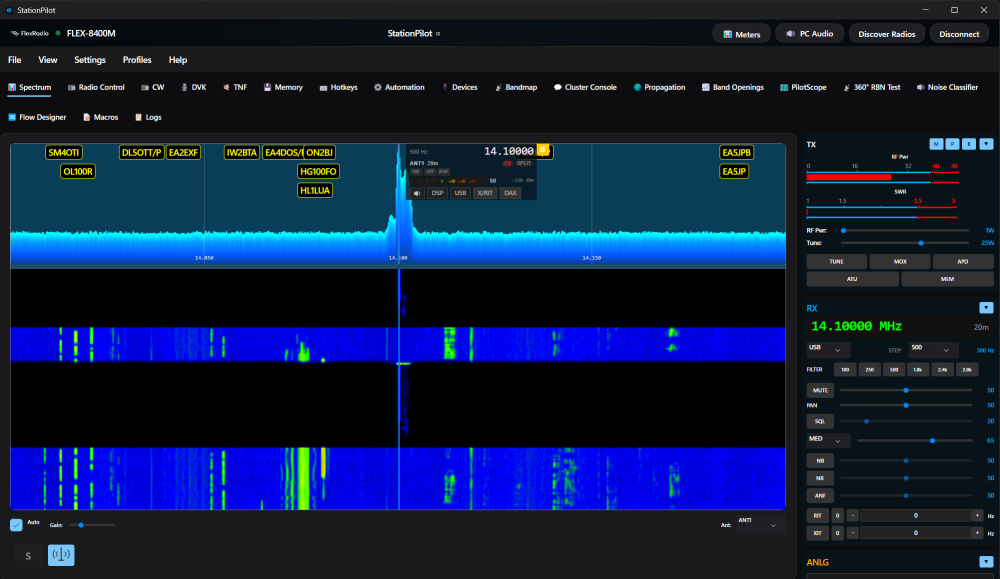
Release 1.0.5
Various bug fixes and UI improvements.
Running companion with SmartSDR only functions as spot aggregator, hotkeys, hamlib, automations etc not spectrum and waterfall.
Standalone it is full functional panadapter with TX/RXMake sure you have .net 10 installed.
Unfortunately I don't have a Mac so cannot provide support on that, but I include a build for mac arm64
 0
0 -
0
-
Would you mind giving a recap on where the development is at please? I bought and installed the licence and the program runs in Windows 11. But when I connect the radio, SmartSDR crashes as does SDC (cw skimmer). I started StationPilot after SmartSDR. Reading through the thread, I'm not sure if this is just how it is at the moment with Ed K9EES also reporting same. Or should v1.0.6 work ok? If so, how to resolve issue?
It looks amazing, there is so much in it. I'm going to need to buy an additional monitor!
Erik
0 -
@Erik Carling EI4KF Yes please make sure to run the latest release, i post here each time i make one.
It functions as standalone multi platform (almost, trying to get mac running) full tx/rx.
Companion to SmartSDR there is no waterfall as it confuses things. It then does dx spot aggregation, hamlib cat integration, hotkeys, stream deck, automations, propagation and some other toys.
0 -
'Companion to SmartSDR', so it should run with. But not for me. Anyway, it has so much potential I shall await further releases and documentation.
0 -
Installed latest on windows 10. The about says version 1.0.5 and not 1.0.6
0 -
Have just tried the new version 1.0.6 on my Apple Mac Studio M1. Have downloaded and installed the MacOS .NET runtime, downloaded and unzipped the new version - copied this to the applications folder. Validated it as safe in Terminal. When I click on the icon nothing happens - last time I got an error message pop up. This time nothing happens…no error message, nor the application running.
Has anyone here been able to successfully get the Mac version running?
0 -
I got kindly given remote access to a spare mac for testing so i will be ironing out the mac bugs in coming days
0 -
@DaveC ah i see, the installer says 1.0.6 but about 1.0.5…it is 1.0.6…just a bug
0 -
@serialcoder This is what I am seeing now. As soon as I connect to my Flex with StationPilot v1.0.6 the Flex's spetrum display freezes. The waterfall in SmartSDR slows down a bit. I have yet to see a panadapter in stationpilot.
0 -
@ka9ees if you close smartsdr you will get a panadapter and tx ability. Are you on 4.1.3 on the radio?
0 -
I am running 4.1.3. I have tried to run it stand alone, but it didn't work. I will try it again to make sure that I did it correctly.
0 -
I have tried it standalone (the Windows version) and it does not work for me. In any case it needs to be a companion to SmartSDR and run alongside as with other clients. It has potential though.
0 -
@serialcoder It works! Except… I have no option for a direct mic connection to the Flex. Without that the program is useless. Tuning is clunky. Took me forever to get the display to zero, on whatever frequency I was operating. The waterfall is way too fast. Need control for that. It's a nice looking prorgam, but as it's devoloping, it still needs work. Keep going Stephane!
0 -
@ka9ees glad you finally saw it running. you’re right it is hard coded to pc mic, i’ll put the option for mic like in smartsdr in next release. also will look at a slider to slow down the waterfall. the tuning is a bit finicky at the moment…we’ll get there
1 -
@serialcoder It's very nice seeing the progress! I am looking forward to the next phase.
0 -
Excited to see this progress. Got it running on my arch install, but can't get audio out. Will try again after the next release. Keep it up, this will be a lifesaver if I can get to the point where I don't have to dual boot windows. Already bought a maestro just to keep from having to load into windows, but even that has it's own audio challenges.
```
[FlexLib] STREAM STATUS: type=remote_audio_rx, stream_id=0x4000009, kvPairs= compression=NONE client_handle=0x252F0643 ip=192.168.50.178
Expression 'paInvalidSampleRate' failed in '/portaudio/src/hostapi/alsa/pa_linux_alsa.c', line: 2050
Expression 'PaAlsaStreamComponent_InitialConfigure( &self->playback, outParams, self->primeBuffers, hwParamsPlayback, &realSr )' failed in '/portaudio/src/hostapi/alsa/pa_linux_alsa.c', line: 2725
Expression 'PaAlsaStream_Configure( stream, inputParameters, outputParameters, sampleRate, framesPerBuffer, &inputLatency, &outputLatency, &hostBufferSizeMode )' failed in '/portaudio/src/hostapi/alsa/pa_linux_alsa.c', line: 2846
```0 -
@ten98 Your system audio device does not accept the 48 kHz sample rate required by Flex remote audio. PortAudio is opening ALSA directly and fails because resampling is not enabled.
Install and enable PipeWire/PulseAudio, or ensure ALSA uses the
plugdevice instead of rawhw:*. USB audio devices often only support fixed sample rates, which causes this exact error.can check what sample rates ALSA accepts
cat /proc/asound/card*/pcm*/sub*/hw_params
If you see something like:
rate: 44100
or
rate: 96000and not 48000, this error is expected.
0 -
@serialcoder I'm running pipewire/wireplumber and it's set to 48k. Does it require 48khz/24bit? I think I'm at 48khz/32bit. I can open an issue tracker on github so we can avoid turning this thread into a helpdesk ticket. I appreciate all of the effort you are putting into this. It's looking great! (also looking forward to the custom actions on streamdeck so I can load my band profiles instead of just changing to band frequency)
Cheers
$ cat /proc/asound/card*/pcm*/sub*/hw_params
access: MMAP_INTERLEAVED
format: S32_LE
subformat: STD
channels: 2
rate: 48000 (48000/1)
period_size: 512
buffer_size: 32768
$ pactl list sinks
Sink #63
State: RUNNING
Name: alsa_output.usb-Topping_D90SE-00.HiFi__Headphones__sink
Description: D90SE Headphones
Driver: PipeWire
Sample Specification: s32le 2ch 48000Hz
Channel Map: front-left,front-right
Owner Module: 4294967295
Mute: no
Volume: front-left: 42598 / 65% / -11.23 dB, front-right: 42598 / 65% / -11.23 dB
balance 0.00
Base Volume: 65536 / 100% / 0.00 dB
Monitor Source: alsa_output.usb-Topping_D90SE-00.HiFi__Headphones__sink.monitor
Latency: 0 usec, configured 0 usec
Flags: HARDWARE DECIBEL_VOLUME LATENCY
Properties:
alsa.card = "0"
alsa.card_name = "D90SE"
alsa.class = "generic"
alsa.components = "USB152a:8750"
alsa.device = "0"
alsa.driver_name = "snd_usb_audio"
alsa.id = "USB Audio"
alsa.long_card_name = "Topping D90SE at usb-0000:13:00.4-2, high speed"
alsa.mixer_device = "_ucm0008.hw:D90SE"
alsa.mixer_name = "USB Mixer"
alsa.name = "USB Audio"
alsa.resolution_bits = "32"
alsa.subclass = "generic-mix"
alsa.subdevice = "0"
alsa.subdevice_name = "subdevice #0"
alsa.sync.id = "00000000:00000000:00000000:00000000"
api.alsa.card.longname = "Topping D90SE at usb-0000:13:00.4-2, high speed"
api.alsa.card.name = "D90SE"
api.alsa.open.ucm = "true"
api.alsa.path = "hw:D90SE,0"
api.alsa.pcm.card = "0"
api.alsa.pcm.stream = "playback"
audio.channels = "2"
audio.position = "FL,FR"
card.profile.device = "0"
device.api = "alsa"
device.bus = "usb"
device.class = "sound"
device.icon_name = "audio-headphones"
device.id = "51"
device.profile.description = "Headphones"
device.profile.name = "HiFi: Headphones: sink"
device.routes = "1"
factory.name = "api.alsa.pcm.sink"
media.class = "Audio/Sink"
device.description = "D90SE"
node.name = "alsa_output.usb-Topping_D90SE-00.HiFi__Headphones__sink"
node.nick = "D90SE"
node.pause-on-idle = "false"
object.path = "alsa:acp:D90SE:0:playback"
port.group = "playback"
priority.driver = "1100"
priority.session = "1100"
session.suspend-timeout-seconds = "0"
factory.id = "19"
clock.quantum-limit = "8192"
client.id = "41"
node.driver = "true"
node.loop.name = "data-loop.0"
library.name = "audioconvert/libspa-audioconvert"
object.id = "63"
object.serial = "63"
node.max-latency = "16384/48000"
api.alsa.period-size = "512"
api.alsa.period-num = "64"
api.alsa.headroom = "512"
api.acp.auto-port = "false"
api.acp.auto-profile = "false"
api.alsa.card = "0"
api.alsa.split-enable = "true"
api.alsa.use-acp = "true"
api.dbus.ReserveDevice1 = "Audio0"
api.dbus.ReserveDevice1.Priority = "-20"
device.bus-id = "usb-Topping_D90SE-00"
device.bus_path = "pci-0000:13:00.4-usb-0:2:1.0"
device.enum.api = "udev"
device.name = "alsa_card.usb-Topping_D90SE-00"
device.nick = "D90SE"
device.plugged.usec = "6423646"
device.product.id = "0x8750"
device.product.name = "D90SE"
device.serial = "Topping_D90SE"
device.subsystem = "sound"
sysfs.path = "/devices/pci0000:00/0000:00:08.1/0000:13:00.4/usb7/7-2/7-2:1.0/sound/card0"
device.vendor.id = "0x152a"
device.vendor.name = "Thesycon Systemsoftware & Consulting GmbH"
spa.object.id = "2"
device.string = "0"
Ports:
[Out] Headphones: Headphones (type: Headphones, priority: 100, availability unknown)
Active Port: [Out] Headphones
Formats:
pcm
$ yay -Qi pipewire
Name : pipewire
Version : 1:1.4.9-2
Description : Low-latency audio/video router and processor
Architecture : x86_64
URL : https://pipewire.org
Licenses : MIT LGPL-2.1-or-later
Groups : None
Provides : None
Depends On : libpipewire=1:1.4.9-2 libpipewire-0.3.so=0-64 dbus libdbus-1.so=3-64 gcc-libs glib2 libglib-2.0.so=0-64 glibc
ncurses libncursesw.so=6-64 readline libreadline.so=8-64 systemd-libs libsystemd.so=0-64 libudev.so=1-64
Optional Deps : gst-plugin-pipewire: GStreamer plugin
pipewire-alsa: ALSA configuration
pipewire-audio: Audio support [installed]
pipewire-docs: Documentation
pipewire-ffado: FireWire support
pipewire-jack-client: PipeWire as JACK client
pipewire-jack: JACK replacement [installed]
pipewire-libcamera: Libcamera support
pipewire-pulse: PulseAudio replacement [installed]
pipewire-roc: ROC streaming
pipewire-session-manager: Session manager [installed]
pipewire-v4l2: V4L2 interceptor
pipewire-x11-bell: X11 bell
pipewire-zeroconf: Zeroconf support
realtime-privileges: realtime privileges with rt module
rtkit: realtime privileges with rtkit module [installed]
Required By : lib32-pipewire pipewire-audio pipewire-jack pipewire-pulse qt6-multimedia wireplumber xdg-desktop-portal
Optional For : electron35 electron37 qt6-webengine sdl3 ungoogled-chromium-bin
Conflicts With : None
Replaces : None
Installed Size : 2.83 MiB
Packager : Carl Smedstad <carsme@archlinux .org>
Build Date : Sat Nov 29 14:21:53 2025
Install Date : Mon Dec 1 14:54:05 2025
Install Reason : Installed as a dependency for another package
Install Script : Yes
Validated By : Signature0 -
yes 48khz, i had it working on a fresh install of debian and raspberry pi. this is the url for issues
0 -
I didn't realise you were supposed to run smartsdr! all i did was select discover radio and then connect - runs smashing. I normally program on Arduinos and while looking at installing to the RPI5 found myself in a maze! is there a site that can help with the procedure to install after .NET 10 install (that went well).
0





Leave a Comment
Categories
- All Categories
- 388 Community Topics
- 2.2K New Ideas
- 658 The Flea Market
- 8.4K Software
- 156 SmartSDR+
- 6.5K SmartSDR for Windows
- 186 SmartSDR for Maestro and M models
- 439 SmartSDR for Mac
- 275 SmartSDR for iOS
- 265 SmartSDR CAT
- 204 DAX
- 386 SmartSDR API
- 9.4K Radios and Accessories
- 52 Aurora
- 297 FLEX-8000 Signature Series
- 7.2K FLEX-6000 Signature Series
- 970 Maestro
- 58 FlexControl
- 866 FLEX Series (Legacy) Radios
- 944 Genius Products
- 471 Power Genius XL Amplifier
- 347 Tuner Genius XL
- 126 Antenna Genius
- 306 Shack Infrastructure
- 215 Networking
- 468 Remote Operation (SmartLink)
- 142 Contesting
- 811 Peripherals & Station Integration
- 144 Amateur Radio Interests
- 1.1K Third-Party Software