SmartSDR v4.2.20 | SmartSDR v4.2.20 Release Notes
SmartSDR v3.10.15 | SmartSDR v3.10.15 Release Notes
The latest 4O3A Genius Product Software:
The latest 4O3A Genius Product Software and Firmware
If you are needing assistance with FlexRadio products, please refer to the product documentation or check the Help Center for known solutions. Need technical support from FlexRadio? It's as simple as creating a HelpDesk ticket.
New Windows11 PC - upgrade to V4.0.1 or update from 2.4.1 to 2.10.1?

I'm going to apologize upfront if some of these questions seem very newbie but I haven't kept up with all the changes (obviously)… So please be patient with me and I welcome all input on this.
OK, so my old Windows10 PC is really struggling so I just acquired a new Windows11 PC (great Black Friday sale with CyberPower PC) and I'm at the point of possibly moving to the latest version of SmartSDR v4.0.1
Are the updates from 2.4.1 to 4.0.1 worth the update? Do I have to get V3 then v4 or can I go straight to V4? Cost?
I have the original Flex 6600, are there any hardware issues I'm going to run into by going to V4.0.1 or am I good to go? I also have a Maestro, does it need a separate license of will it be covered under a new license for the 6600?
Thank You
Rob - AK7RM
Mesa, AZ
Comments
-
Hi Rob, you should upgrade to 4.1.3 basic tomorrow when it becomes available. This is a free upgrade and does not require you to go through any intermediary upgrades (i.e. Flex does not do incremental upgrades). Don't upgrade to 4.0.1 from V2 because there is a problem with that upgrade that will presumably be fixed with 4.1.3 tomorrow.
Since you are currently on V2, you will only get V2 capabilities when you upgrade. After the upgrade, you can purchase SmartSDR+ that will give you the latest functionality, and any further upgrades for a year. Whether you purchase a SmartSDR+ license or not, you will get free bug fixes with the basic upgrades as they come out. Check out the Flex web site for information on what functionality you get with SmartSDR+.
Only the radio itself is licensed, not client devices like your computer or your Maestro.
1 -
THANKS Len….
0 -
Hey Len, i downloaded 4.1.3 and did the install. I got this error:
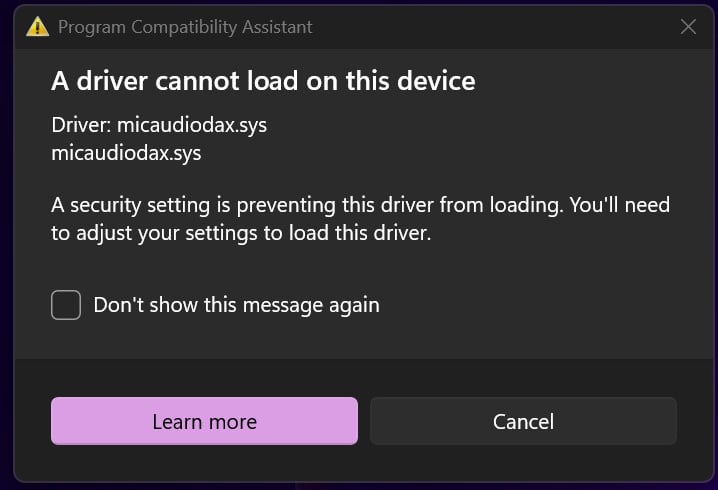
It was my anti virus and VPN from Aura that caused it. I turned them off, re-installed and it went through just fine!
Thanks
Rob - AK7RM
1 -
You need to turn off Memory Integrity in the core isolation settings2
-
So this must be a known issue with that driver. Is there a fix in the works for this driver? I went through the MS website about turning off Memory Integrity and this is what it says:
Warning: Turning off Memory Integrity on a Secured-core PC takes the device out of a Secured-core state. If you choose to continue using your device without addressing the driver problem, you might discover that the functionality the driver supports does not work any longer, which could have consequences ranging from negligible to severe.
Thoughts!
0 -
Turned mine off . . . Did install and turned back on . . . No issues here0
-
oh, so turning it back on (after it loads) won't cause an issue with the driver?
0 -
ok, so it will not let me turn it back on because of the compatibility issue, as long as it exists it will not allow me to turn memory integrity back on and it lists all the Flex drivers (8 of them) as incompatible.
0 -
Looks like I should have turned that off before I did the 4.1.3 install. I didn't know there was an issue. Do I have to un-install then re-install 4.1.3 OR can I just re-install it without uninstalling it? Sorry for all the questions, just not as tech savvy these days and a lot has changed.
0 -
I just re ran the installer . . . Actually I misspoke . . . It won't turn back on due to issues with the flex audio drivers0
-
yup, just an fyi, i went ahead and un-installed SmartSDR, re-installed it (making sure that Memory Integrity was switched off). Went back in to turn it back on and you can't. Any idea if Flex is working to correct it?
THANKS FOR YOUR HELP, much appreciated!
0 -
Wow, I had no idea that there was an issue with these drivers and Windows Memory Integrity as far back as 2022… 3Yrs, really… Very disappointed and here I thought this was a new issue. That tells you how out of the loop I am these days.
0



Leave a Comment
Categories
- All Categories
- 401 Community Topics
- 2.2K New Ideas
- 681 The Flea Market
- 8.6K Software
- 194 SmartSDR+
- 6.6K SmartSDR for Windows
- 197 SmartSDR for Maestro and M models
- 456 SmartSDR for Mac
- 278 SmartSDR for iOS
- 268 SmartSDR CAT
- 219 DAX
- 394 SmartSDR API
- 9.6K Radios and Accessories
- 98 Aurora
- 339 FLEX-8000 Signature Series
- 7.2K FLEX-6000 Signature Series
- 991 Maestro
- 58 FlexControl
- 872 FLEX Series (Legacy) Radios
- 965 Genius Products
- 480 Power Genius XL Amplifier
- 353 Tuner Genius XL
- 132 Antenna Genius
- 319 Shack Infrastructure
- 224 Networking
- 482 Remote Operation (SmartLink)
- 144 Contesting
- 845 Peripherals & Station Integration
- 147 Amateur Radio Interests
- 1.1K Third-Party Software